Loading
Form preview
  • US Legal Forms
  • Other Templates
  • Industry Forms
  • Industry Shipping Forms
  • Ups Dangerous Goods Agreement 2008

Get Ups Dangerous Goods Agreement 2008-2026

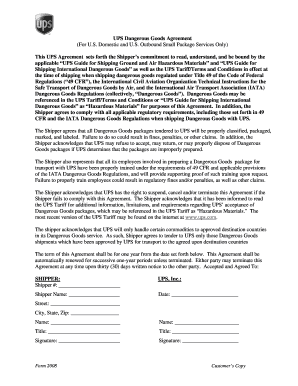
Le UPS Guide for Shipping Ground and Air Hazardous Materials and UPS Guide for Shipping International Dangerous Goods as well as the UPS Tariff/Terms and Conditions in effect at the time of shipping when shipping dangerous goods regulated under Title 49 of the Code of Federal Regulations ( 49 CFR ), the International Civil Aviation Organization Technical Instructions for the Safe Transport of Dangerous Goods by Air, and the International Air Transport Association (IATA) Dangerous.

How it works

  1. Open form

    Open form follow the instructions

  2. Easily sign form

    Easily sign the form with your finger

  3. Share form

    Send filled & signed form or save

How to fill out the UPS Dangerous Goods Agreement online

Filling out the UPS Dangerous Goods Agreement is an essential process for shippers handling hazardous materials. This guide will provide clear instructions to support users in completing the agreement accurately and efficiently.

Follow the steps to complete the UPS Dangerous Goods Agreement online.

  1. Press the ‘Get Form’ button to access the UPS Dangerous Goods Agreement form and open it in your preferred editing platform.
  2. In the 'Shipper #' field, enter your unique shipper number, which helps UPS identify your account and track shipments.
  3. Complete the 'Shipper Name' section by providing the legal name of the entity or individual who is sending the dangerous goods.
  4. Fill in the date when the agreement is being completed in the 'Date' field to establish the timeline of the agreement.
  5. In the 'Street' section, indicate the shipping address including the street name and number.
  6. Specify the 'City, State, Zip' by entering the respective city, state, and zip code associated with the shipping address.
  7. Provide the name of the person responsible for signing the document in the first 'Name' field.
  8. Input an additional name if applicable in the second 'Name' field for another signatory or point of contact.
  9. In the first 'Title' field, state the title or position of the first signatory within the organization.
  10. In the second 'Title' field, provide the title of the second signatory, if there is one.
  11. Ensure that both signatories provide their signatures in the respective 'Signature' fields to validate the agreement.
  12. After completing the form, you can save your changes, download, print, or share the completed UPS Dangerous Goods Agreement.

Complete your UPS Dangerous Goods Agreement online today for safe and compliant shipping.

Get form

Experience a faster way to fill out and sign forms on the web. Access the most extensive library of templates available.
Get form

Related content

Group #79011 Award #23066 Small Package ......
The authorized user agrees that all Hazardous Material, Dangerous Goods and Biological...
Learn more
Information on UPS Contract
▫ UPS Dangerous Goods (Including Category A): Help move your hazardous materials in a...
Learn more
COVID-19 Packing and Shipping Job Aid
The shipper and consignee's name and address must appear on all dangerous goods packages...
Learn more

Related links form

Form 2 - Uniform Blood And Body Fluid Exposure Report - BD Bd Bactec Blood Culture Procedural Trays Form Bdfax Bd Brand Single Use Safety Lok Syringe Sds

Questions & Answers

Get answers to your most pressing questions about US Legal Forms API.

Contact support

Yes, you can send HAZMAT with UPS, provided you have a valid UPS Dangerous Goods Agreement. This enables you to ship hazardous materials while ensuring compliance with safety standards and regulations. It's important to familiarize yourself with UPS guidelines for packing and labeling hazardous goods to avoid any potential issues during shipping.

Any business or individual that holds a valid UPS Dangerous Goods Agreement can ship dangerous goods with UPS. This agreement is typically granted to those who have demonstrated their ability to comply with proper safety and handling practices for hazardous materials. If you're new to shipping HAZMAT, consider utilizing platforms like uslegalforms to help you understand and establish the necessary agreements.

You can identify if a customer has a contract to ship HAZMAT with UPS by checking their shipping documentation or directly communicating with them. Customers with an UPS Dangerous Goods Agreement will typically have documentation specifying their approval to ship hazardous materials. If you're supporting logistics for such a customer, it may be beneficial to verify their current contracts periodically.

An UPS Dangerous Goods contract is an agreement that allows a shipper to send hazardous materials via UPS. This contract outlines specific terms and conditions, ensuring compliance with safety regulations for transporting dangerous goods. Having such an agreement is crucial for businesses that regularly ship hazardous materials to ensure safe and compliant shipping practices.

To find out if a shipment includes a hazardous product, you should examine the shipping documents and labels attached to the package. Additionally, you can assess the product’s Material Safety Data Sheet (MSDS) for any relevant information. If you're unsure, contacting the shipper directly is a proactive way to confirm whether the shipment is covered under a UPS Dangerous Goods Agreement.

The shipper is primarily responsible for HAZMAT shipping papers. This includes ensuring that all necessary documentation is correctly filled out and accompanies the shipment. In the context of a UPS Dangerous Goods Agreement, both the shipper and UPS share a responsibility to comply with safety regulations and proper paperwork.

You can determine if a customer has a contract to ship hazardous materials by reviewing their shipping documentation. Generally, contracts for shipping hazardous materials will be clearly stated within shipping agreements or invoices. Moreover, reaching out to the customer or their shipping department can clarify whether they hold a UPS Dangerous Goods Agreement.

To obtain a Dangerous Goods Notice (DGN), you should start by preparing the DG Declaration as per the guidelines in the UPS Dangerous Goods Agreement. After you have completed the declaration, submit it through the appropriate UPS channels. Once reviewed and approved, you will be issued a DGN that confirms the compliance of your shipment with regulatory standards. Using platforms like uslegalforms can help streamline this process and ensure accurate submission.

To secure a contract with UPS, begin by visiting their official website and exploring their service offerings. You need to fill out an application detailing your shipping needs. If you plan to ship dangerous goods, the UPS Dangerous Goods Agreement will be a vital part of this contract. This agreement clearly defines the expectations and responsibilities for shipping hazardous materials, ensuring compliance and safety.

To get a dangerous goods declaration, follow the procedures outlined in the UPS Dangerous Goods Agreement. Begin by identifying the substances involved in your shipment, as this will determine the specific requirements. Complete the declaration form accurately, ensuring all details are correct to comply with transportation regulations. You may also consider using uslegalforms, which offers guidance and templates to assist with the declaration process.

Get This Form Now!

Use professional pre-built templates to fill in and sign documents online faster. Get access to thousands of forms.
Get form
If you believe that this page should be taken down, please follow our DMCA take down processhere.
Get UPS Dangerous Goods Agreement
Get form
  • Adoption
  • Bankruptcy
  • Contractors
  • Divorce
  • Home Sales
  • Employment
  • Identity Theft
  • Incorporation
  • Landlord Tenant
  • Living Trust
  • Name Change
  • Personal Planning
  • Small Business
  • Wills & Estates
  • Packages A-Z
  • Affidavits
  • Bankruptcy
  • Bill of Sale
  • Corporate - LLC
  • Divorce
  • Employment
  • Identity Theft
  • Internet Technology
  • Landlord Tenant
  • Living Wills
  • Name Change
  • Power of Attorney
  • Real Estate
  • Small Estates
  • Wills
  • All Forms
  • Forms A-Z
  • Other Templates
  • Legal Hub
  • About Us
  • Help Portal
  • Legal Resources
  • Blog
  • Affiliates
  • Contact Us
  • Delete My Account
  • Site Map
  • Industries
  • Forms in Spanish
  • Localized Forms
  • State-specific Forms
  • Forms Kit
  • Real Estate Handbook
  • All Guides
  • Notarize
  • Incorporation services
  • For Consumers
  • For Small Business
  • For Attorneys
  • USLegal
  • FormsPass
  • pdfFiller
  • signNow
  • altaFlow
  • DocHub
  • Instapage
Form Packages
  • Adoption
  • Bankruptcy
  • Contractors
  • Divorce
  • Home Sales
  • Employment
  • Identity Theft
  • Incorporation
  • Landlord Tenant
  • Living Trust
  • Name Change
  • Personal Planning
  • Small Business
  • Wills & Estates
  • Packages A-Z
Form Categories
  • Affidavits
  • Bankruptcy
  • Bill of Sale
  • Corporate - LLC
  • Divorce
  • Employment
  • Identity Theft
  • Internet Technology
  • Landlord Tenant
  • Living Wills
  • Name Change
  • Power of Attorney
  • Real Estate
  • Small Estates
  • Wills
  • All Forms
  • Forms A-Z
  • Other Templates
Customer Service
  • Legal Hub
  • About Us
  • Help Portal
  • Legal Resources
  • Blog
  • Affiliates
  • Contact Us
  • Delete My Account
  • Site Map
  • Industries
  • Forms in Spanish
  • Localized Forms
  • State-specific Forms
  • Forms Kit
Legal Guides
  • Real Estate Handbook
  • All Guides
Prepared for you
  • Notarize
  • Incorporation services
Our Customers
  • For Consumers
  • For Small Business
  • For Attorneys
Our Sites
  • USLegal
  • FormsPass
  • pdfFiller
  • signNow
  • altaFlow
  • DocHub
  • Instapage
Social Media
Call us now toll free:
+1 833 426 79 33
As seen in:
© Copyright 1999-2026 airSlate Legal Forms, Inc. 17 Station Street, Suite 303, Brookline, MA 02445
  • Your Privacy Choices
  • Terms of Service
  • Privacy Notice
  • Content Takedown Policy
  • Bug Bounty Program