Loading

Open form follow the instructions

Easily sign the form with your finger

Send filled & signed form or save
How to fill out the ZA SARS DA 185 online
Filling out the ZA SARS DA 185 application form accurately is essential for the registration and licensing of customs and excise clients. This guide provides detailed instructions to assist users in completing the form online, ensuring that all necessary information is included.
Follow the steps to complete the ZA SARS DA 185 online efficiently.
- Click ‘Get Form’ button to access the form and open it in your editing platform.
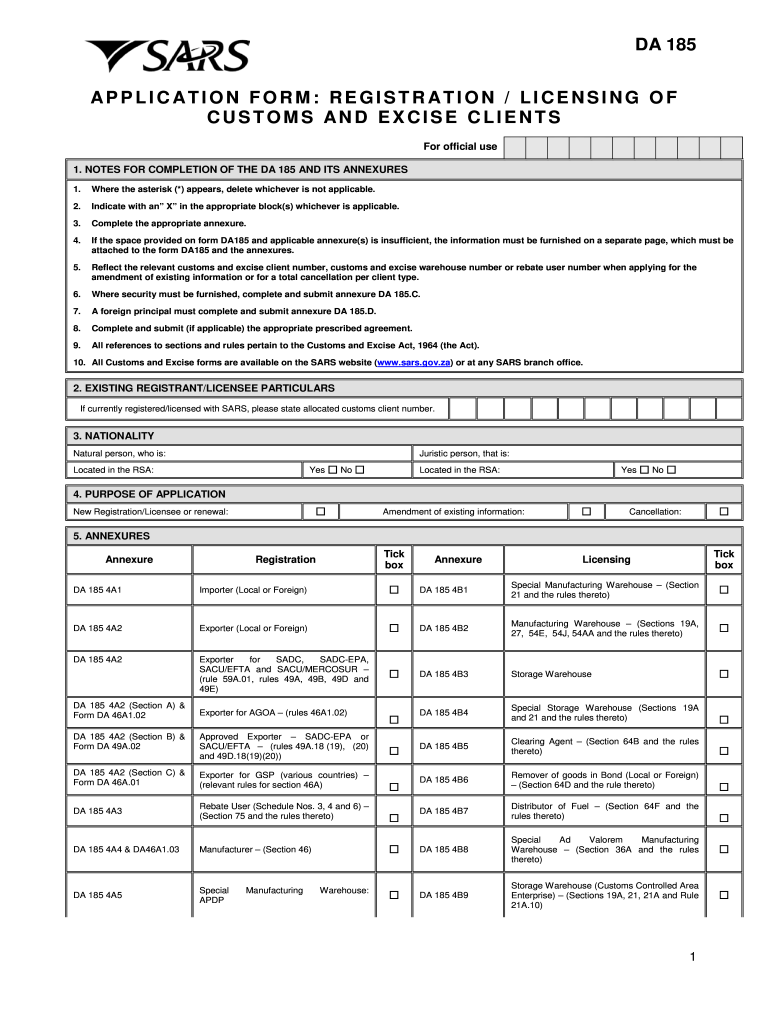
- Begin by reviewing the notes for completion. Where applicable, delete options marked with an asterisk (*) and indicate your selections by placing an 'X' in the relevant blocks.
- For existing registrants, input your allocated customs client number. If you are not currently registered, proceed with the next sections.
- Indicate your nationality by selecting whether you are a natural or juristic person and if located in the Republic of South Africa (RSA).
- Clearly state the purpose of your application: whether it is for new registration or licensing, amendment of existing information, or cancellation.
- Check the boxes under annexures to indicate which documents are relevant to your application. Make sure to include any additional annexures listed.
- Fill in your business or personal particulars, including name, address, contact information, and bank account details if you have a local savings or cheque account.
- Provide your SARS revenue identification numbers, if applicable. Ensure accuracy to avoid delays.
- Detail the nature of your business, including the type of entity and registration numbers when required.
- Input the particulars of sole proprietors, directors, or partners as required. Include ID or passport numbers and relevant countries.
- Provide the public officer or representative's details, including contact information, and specify their capacity.
- Respond to questions regarding contraventions and other legal matters. If answering 'yes' to any, include detailed explanations on a separate page.
- Attach any documents in support of your application. Make sure these documents are current and meet the requirements.
- Complete the declaration section by signing and dating the application. Ensure your information is accurate and comprehensive.
- Finally, save your changes, download the completed form, and print or share it as needed to complete your submission.
Start filling out the ZA SARS DA 185 application form online today to ensure your compliance and efficiency in customs and excise processes.
Experience a faster way to fill out and sign forms on the web. Access the most extensive library of templates available.
Related content
by PFN Souza · 2022 · Cited by 67 — This review brings details in an understandable...
by S Shrestha · 2023 — The main protein components of the coronavirus include spike (S)...
Dec 10, 2012 — You must undertake to comply with relevant registration requirements set...
Get answers to your most pressing questions about US Legal Forms API.
How do I find my customs code?
To find your customs code, also known as the tariff classification, you can start by visiting the ZA SARS DA 185 website. This platform provides valuable resources and tools to help you identify the correct code for your goods. Additionally, you may consult the South African Revenue Service guidelines or contact their support for assistance. Remember, having the right customs code ensures smooth customs clearance and compliance with regulations.
What is a SARS administrative penalty?
A SARS administrative penalty is a financial penalty imposed for specific infractions related to tax compliance as defined by ZA SARS DA 185. It serves to reinforce the importance of following the tax regulations set by SARS. Understanding the nature of these penalties can help taxpayers avoid unnecessary costs and maintain a good standing with tax authorities. Tools and resources provided by USLegalForms can assist you in staying compliant and informed.
What is the purpose of the administrative penalty?
The purpose of the administrative penalty is to promote compliance and ensure that taxpayers adhere to ZA SARS DA 185. This penalty acts as a reminder for individuals and businesses to fulfill their tax obligations punctually. Moreover, it enhances the integrity of the tax system by discouraging deliberate non-compliance. By leveraging tools available on USLegalForms, you can better understand these penalties and maintain compliance with ease.
What is the admin penalty on SARS?
The admin penalty on SARS can arise when there are violations of tax laws outlined under ZA SARS DA 185. This penalty serves as a financial consequence for non-compliance and aims to deter future violations. It becomes critical for taxpayers to stay informed about these penalties to avoid unnecessary charges. Utilizing resources from USLegalForms can help you navigate these regulations and minimize your risk.
What is the customs mandate for SARS?
The customs mandate for ZA SARS DA 185 involves ensuring compliance with South Africa's customs laws and regulations. When importing or exporting goods, it is crucial that you adhere to these guidelines to avoid penalties. ZA SARS DA 185 outlines your responsibilities as a taxpayer, making it essential to understand how these laws affect your business operations. By using platforms like USLegalForms, you can easily access the necessary documents to ensure you meet these mandates.
How does Customs clearance work in South Africa?
Every importer or exporter of goods must lodge a CCD, except when exempted by specific rules before the goods are imported to or exported from South Africa. Clients make a self-assessment with the transaction documentation and submit the CCD to Customs either electronically or manually.
What is a Customs client code in South Africa?
A CCN or a Customs Client Number is an Importers Code. Any person or business in South Africa wanting to import goods, must register as an importer with the South African Revenue Service (SARS) and apply for an Importers Code or CCN.
What is an import code in South Africa?
An import or export code (also called importer's exporter's customs-licence / customs-code) is a specific number (like an ID number) that is connected to a business or individual that imports or exports goods from or into South Africa.
How do I get an import code in South Africa?
If you are a prospective importer you must complete forms DA185 and DA185. 4A1 and forward them to the relevant Customs Offices where a Customs and Excise client code will be allocated to you. The documents that must accompany the application are: Proof of address i.e. your municipal water and electricity account.
How do I contact Johannesburg Customs?
All telephone calls to Customs offices are routed automatically to the SARS Contact Centre on 0800 00 7277.
Use professional pre-built templates to fill in and sign documents online faster. Get access to thousands of forms.
If you believe that this page should be taken down, please follow our DMCA take down process here.