Get Tightwad Bank Personal Financial Statement 2004-2026
How it works
-

Open form follow the instructions
-

Easily sign the form with your finger
-

Send filled & signed form or save
How to fill out the Tightwad Bank Personal Financial Statement online
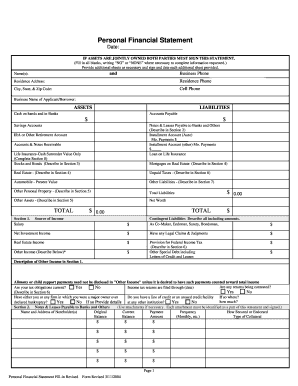
Filling out the Tightwad Bank Personal Financial Statement online is a crucial step for individuals seeking to provide a comprehensive overview of their financial situation. This guide will walk you through each section, ensuring that you accurately complete the form to help facilitate your banking needs.
Follow the steps to accurately complete your personal financial statement.
- Click ‘Get Form’ button to obtain the form and open it in the editor. This allows you to start filling out your personal financial statement online.
- Begin with your personal information by filling out your name as the applicant or borrower. Ensure to include your business name if applicable. Provide your residence address, business phone, and various contact numbers accurately.
- In the assets section, list your cash on hand and in banks. Include all savings accounts and other assets, such as stocks, bonds, and real estate, specifying the details required in the sub-sections provided.
- Complete the liabilities section by listing all outstanding debts, including accounts payable, notes payable to banks, and other debts, providing descriptions where necessary.
- Proceed to section 1, where you will provide details about your income, including salary, investment income, and any other sources of income. Be sure to disclose any contingent liabilities and legal claims if they apply.
- In section 2, detail any notes and leases you have payable to banks or others. Describe how these are secured and include the payment frequency and current balances.
- Move on to section 3 where you will list stocks and bonds, including the market value and the respective exchanges or quotations for each security.
- For section 4, provide information regarding real estate owned, including property details, valuation, and mortgage information. Each property should be listed separately.
- Complete section 5 with details of other personal property and assets, followed by sections 6, 7, and 8 that detail unpaid taxes, additional liabilities, and any life insurance held.
- Once all sections are filled out, review your information for accuracy. Finally, ensure to sign and date the form appropriately. Users can save changes, download, print, or share the completed form as needed.
Start filling out your Tightwad Bank Personal Financial Statement online today for a seamless banking experience.
To fill in a financial statement, begin by writing down your total assets, followed by your total liabilities, to determine your net worth. You may break down each section into smaller details for clarity. A Tightwad Bank Personal Financial Statement can provide you with helpful prompts to enter your information accurately, making the process more straightforward and manageable.