Loading

Open form follow the instructions

Easily sign the form with your finger

Send filled & signed form or save
How to fill out the IL BCBCS 23XX3160 online
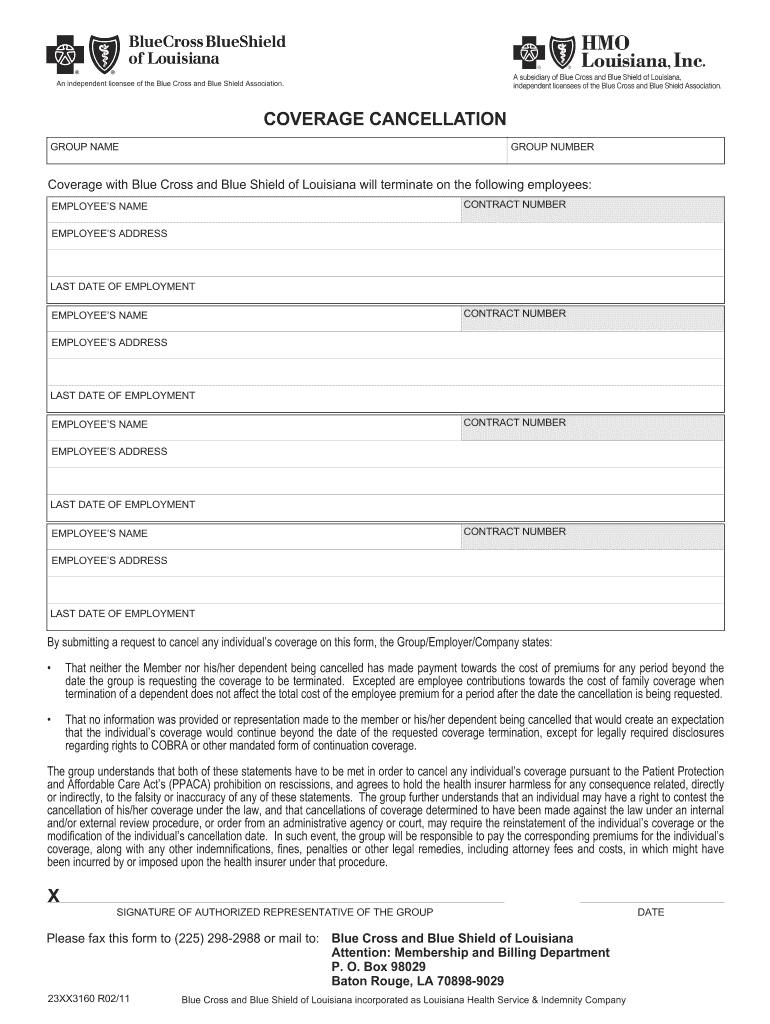
Filling out the IL BCBCS 23XX3160 form online is a straightforward process that allows users to submit requests for coverage cancellation efficiently. This guide provides clear, step-by-step instructions to help you navigate the completion of this important document.
Follow the steps to complete the IL BCBCS 23XX3160 form online.
- Press the ‘Get Form’ button to access the IL BCBCS 23XX3160 form. This action will allow you to open the form in the online editing tool provided.
- Once the form is open, begin by entering the group name and group number at the top of the form. Ensure that these details are accurate as they identify your organization.
- In the section for coverage termination, list the name and address of each employee whose coverage is being canceled. Make sure to fill in the contract number for each employee clearly to avoid any confusion.
- Next, specify the last date of employment for each individual. This information is crucial for the processing of the cancellation request.
- Review the statements regarding the cancellation. Confirm that the group or employer has adhered to the conditions outlined, particularly those related to premium payments and expectations of coverage.
- An authorized representative must sign the form in the designated area. Make sure this person is qualified to submit cancellation requests on behalf of the group.
- Finally, save any changes made on the form, and you can choose to download, print, or share the document as required. Ensure that all necessary copies are distributed as per your organization's procedures.
Complete your documents online efficiently and ensure all coverage cancellations are handled promptly.
Experience a faster way to fill out and sign forms on the web. Access the most extensive library of templates available.
Get answers to your most pressing questions about US Legal Forms API.
How do I find my provider ID number?
Finding your provider ID number is straightforward; typically, it's printed on your BCBS ID card or available in your online account. You may also reach out to your healthcare provider's office or BCBS customer support for help. Keeping your provider ID number handy helps streamline your healthcare experience under IL BCBCS 23XX3160.
How to find BCBS provider ID number?
To locate your BCBS provider ID number, start by checking any official documents, such as your member ID card. You can also log into your online account, where your provider details are easily accessible. If you encounter any issues, customer support is available to assist you in retrieving this important information.
Is BCBS the same as BCBS of Illinois?
BCBS, or Blue Cross Blue Shield, operates in various states, including Illinois. While they share the same overall network and brand, services and plans may differ depending on your location. Always refer to BCBS of Illinois for specifics related to your coverage under IL BCBCS 23XX3160.
How to get a 1095-B form from Blue Cross Blue Shield Illinois?
To obtain your 1095-B form from Blue Cross Blue Shield Illinois, log into your member account online. This form will summarize your health coverage for the year and can usually be accessed electronically. If you prefer a physical copy, you may request it directly from customer service. For extra help, USLegalForms can guide you through the process.
What is the prefix for BCBS Illinois Medicaid?
The prefix for BCBS Illinois Medicaid varies based on the individual member's account and setup. Generally, you can find this prefix on your Medicaid card or by contacting Blue Cross customer service. Knowing your prefix is essential for ensuring seamless access to your benefits in the IL BCBCS 23XX3160 program.
How do I find my BCBSIL member ID?
Your BCBSIL member ID can be found on your insurance card, which should be with you at all times. Additionally, you can log into your BCBS account online where your member ID will be displayed prominently. Keeping track of your member ID is essential for accessing benefits and services under IL BCBCS 23XX3160.
What is the PO box 660603 for Blue Cross Blue Shield of Illinois?
PO Box 660603 is the address for Blue Cross Blue Shield of Illinois for processing claims and payments. If you need to send documents or claims via mail, ensure you address them to this PO box correctly. This helps avoid delays in processing and ensures your claims are handled efficiently. For any paperwork-related questions, check USLegalForms for templates.
Does Blue Cross accept paper claims?
Yes, Blue Cross does accept paper claims, although electronic submissions are generally preferred for speed and efficiency. To submit a paper claim, ensure you have the proper forms, complete them accurately, and send them to the designated address provided by Blue Cross. Always keep a copy of your submission for your records. For further guidance, USLegalForms can provide templates and instructions.
What is the ID number on Blue Cross Blue Shield?
The ID number on your Blue Cross Blue Shield card is a unique identifier assigned to you as a member. This number allows healthcare providers to verify your benefits and process claims efficiently. Always keep your ID number secure, as it is vital for accessing care under IL BCBCS 23XX3160. If lost, contact their support immediately.
How do I find my BCBS provider ID?
To find your BCBS provider ID, check your member ID card or access your account on the Blue Cross Blue Shield website. You'll see the provider ID listed alongside your personal information. If you're having trouble, you can contact customer support for assistance. Remember, having your provider ID at hand is crucial for uninterrupted medical services under IL BCBCS 23XX3160.
Use professional pre-built templates to fill in and sign documents online faster. Get access to thousands of forms.
If you believe that this page should be taken down, please follow our DMCA take down process here.
This form is available in several versions. Select the version you need from the drop-down list below.