Loading
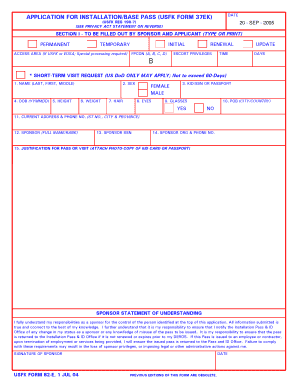
Get Usfk 82-e 2004
How it works
-

Open form follow the instructions
-

Easily sign the form with your finger
-

Send filled & signed form or save
How to fill out the USFK 82-E online
This guide provides clear and detailed instructions for completing the USFK 82-E form online. Whether you are a sponsor or an applicant, following these steps will ensure that you accurately fill out the necessary information.
Follow the steps to complete your USFK 82-E form online.
- Press the ‘Get Form’ button to obtain the form and open it in your preferred online editor.
- Begin filling out Section I, which is to be completed by the sponsor and applicant. Make sure to provide your name (last, first, middle), date of birth (YYMMDD), and indicate your height, weight, hair color, and eye color.
- Specify your current address and phone number. Ensure that the information is clear and accurate.
- Fill in the sponsor's full name and rank, social security number, and the organization along with their contact number. This section helps establish the relationship and responsibilities of the sponsor.
- Provide a justification for the pass or visit. If required, attach a photocopy of the kid card or passport.
- Complete the sponsor statement of understanding, then provide your signature and date, confirming your responsibilities as a sponsor.
- Proceed to Section II, which is to be filled out by the DoD sponsor, CPOC, or USACCK. Enter the grade/rank, job title, date of employment, and unit/agency/company address and phone number.
- Continue with Section III, which deals with background checks and whether the applicant is a designated country person (DCP). Indicate the required answers and provide the signature of the pass & ID section chief or NCOIC.
- Lastly, complete Section IV, which involves the requesting and approving authority's signature. Make sure to indicate any recommendations for approval or disapproval.
- Once all sections are completed, review the form for accuracy. Users can then save the changes, download, print, or share the completed form as needed.
Completing documents online is straightforward. Start filling out the USFK 82-E today!
Get form
Experience a faster way to fill out and sign forms on the web. Access the most extensive library of templates available.
Get This Form Now!
Use professional pre-built templates to fill in and sign documents online faster. Get access to thousands of forms.