Loading
Form preview
  • US Legal Forms
  • Form Library
  • More Forms
  • More Multi-State Forms
  • Sc Charleston County School District Buist Family Directory Information And Release Form 2020

Get Sc Charleston County School District Buist Family Directory Information And Release Form 2020-2026

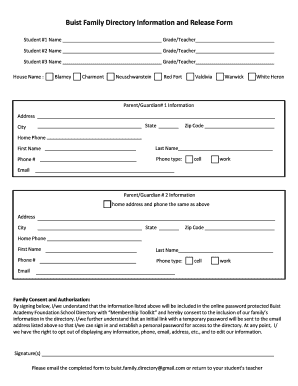
Buist Family Directory Information and Release Form Student #1 NameGrade/TeacherStudent #2 NameGrade/TeacherStudent #3 NameGrade/TeacherHouse Name :BlarneyCharmontNeuschwansteinRed FortValdiviaWarwickWhite.

How it works

  1. Open form

    Open form follow the instructions

  2. Easily sign form

    Easily sign the form with your finger

  3. Share form

    Send filled & signed form or save

How to fill out the SC Charleston County School District Buist Family Directory Information and Release Form online

Filling out the SC Charleston County School District Buist Family Directory Information and Release Form online is an essential process for families wishing to be included in the directory. This guide provides detailed, step-by-step instructions to help users complete the form accurately and efficiently.

Follow the steps to complete the directory information form online.

  1. Click ‘Get Form’ button to obtain the form and open it in your preferred editor.
  2. Begin by entering the names and grade levels of up to three students in the designated fields labeled 'Student #1 Name,' 'Student #2 Name,' and 'Student #3 Name.' Ensure that each name is spelled correctly and that the corresponding grade or teacher is accurately filled in.
  3. Next, select the house name from the list provided. This section allows families to indicate the assigned house based on the provided options such as Blarney, Charmont, Neuschwanstein, Red Fort, Valdivia, Warwick, or White Heron.
  4. In the Parent/Guardian #1 Information section, fill in your complete address, including state, city, and zip code. Additionally, provide a home phone number, first name, last name, and phone number. Choose the appropriate phone type (cell or work) and enter a valid email address.
  5. Repeat the process for Parent/Guardian #2 Information, ensuring that if the home address and phone are the same as above, you indicate that clearly. Fill out the required fields as accurately as possible.
  6. Review the Family Consent and Authorization section carefully. By signing, you acknowledge that the listed information may be included in the online password-protected Buist Academy Foundation School Directory. Ensure to understand your rights to opt out or edit information at any time.
  7. After completing and reviewing the form for accuracy, add your signature(s) to confirm consent.
  8. Finally, save your changes. You can choose to download, print, or share the completed form via email to buist.family.directory@gmail.com or return it to your student's teacher.

Complete the SC Charleston County School District Buist Family Directory Information and Release Form online today to ensure your family is included in the directory!

Get form

Experience a faster way to fill out and sign forms on the web. Access the most extensive library of templates available.
Get form

Related content

Four SC schools named 2024 National Blue Ribbon...
Sep 23, 2024 — Four SC schools named 2024 National Blue Ribbon Schools · Buist Academy...
Learn more
Annual Security and Fire Safety Report 2025-2026
An update of the log is completed within two business days of the filing of an initial...
Learn more
Mic Memo
Welcome! This CD holds 22 years of Mic Memo issues — a tremendous database of...
Learn more

Related links form

2002 PTE-TA - FormSend NYC-3360 2002 - FormSend NYC-3A 2003 - FormSend Form N-30 Rev 2003 Corporation Income Tax Return - FormSend

Questions & Answers

Get answers to your most pressing questions about US Legal Forms API.

Contact support

Resetting your RMS password involves navigating to the RMS login page and looking for the 'Forgot Password?' option. By entering your username, you will receive guidance through a password recovery process via email. If complications arise during this step, the tech support team is ready to assist. Remember to keep your credentials organized for easy access.

You can contact the Charleston County School District through their official website where you will find a list of phone numbers and email addresses for various departments. For immediate assistance, consider using the contact form provided on their site. Ensure you provide clear details in your message to get timely help.

Charleston County is home to several school districts, with the primary one being the Charleston County School District. This district serves a diverse group of students across many schools. Understanding the different districts can help parents find the right educational fit for their children. For more comprehensive information, visit the county's educational resources.

To reset your DPS password, go to the DPS login page and click on 'Forgot Password.' You'll have to enter your email or username associated with your account. An email will be sent to you with a link to create a new password. Be proactive and don't hesitate to ask for support if you run into any issues.

Resetting your CCSD password can be done via the password recovery link on the CCSD login page. Click on the link, then enter your username to receive a reset email. Follow the instructions in the email to create a new password. Make sure to store this information securely for future reference.

To reset your school computer password, access the computer login screen and select the password reset option. Follow the prompts, which typically require you to answer security questions or use your registered email. If you have trouble during this process, reach out to the IT department for help. Having the right information handy can streamline your request.

Registration for Charleston County School District requires filling out the online registration form available on their official website. Ensure you have the necessary documents, such as proof of residency and your child's birth certificate. After submitting the form, you may receive further instructions to finalize the registration process. Don't forget to check if you need the SC Charleston County School District Buist Family Directory Information and Release Form.

To reset your Charleston County School District password, navigate to the login page and select the 'Forgot Password' link. You will receive an email with instructions on how to set a new password. Be sure to have access to the email address associated with your account. If you encounter issues, contact the tech support team for assistance.

Get This Form Now!

Use professional pre-built templates to fill in and sign documents online faster. Get access to thousands of forms.
Get form
If you believe that this page should be taken down, please follow our DMCA take down processhere.

Industry-leading security and compliance

US Legal Forms protects your data by complying with industry-specific security standards.
  • In businnes since 1997
    25+ years providing professional legal documents.
  • Accredited business
    Guarantees that a business meets BBB accreditation standards in the US and Canada.
  • Secured by Braintree
    Validated Level 1 PCI DSS compliant payment gateway that accepts most major credit and debit card brands from across the globe.
Get SC Charleston County School District Buist Family Directory Information and Release Form
Get form
Form Packages
Adoption
Bankruptcy
Contractors
Divorce
Home Sales
Employment
Identity Theft
Incorporation
Landlord Tenant
Living Trust
Name Change
Personal Planning
Small Business
Wills & Estates
Packages A-Z
Form Categories
Affidavits
Bankruptcy
Bill of Sale
Corporate - LLC
Divorce
Employment
Identity Theft
Internet Technology
Landlord Tenant
Living Wills
Name Change
Power of Attorney
Real Estate
Small Estates
Wills
All Forms
Forms A-Z
Form Library
Customer Service
Your Privacy Choices
Terms of Service
Privacy Notice
Legal Hub
Content Takedown Policy
Bug Bounty Program
About Us
Help Portal
Legal Resources
Blog
Affiliates
Contact Us
Delete My Account
Site Map
Industries
Forms in Spanish
Localized Forms
State-specific Forms
Forms Kit
Legal Guides
Real Estate Handbook
All Guides
Prepared for You
Notarize
Incorporation services
Our Customers
For Consumers
For Small Business
For Attorneys
Our Sites
US Legal Forms
USLegal
FormsPass
pdfFiller
signNow
altaFlow
DocHub
Instapage
Social Media
Call us now toll free:
+1 833 426 79 33
As seen in:
  • USA Today logo picture
  • CBC News logo picture
  • LA Times logo picture
  • The Washington Post logo picture
  • AP logo picture
  • Forbes logo picture
© Copyright 1997-2026
airSlate Legal Forms, Inc.
3720 Flowood Dr, Flowood, Mississippi 39232
Form Packages
Adoption
Bankruptcy
Contractors
Divorce
Home Sales
Employment
Identity Theft
Incorporation
Landlord Tenant
Living Trust
Name Change
Personal Planning
Small Business
Wills & Estates
Packages A-Z
Form Categories
Affidavits
Bankruptcy
Bill of Sale
Corporate - LLC
Divorce
Employment
Identity Theft
Internet Technology
Landlord Tenant
Living Wills
Name Change
Power of Attorney
Real Estate
Small Estates
Wills
All Forms
Forms A-Z
Form Library
Customer Service
Your Privacy Choices
Terms of Service
Privacy Notice
Legal Hub
Content Takedown Policy
Bug Bounty Program
About Us
Help Portal
Legal Resources
Blog
Affiliates
Contact Us
Delete My Account
Site Map
Industries
Forms in Spanish
Localized Forms
State-specific Forms
Forms Kit
Legal Guides
Real Estate Handbook
All Guides
Prepared for You
Notarize
Incorporation services
Our Customers
For Consumers
For Small Business
For Attorneys
Our Sites
US Legal Forms
USLegal
FormsPass
pdfFiller
signNow
altaFlow
DocHub
Instapage
Social Media
Call us now toll free:
+1 833 426 79 33
As seen in:
  • USA Today logo picture
  • CBC News logo picture
  • LA Times logo picture
  • The Washington Post logo picture
  • AP logo picture
  • Forbes logo picture
© Copyright 1997-2026
airSlate Legal Forms, Inc.
3720 Flowood Dr, Flowood, Mississippi 39232