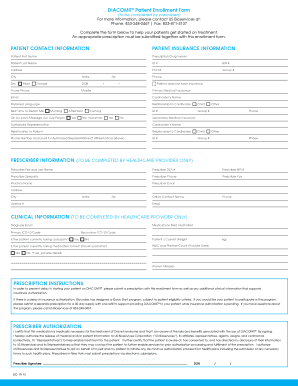
Get Diacomit Patient Enrollment Form
How it works
-

Open form follow the instructions
-

Easily sign the form with your finger
-

Send filled & signed form or save
How to fill out the DIACOMIT Patient Enrollment Form online
Filling out the DIACOMIT Patient Enrollment Form online is a crucial step in helping patients start their treatment. This guide provides clear instructions on how to effectively navigate each section of the form, ensuring all necessary information is accurately provided.
Follow the steps to successfully complete the form.
- Click ‘Get Form’ button to access the DIACOMIT Patient Enrollment Form and open it in your preferred editor.
- Begin by filling out the patient contact information section. This includes the patient’s first and last name, date of birth, home phone number, mobile phone number, email address, address, and city, state, and zip code.
- Provide the patient’s insurance information. This includes the prescription drug insurer, ID number, BIN number, PCN number, and group number. If the patient does not have insurance, select the appropriate checkbox.
- Complete the preferred language and relationship to the cardholder fields, as well as specify the best time to reach the patient.
- If applicable, fill out the secondary medical insurance information with the cardholder’s name, ID, group numbers, and relationship to the patient.
- Next, the prescriber information section should be filled out by the healthcare provider. This contains the prescriber’s name, DEA number, NPI number, specialty, contact details, and practice name.
- Healthcare providers must then complete the clinical information section, detailing the diagnosis, medications tried and failed, primary and secondary ICD-10 codes, current weight, WBC and platelet count, and any known allergies.
- In the prescription instructions area, ensure a prescription is included along with the necessary clinical information. If desired, indicate participation in the Quick Start program with a supporting prescription for a 30-day supply.
- The prescriber authorization section requires the prescriber’s signature to confirm medication necessity. Ensure this is completed correctly.
- Finally, fill out the patient HIPAA authorization section, obtaining signatures from the patient and/or legal guardian where necessary. After reviewing the authorization, make sure to retain a copy for future reference.
- Once all sections are complete, review the form for accuracy, then save your changes, download a copy, or print it for submission.
Complete the DIACOMIT Patient Enrollment Form online today to help ensure timely treatment for your patients.
The health enrollment form serves as a means to gather personal health information for managing patient care effectively. It ensures that healthcare providers have all necessary details to tailor treatments appropriately, including the use of DIACOMIT. By completing the DIACOMIT Patient Enrollment Form, you help create a comprehensive health profile that can significantly enhance your treatment experience.