Loading
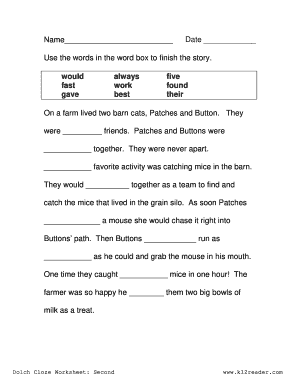
Get Cloze Passages Grade 2
How it works
-

Open form follow the instructions
-

Easily sign the form with your finger
-

Send filled & signed form or save
How to fill out the Cloze Passages Grade 2 online
This guide provides clear and concise instructions for completing the Cloze Passages Grade 2 form online. Following these steps will help ensure that all required fields are filled out accurately and efficiently.
Follow the steps to successfully fill out the Cloze Passages Grade 2 form.
- Click the ‘Get Form’ button to access the Cloze Passages Grade 2 form and open it in your online editor.
- Once the form is open, locate the section for the user's name. Enter the name in the provided space to identify who is completing the form.
- Next, find the date field. Input the current date in the format required, which is usually month-day-year.
- Proceed to the story section of the form. Use the words from the word box to fill in the blanks throughout the story. Ensure that the selected words make grammatical sense in the context of the sentences.
- After completing the story, review your entries for accuracy. Make sure that each blank has been filled appropriately and that the story flows well.
- Finally, once you are satisfied with your completed form, you can save your changes, download a copy, print it out, or share it online as needed.
Start completing your Cloze Passages Grade 2 form online today!
The cloze passage technique refers to the process of omitting words from a text, allowing learners to fill in the gaps. This engaging method helps promote reading comprehension among Grade 2 students by encouraging them to analyze language. By using the cloze passage technique, children enhance their ability to derive meaning and context, creating a more immersive learning experience. It is a powerful tool in building literacy skills.