Get Northwell Health Vd001 2015
How it works
-

Open form follow the instructions
-

Easily sign the form with your finger
-

Send filled & signed form or save
How to fill out the Northwell Health VD001 online
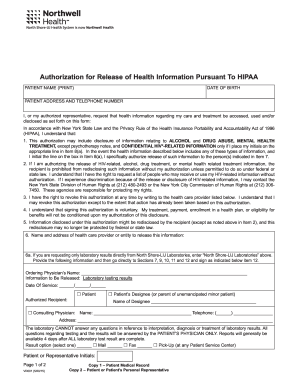
Filling out the Northwell Health VD001 form is an essential step for individuals seeking to authorize the release of their health information. This guide will walk you through the process, ensuring that you complete each section accurately and efficiently.
Follow the steps to successfully complete the Northwell Health VD001 online
- Press the ‘Get Form’ button to obtain the form and view it in the designated editing platform.
- Begin with the 'Patient Name' field, where you should clearly print your full name.
- Next, enter your 'Date of Birth' in the specified format (MM/DD/YYYY) to ensure accurate identification.
- Fill in your current 'Address' and 'Telephone Number' to provide your contact details.
- Section 1 indicates your request to access, use, and/or disclose information. Ensure you understand the implications of this authorization as stated in the document.
- For section 6, provide the name and address of the healthcare provider or entity from which you are authorizing the release of your information.
- Complete section 7 by listing the name, address, telephone, and fax numbers of the person(s) or category of person to whom your information will be sent.
- In section 8(a), specify the types of information you want to be released by selecting the appropriate checkboxes and initialing if necessary for sensitive information.
- Indicate your selection in section 8(b) regarding the authorization to discuss your health information with a designated individual, providing their name.
- Detail the 'Reason for Release of Information' in section 9, selecting from the options provided, or specifying another reason.
- Fill out the authorization expiration date or event in section 10 to specify when this authorization will no longer be valid.
- Sign and print your name in section 11. If you are signing on behalf of another individual, provide your relationship in section 12.
- Once all sections are completed, review your entries for accuracy and make any necessary corrections.
- Finally, save your changes and download or print the completed form for your records or submit as needed.
Complete and submit the Northwell Health VD001 form online to ensure your health information is properly managed.
Get form
Northwell Health VD001 holds a prestigious reputation due to its consistent rankings and recognition in the healthcare field. Patients trust Northwell for its commitment to quality, innovation, and comprehensive services. The organization invests in cutting-edge technology and skilled professionals, solidifying its status in the community. This prestige translates into patient confidence and high standards of care.