Loading
Get Ncds Mitsubishi Customer Arbitration Application
How it works
-

Open form follow the instructions
-

Easily sign the form with your finger
-

Send filled & signed form or save
How to fill out the NCDS Mitsubishi Customer Arbitration Application online
Completing the NCDS Mitsubishi Customer Arbitration Application online can help streamline your dispute resolution process. This guide provides detailed instructions to assist you in accurately filling out each section of the form.
Follow the steps to complete your application effectively.
- Click 'Get Form' button to obtain the application and open it in the editor.
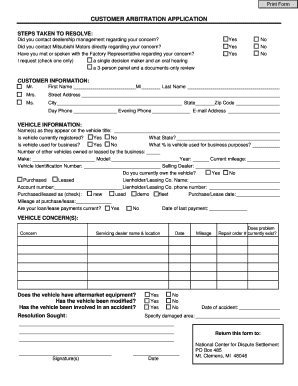
- Begin with the 'Steps Taken to Resolve' section. Here, indicate whether you contacted dealership management, Mitsubishi Motors directly, or the Factory Representative regarding your concern by selecting 'Yes' or 'No' for each inquiry.
- In the 'Customer Information' section, fill in your first name, middle initial, and last name. Select your title (Mr., Mrs., Ms.) and provide your street address, city, state, zip code, daytime phone number, evening phone number, and email address.
- Next, move to the 'Vehicle Information' subsection. Provide the name(s) as they appear on the vehicle title. Indicate whether the vehicle is currently registered, state of registration, and if it is used for business purposes, along with the percentage of business use.
- Continue filling out the vehicle details by entering the make, model, year, current mileage, and Vehicle Identification Number (VIN). Include the selling dealer's name and specify if you currently own the vehicle, and the terms of purchase or lease.
- Complete the loan or lease information by including the lienholder's name, account number, and contact number. Select the purchase/lease type (new, used, demo, fleet) and provide the purchase/lease date, mileage at that time, and confirm if your loan/lease payments are current.
- Describe the vehicle concern(s) in the designated section. You will need to provide the servicing dealer's name and location and specify if the vehicle has aftermarket equipment or has been modified, as well as any accident involvement.
- Finally, specify the resolution sought. Complete the date, mileage, and indicate if a repair order currently exists.
- Sign and date the application. Ensure the completed application is returned to the National Center for Dispute Settlement at the provided address.
- Review the entire form for accuracy, then proceed to save your changes, download, print, or share your completed application as needed.
Take the next step in your dispute resolution process by completing the NCDS Mitsubishi Customer Arbitration Application online today.
During arbitration, it's crucial to stay focused on the facts of your case and avoid emotional statements. Inappropriate language or personal attacks can undermine your position. Utilizing the NCDS Mitsubishi Customer Arbitration Application helps you structure your arguments effectively, guiding you to present your case professionally.