Loading
Form preview
  • US Legal Forms
  • Other Templates
  • Foreign Forms
  • Foreign Australia Other Forms
  • Au Australiansuper Change My Details 2019

Get Au Australiansuper Change My Details 2019-2026

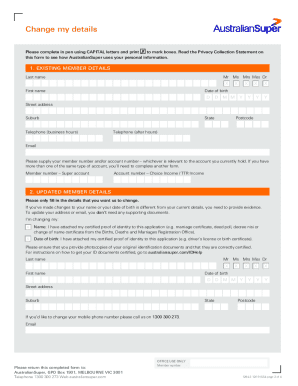
Change my details How to complete this form Compulsory details Nomination of preferred beneficiary Please complete your member number, full name and date of birth details. If you don t know your member.

How it works

  1. Open form

    Open form follow the instructions

  2. Easily sign form

    Easily sign the form with your finger

  3. Share form

    Send filled & signed form or save

How to fill out the AU AustralianSuper Change My Details online

Completing the AU AustralianSuper Change My Details form online is a straightforward process that allows users to update their personal information securely. This guide provides step-by-step instructions to help you navigate the form efficiently, ensuring your details are accurate and up to date.

Follow the steps to successfully complete your form.

  1. Press the ‘Get Form’ button to access the Change My Details form. This initiates the process of filling out your information online.
  2. In section 1, provide your existing member details, including your last name, first name, date of birth, address, telephone numbers, email, and member or account number. Ensure all information is accurate and complete.
  3. In section 2, if you are updating your name or date of birth, indicate this and ensure to have certified proof of identity ready. If only changing your address or email, no supporting documentation is needed.
  4. In section 3, nominate your preferred beneficiaries. List their names and relationship to you, ensuring the total percentage equals 100%. This section is crucial for ensuring your benefits are distributed according to your wishes.
  5. If you are changing bank account details, complete section 4 with your new account information. Make sure to attach certified proof of identity to avoid delays.
  6. In section 5, indicate how often you want to receive payments and the specific amount or options available. This helps manage your financial needs efficiently.
  7. Finally, sign and date section 6 to declare that all information provided is correct. Ensure that you review the Privacy Collection Statement to understand how your information will be used.
  8. Once you have completed the form, you can save your changes, download, print, or share the document as needed.

Start filling out the AU AustralianSuper Change My Details form online today to keep your information current.

Get form

Experience a faster way to fill out and sign forms on the web. Access the most extensive library of templates available.
Get form

Related content

0001694164-22-000003.txt
(a) Name of Person Filing: AustralianSuper Pty Ltd (b) Address of Principal Business...
Learn more
Why Australian super funds are outperforming...
Apr 15, 2025 — A new study shows how Australian super funds buck global trends, earning...
Learn more
Annual Report
Oct 31, 2019 — Today, AustralianSuper is the largest superannuation fund in Australia...
Learn more

Related links form

Working Bid Doc 2013 River Forest Sanitary Improvements.docx Dublin Individual Income Tax Return EZ - City Of Dublin Hamilton County Oh Dpo Sample Form Transcript Request Form - Hamilton County, Ohio - Hamilton-co

Questions & Answers

Get answers to your most pressing questions about US Legal Forms API.

Contact support

To change your beneficiary on AustralianSuper, access your online account and navigate to the beneficiary section. Here, you can update or change your nominated beneficiary information easily. Make sure to review your choices regularly to ensure they reflect your current wishes, especially after significant life events.

You can contact AustralianSuper through their customer service hotline or by using the contact form on their website. For urgent inquiries, their support team is available during business hours to assist you. If you have specific questions about how to AU AustralianSuper Change My Details, this is a great way to get direct help.

Yes, you can change the name of your Self-Managed Super Fund (SMSF). To do this, you will need to inform the Australian Taxation Office and update any relevant documentation. Make sure to follow the appropriate procedures to ensure compliance and remember that this change must be reflected accurately in your fund notes.

To change your details on Aus Super, log into your online account and access the personal details section. Here, you can modify information such as your address, email, and phone number. It's essential to keep your details current to maintain communication and update your records accurately when you AU AustralianSuper Change My Details.

Verifying your identity on AustralianSuper can be done online through your account. You may need to provide personal information and upload identification documents, such as your driver's license or passport. Completing this step is important, especially when you wish to AU AustralianSuper Change My Details confidently.

To change your name on your AustralianSuper fund, you will need to submit a name change form along with supporting documents. You can download the form from the AustralianSuper website. Once you have completed the form, send it back to them for processing and ensure you fulfill any necessary identification requirements for the AU AustralianSuper Change My Details process.

Your AustralianSuper account name is typically the name you registered with when you created your account. To find your account name, log into your AustralianSuper online portal or check the welcome email you received upon signing up. If you have trouble, you can reach out to customer support for assistance.

To update your name in AustralianSuper, you need to log into your online account. Once there, navigate to the personal details section where you can enter your new name. Make sure to provide supporting documents to verify your identity, as this is a requirement when you AU AustralianSuper Change My Details.

If you wish to give someone access to your AustralianSuper account, you can set up an 'Authority to Access' form. This form allows designated individuals to manage specific aspects of your account on your behalf. Be cautious in selecting trusted individuals, as they will have access to sensitive information related to your superannuation.

Adding a beneficiary to your AustralianSuper account is vital for ensuring your funds go to the right person in the event of your passing. To do this, log in to your account and go to the 'Beneficiaries' section. You can then enter the details of your chosen beneficiary. Remember, keeping your beneficiary information up to date is important, so make adjustments as necessary.

Get This Form Now!

Use professional pre-built templates to fill in and sign documents online faster. Get access to thousands of forms.
Get form
If you believe that this page should be taken down, please follow our DMCA take down processhere.
Get AU AustralianSuper Change My Details
Get form
  • Adoption
  • Bankruptcy
  • Contractors
  • Divorce
  • Home Sales
  • Employment
  • Identity Theft
  • Incorporation
  • Landlord Tenant
  • Living Trust
  • Name Change
  • Personal Planning
  • Small Business
  • Wills & Estates
  • Packages A-Z
  • Affidavits
  • Bankruptcy
  • Bill of Sale
  • Corporate - LLC
  • Divorce
  • Employment
  • Identity Theft
  • Internet Technology
  • Landlord Tenant
  • Living Wills
  • Name Change
  • Power of Attorney
  • Real Estate
  • Small Estates
  • Wills
  • All Forms
  • Forms A-Z
  • Other Templates
  • Legal Hub
  • About Us
  • Help Portal
  • Legal Resources
  • Blog
  • Affiliates
  • Contact Us
  • Delete My Account
  • Site Map
  • Industries
  • Forms in Spanish
  • Localized Forms
  • State-specific Forms
  • Forms Kit
  • Real Estate Handbook
  • All Guides
  • Notarize
  • Incorporation services
  • For Consumers
  • For Small Business
  • For Attorneys
  • USLegal
  • FormsPass
  • pdfFiller
  • signNow
  • altaFlow
  • DocHub
  • Instapage
Form Packages
  • Adoption
  • Bankruptcy
  • Contractors
  • Divorce
  • Home Sales
  • Employment
  • Identity Theft
  • Incorporation
  • Landlord Tenant
  • Living Trust
  • Name Change
  • Personal Planning
  • Small Business
  • Wills & Estates
  • Packages A-Z
Form Categories
  • Affidavits
  • Bankruptcy
  • Bill of Sale
  • Corporate - LLC
  • Divorce
  • Employment
  • Identity Theft
  • Internet Technology
  • Landlord Tenant
  • Living Wills
  • Name Change
  • Power of Attorney
  • Real Estate
  • Small Estates
  • Wills
  • All Forms
  • Forms A-Z
  • Other Templates
Customer Service
  • Legal Hub
  • About Us
  • Help Portal
  • Legal Resources
  • Blog
  • Affiliates
  • Contact Us
  • Delete My Account
  • Site Map
  • Industries
  • Forms in Spanish
  • Localized Forms
  • State-specific Forms
  • Forms Kit
Legal Guides
  • Real Estate Handbook
  • All Guides
Prepared for you
  • Notarize
  • Incorporation services
Our Customers
  • For Consumers
  • For Small Business
  • For Attorneys
Our Sites
  • USLegal
  • FormsPass
  • pdfFiller
  • signNow
  • altaFlow
  • DocHub
  • Instapage
Social Media
Call us now toll free:
+1 833 426 79 33
As seen in:
© Copyright 1999-2026 airSlate Legal Forms, Inc. 17 Station Street, Ste. 203, Brookline, MA 02445
  • Your Privacy Choices
  • Terms of Service
  • Privacy Notice
  • Content Takedown Policy
  • Bug Bounty Program