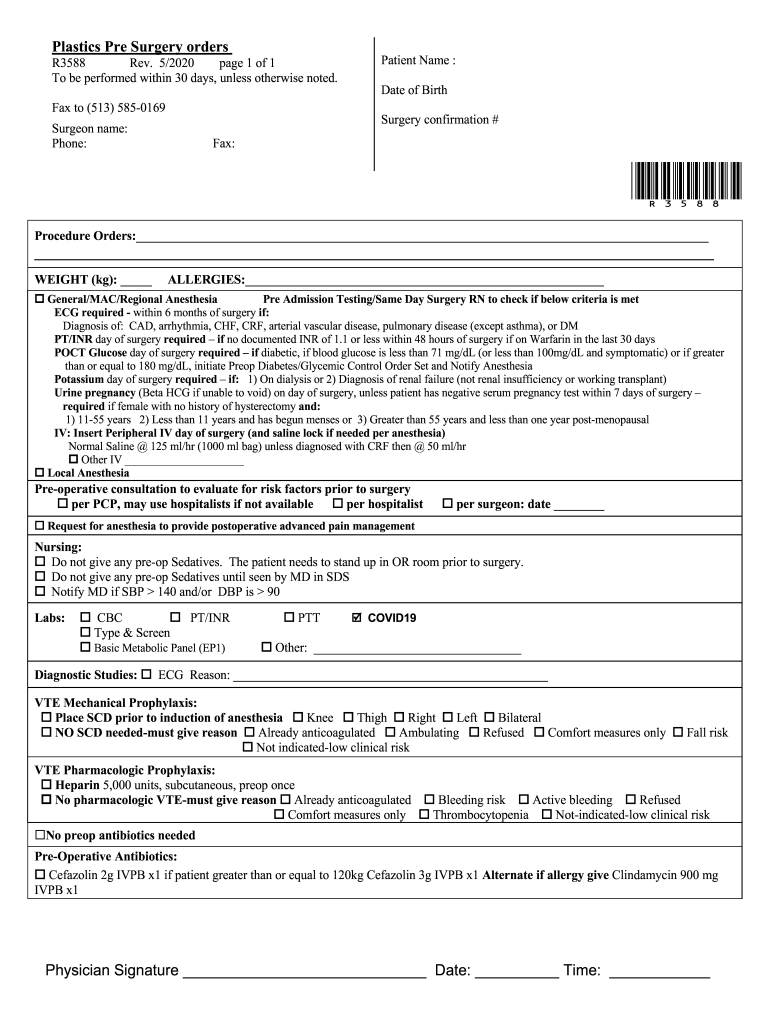
N name: Phone: Fax: *R3588* Procedure Orders: WEIGHT (kg): ALLERGIES: o General/MAC/Regional Anesthesia Pre Admission Testing/Same Day Surgery RN to check if below criteria is met ECG required - within 6 months of surgery if: Diagnosis of: CAD, arrhy.
Loading

Open form follow the instructions

Easily sign the form with your finger

Send filled & signed form or save
How to fill out The Christ Hospital R3588 online
This guide provides step-by-step instructions for completing The Christ Hospital R3588 online form. It is designed to assist users in accurately filling out the necessary information for pre-surgery procedures at The Christ Hospital.
Follow the steps to complete the online form effectively.
- Press the ‘Get Form’ button to access the online version of The Christ Hospital R3588 form. This will open the document in the designated editor for your completion.
- Enter the patient’s name in the specified field. Ensure the spelling is correct, as this information is crucial for identification purposes.
- Input the patient's date of birth in the designated format. This information is necessary for verifying the patient's identity and medical history.
- Fill in the surgery confirmation number as instructed. This may be provided by the medical staff during the scheduling of the procedure.
- Enter the surgeon's name and their contact information, including phone and fax numbers. This is important for any communication regarding the surgery.
- Specify the procedure orders in the provided space. If more space is necessary, continue detailing the procedures as instructed.
- Indicate the patient’s weight in kilograms in the provided field. Accurate weight is important for medication dosages and surgery preparation.
- List any known allergies in the designated section to ensure patient safety during the surgical procedure.
- Review the anesthesia requirements, marking the appropriate selections for general, MAC, or regional anesthesia as applicable.
- Complete the required pre-admission testing details as directed, checking off which tests have been successfully completed.
- Provide details regarding any intravenous (IV) lines, including the need for saline locks and the type of fluids to be used.
- Mark whether a urine pregnancy test is required based on the patient's age and medical history.
- Indicate any nursing instructions that should be followed on the day of surgery.
- Fill out the necessary lab tests required for the surgery, ensuring all relevant tests are checked.
- Complete the diagnostic studies section if an electrocardiogram (ECG) is required, providing the reason for the test.
- Complete the VTE (venous thromboembolism) prophylaxis sections, marking if mechanical or pharmacologic methods are indicated.
- Enter information regarding pre-operative antibiotics, following the outlined requirements based on patient weight and allergies.
- The final step requires the physician's signature, date, and time to validate the document. Ensure this is properly filled before submission.
- Once all fields are completed, you can save changes, download, print, or share the form as needed.
Complete your documents online for a seamless surgery preparation experience.
Experience a faster way to fill out and sign forms on the web. Access the most extensive library of templates available.
Related content
RIORDAN: A bill (H. R. 13256) to place David Rob- ertson, sergeant, first class, Hospital...
The 1970 Austell/Mableton directory contains information identifying residents and local...
Get answers to your most pressing questions about US Legal Forms API.
How many locations does Christ Hospital have?
The Christ Hospital operates multiple locations across the Cincinnati area. These facilities offer comprehensive medical services, ensuring that communities have access to quality care. By expanding their locations, The Christ Hospital R3588 aims to reach more patients and provide convenience. This network enhances the ability to serve diverse patient needs effectively.
Who is the CEO of Christ Hospital?
The current CEO of The Christ Hospital is Dr. Dwayne A. C. Smith. Under his leadership, the hospital has continued to improve patient care and expand services. Dr. Smith's vision includes striving for excellence in healthcare, benefiting the Cincinnati community and beyond. His commitment supports The Christ Hospital R3588 in becoming a trusted healthcare provider.
What movie was filmed at the Christ Hospital, Cincinnati?
The Christ Hospital, Cincinnati, is featured in 'The Killing of a Sacred Deer.' This film effectively uses the hospital's realistic environment to enhance its storyline. The Christ Hospital R3588 is integral to the film's setting and provides an authentic feel that audiences appreciate. It's exciting to see local institutions play a role in artistic projects.
What city did they film The Killing of a Sacred Deer in?
The Killing of a Sacred Deer was filmed in and around Cincinnati, Ohio. This city offers diverse settings that filmmakers often seek. The Christ Hospital R3588, as a notable site in the area, shows the city's role in bringing cinematic stories to life. Cincinnati's vibrant landscape helps create immersive film environments.
What movie was filmed at Roger Bacon High School?
Roger Bacon High School was featured in the film 'Airborne.' This movie highlights the school's community and adds depth to the narrative. It's always interesting to see how different filming locations can shape a movie's character. Many local sites serve as impactful settings in various productions.
What movie was filmed at the Christ Hospital?
The film that prominent scenes at The Christ Hospital is 'The Killing of a Sacred Deer.' This location adds an element of authenticity to the movie's narrative. The Christ Hospital R3588 provided an intriguing backdrop that enhances the story's chilling atmosphere. It's fascinating how local venues contribute to the film industry.
Is The Killing of a Sacred Deer a good movie?
The Killing of a Sacred Deer has received mixed reviews. Some viewers appreciate its unique storytelling, while others find it unsettling. If you're interested in films that provoke thought and engage audiences with moral dilemmas, this movie might resonate with you. For fans of unconventional cinema, it could be a worthwhile experience.
Is Christ Hospital a teaching hospital?
Yes, The Christ Hospital R3588 is indeed a teaching hospital. It plays a crucial role in training the next generation of healthcare professionals. This commitment not only enhances the learning experience for medical students and residents, but it also provides patients with access to innovative treatments and high-quality care during their visits.
How many beds are at the Christ Hospital?
The Christ Hospital R3588 features approximately 555 licensed inpatient beds. This capacity allows the hospital to accommodate a broad range of medical needs and ensure that patients receive timely care. With modern facilities and resources, The Christ Hospital is equipped to handle diverse medical cases, supporting both community health and specialized care.
Is the Christ Hospital a teaching hospital?
Indeed, The Christ Hospital R3588 is a teaching hospital dedicated to education in the medical field. By providing training opportunities for medical students and residents, it plays a vital role in shaping the future of healthcare. Patients can be assured that they receive care from well-trained professionals who stay current with new medical practices and technologies.
Use professional pre-built templates to fill in and sign documents online faster. Get access to thousands of forms.
If you believe that this page should be taken down, please follow our DMCA take down process here.