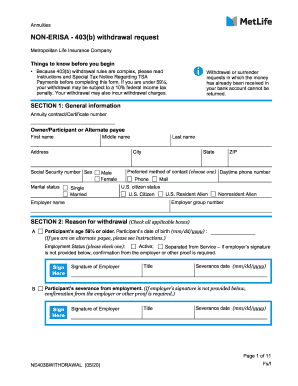
Get Metlife Non-erisa 403(b) Withdrawal Request 2020-2026
How it works
-

Open form follow the instructions
-

Easily sign the form with your finger
-

Send filled & signed form or save
How to fill out the MetLife Non-Erisa 403(b) Withdrawal Request online
Navigating the process of completing the MetLife Non-Erisa 403(b) Withdrawal Request online can seem daunting, but with careful attention to detail, you can ensure your request is processed smoothly. This guide breaks down each section of the form to help you understand what you need to complete accurately.
Follow the steps to fill out the withdrawal request form with ease.
- Press the ‘Get Form’ button to access the withdrawal request form and open it in the designated editor.
- Complete Section 1: General Information. Provide the required details such as your annuity contract number, name, address, and Social Security number. Select your preferred method of contact and indicate your U.S. citizen status.
- In Section 2: Reason for Withdrawal, check the boxes that apply to your situation. Be prepared to provide documentation if required, such as employer signatures or medical confirmations.
- Fill out Section 3: Amount and Source of Withdrawal. Indicate whether you wish to withdraw your entire account balance or just a partial amount, and specify any relevant details regarding your account.
- If applicable, complete Section 4: Required Minimum Distribution Instructions for rollovers/transfers, indicating your enrollment in the Minimum Distribution Service.
- Address any outstanding loans in Section 5: Outstanding Loan Payoff Information and Instructions. Select how you would like to manage any existing loan balances.
- In Section 6: Payment Instructions, choose your preferred method to receive funds. Options include electronic funds transfer or check and, if applicable, provide necessary banking details.
- Review the federal income tax withholding requirements in Sections 7-9 and specify any desired withholding amounts.
- Once you have reviewed all sections for accuracy, sign and date the form in Section 10. Ensure all parties required to sign have done so to avoid delays.
- Submit the completed form via mail, fax, or email, as per the instructions provided in Section 13. Consider keeping a copy for your records.
Complete your withdrawal request online today to ensure a smooth process!
Related links form
The main difference between ERISA and non-ERISA 403b plans lies in the regulatory framework. ERISA plans must meet specific federal compliance requirements, while non-ERISA plans, which typically cover employees of public schools and certain non-profits, have fewer regulations. Knowing these differences can help you navigate the MetLife Non-Erisa 403(b) Withdrawal Request with confidence and clarity.