Get Canada Omers F168 2020-2026
How it works
-

Open form follow the instructions
-

Easily sign the form with your finger
-

Send filled & signed form or save
How to fill out the Canada OMERS F168 online
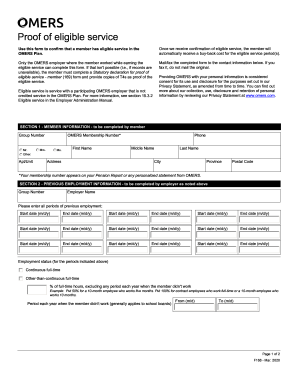
Filling out the Canada OMERS F168 form is essential for confirming a member's eligible service within the OMERS Plan. This guide provides detailed, step-by-step instructions to help users complete the form accurately and efficiently.
Follow the steps to fill out your OMERS F168 form online.
- Click ‘Get Form’ button to access the OMERS F168 form and open it in your preferred editing interface.
- Begin by completing the member information section. Provide your group number, OMERS membership number, first name, middle name, last name, and contact information, including your phone number and address, ensuring accuracy in the city, province, and postal code fields.
- Next, the previous employment information must be filled out by the employer. Enter the group number and employer name, followed by listing all periods of previous employment with start and end dates. If there are multiple periods, follow the same format for each entry.
- Indicate the employment status for the indicated periods, specifying if it was continuous full-time or other-than-continuous full-time. Include the percentage of full-time hours worked, if applicable.
- Document any periods when the member was not working during the year, filling in the start and end dates accordingly.
- Provide details regarding any breaks in service, if applicable, stating the leave start and end dates and whether the leave was statutory.
- In the following section, complete whether the member belonged to a registered pension plan during the service period. If yes, enter the plan registration number, the name of the registered pension plan, and the date of enrollment.
- Complete the employer authorization section by providing the name, title, phone, fax, and email of the authorized signing officer. The officer must also sign and date the form.
- After filling out all fields, ensure to save the changes. You can download, print, or share the completed form as needed based on your requirements.
Start the process today by completing your Canada OMERS F168 form online.
OMERS and RRSP are not the same. While RRSP is a government-regulated retirement savings plan available to all Canadians, Canada OMERS F168 specifically refers to the pension plan offered to employees in Ontario. OMERS is designed to provide defined benefits upon retirement, whereas an RRSP allows individuals to save and invest for their retirement on their own terms. Each option has its benefits, so it’s wise to consider your personal financial situation.