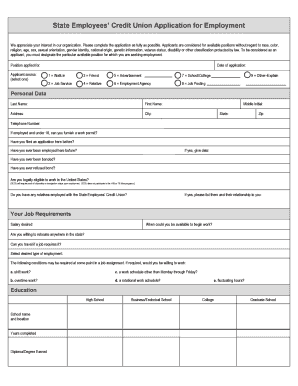
Get State Employees Credit Union Application For Employment (secu 441) 2019-2025
How it works
-

Open form follow the instructions
-

Easily sign the form with your finger
-

Send filled & signed form or save
How to fill out the State Employees Credit Union Application for Employment (SECU 441) online
Completing the State Employees Credit Union Application for Employment (SECU 441) online is a straightforward process that enables applicants to express their interest in available positions. This guide provides step-by-step instructions to ensure that you fill out the application accurately and effectively.
Follow the steps to fill out the SECU 441 application online with confidence.
- Press the ‘Get Form’ button to access the application form and open it in the editor.
- Designate the specific position you are applying for by entering the title in the 'Position applied for' field.
- Select your applicant source by choosing one option from the provided list, such as 'Friend' or 'Advertisement.'
- Fill in the date of your application in the specified format.
- Complete the 'Personal Data' section, including your last name, first name, address, city, state, zip code, telephone number, and middle initial.
- Indicate whether you are under 18 and if you can provide a work permit, along with other eligibility questions regarding prior applications and employment.
- Provide detailed responses in the 'Your Job Requirements' section, including your desired salary and availability to start work.
- Complete the 'Education' section, detailing your educational history including the name of the institution, years completed, and degrees earned.
- List your professional activities and an overview of your work experience, starting with the most recent position first. Ensure you include the job title, employer, dates of employment, and reason for leaving.
- Provide three references that are not related to you, including their names, addresses, and telephone numbers.
- Read and sign the 'Applicant’s Certification and Agreement' section, ensuring your signature is handwritten.
- In the optional 'Pre-Offer Voluntary Self-Identification' section, provide demographic information if you choose to do so.
- Complete any additional voluntary self-identification forms regarding disabilities and veteran status as applicable.
- Finalize your application by saving any changes, and choose the option to download, print, or share the finished form.
Get started on your application today by completing the State Employees Credit Union Application for Employment online.
The North Carolina State Employees Credit Union, often abbreviated as SECU, is a not-for-profit financial cooperative that caters primarily to state employees and their families. With products ranging from loans to investment options, SECU aims to meet the unique financial needs of its members. Their State Employees Credit Union Application for Employment (SECU 441) allows potential employees to explore fulfilling career opportunities within this respected institution. SECU’s mission centers on providing excellent service and fostering financial wellness in the community.
Industry-leading security and compliance
-
In businnes since 199725+ years providing professional legal documents.
-
Accredited businessGuarantees that a business meets BBB accreditation standards in the US and Canada.
-
Secured by BraintreeValidated Level 1 PCI DSS compliant payment gateway that accepts most major credit and debit card brands from across the globe.