Loading
Get Fl Bls 3020 2019-2026
How it works
-

Open form follow the instructions
-

Easily sign the form with your finger
-

Send filled & signed form or save
How to fill out the FL BLS 3020 online
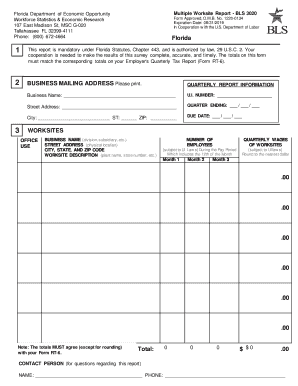
Filling out the FL BLS 3020, also known as the Multiple Worksite Report, is essential for providing accurate employment and wage information for businesses operating under the same Unemployment Insurance Account Number. This guide offers clear, step-by-step instructions to assist users in completing the form properly.
Follow the steps to fill out the FL BLS 3020 accurately and efficiently.
- Click ‘Get Form’ button to obtain the form and open it in the editor.
- Review and update the business name, contact name, and mailing address in the Business Mailing Address section. Ensure that all information is accurate and complete.
- In the Quarterly Report Information section, enter the business name, U.I. number, street address, and quarter ending date. Make sure to provide full and accurate details.
- Complete the Worksites section by reviewing the list of individual worksites. For each worksite, verify and correct the name, address, and description. If a description is missing, provide a unique identifier for that worksite.
- Enter the number of employees for each month of the quarter. This includes all full-time and part-time employees who worked during or received pay for the pay period including the 12th of the month.
- Record the quarterly wages for each worksite, rounding to the nearest dollar. The wages must comply with the State Unemployment Insurance laws.
- Indicate if any worksites have been closed or sold. Use the space beside the worksite to provide the closure or sale date, and if applicable, the name of the new owner and their U.I. number.
- Check if all worksites under the U.I. number are included. If there are additional worksites, provide the necessary information for each new location on available blank lines or a separate page.
- Complete the Totals section by summing the number of employees and wages for all worksites for each month during the quarter.
- Once all information is filled out accurately, return your completed form using the enclosed envelope provided for submission.
- If you have questions or need further assistance, contact the Florida Department of Economic Opportunity at the provided phone numbers.
Take action now and ensure compliance by completing the FL BLS 3020 online.
Whether you are required to report to BLS depends on your business size and industry. Many employers in Florida must report to ensure compliance with labor statistics reporting, including FL BLS 3020. If you have questions about your reporting requirements, uslegalforms can help clarify and provide the necessary tools to fulfill your obligations.