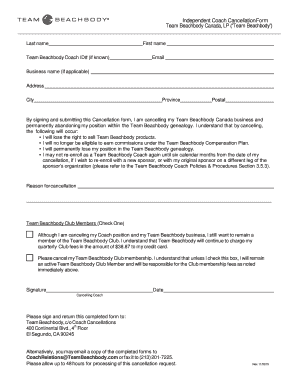
Province Postal By signing and submitting this Cancellation form, I am cancelling my Team Beachbody Canada business and permanently abandoning my position within the Team Beachbody genealogy. I understand that by canceling, the following will occur: I will lose the right to sell Team Beachbody products. I will no longer be eligible to earn commissions under the Team Beachbody Compensation Plan. I will permanently lose my position in the Team Beachbody genealogy. I may not re-en.

How it works
  • Open form

    Open form follow the instructions

  • Easily sign form

    Easily sign the form with your finger

  • Share form

    Send filled & signed form or save

How to fill out the Team Beachbody Independent Coach Cancellation Form online

This guide will assist you in completing the Team Beachbody Independent Coach Cancellation Form online. By following these straightforward steps, you can ensure that the cancellation process is handled efficiently and accurately.

Follow the steps to complete the cancellation form successfully.

  1. Click ‘Get Form’ button to access the Team Beachbody Independent Coach Cancellation Form. This action will allow you to open the document in your preferred online platform.
  2. Fill in your last name and first name in the designated fields. Ensure to provide the names as they appear on your Team Beachbody account to avoid any processing issues.
  3. Enter your Team Beachbody Coach ID number if you have it. This number will help identify your account faster.
  4. Provide your email address. This is important for any correspondence regarding your cancellation request.
  5. If applicable, include your business name in the specified field. This ensures clarity on which account is being canceled.
  6. Complete the address section by adding your street address, city, province, and postal code. Accurate information will facilitate the processing of your cancellation.
  7. Select the reason for your cancellation from the available options. This step is crucial for Team Beachbody to gather feedback.
  8. Determine whether you want to continue as a Team Beachbody Club Member. If you wish to cancel your membership, be sure to check the appropriate box.
  9. Sign and date the form in the designated area. Your signature indicates that you understand the implications of your cancellation.
  10. Once you have completed the form, you can save your changes. After this, you can choose to download, print, or share the form as needed.

Complete your cancellation form online today to ensure a smooth and efficient process.

Get form

Experience a faster way to fill out and sign forms on the web. Access the most extensive library of templates available.

Related content

Form S-4

Seasoned Management Team. The Beachbody management team, which will remain in place...

Learn more
Perceptions of Social Support in an Online Weight...

by B Davies · 2018 — Exploring the experiences of participants and coaches (group...

Learn more
Questions & Answers

Get answers to your most pressing questions about US Legal Forms API.

Contact support

How can I cancel Beachbody?

Cancelling Beachbody is straightforward with the Team Beachbody Independent Coach Cancellation Form. Simply access your account settings, find the cancellation instructions, and submit the form. For any further assistance, you can always contact customer support.

To cancel your Beachbody on demand subscription, fill out the Team Beachbody Independent Coach Cancellation Form. Sign into your account, navigate to subscriptions, and follow the prompts to cancel. You will get an email confirming your cancellation shortly after.

To cancel your Beachbody coach membership, the Team Beachbody Independent Coach Cancellation Form is essential. Log into your account, find the cancellation option, and submit the form. You will receive confirmation once your cancellation is processed.

For deleting your Fit account, use the Team Beachbody Independent Coach Cancellation Form. Visit your account settings, select the option to delete your account, and submit the form. Should you encounter any challenges, reach out to customer support for help.

To delete your body shop account, you should complete the Team Beachbody Independent Coach Cancellation Form. Access the relevant section of your account profile, fill out the form, and submit it for review. If you run into issues, consult customer support for assistance.

Deleting a Beachbody account requires submitting the Team Beachbody Independent Coach Cancellation Form. Navigate to account settings, and follow the prompts for account deletion. For any difficulties, customer support is available to help you.

To cancel your coach, complete the Team Beachbody Independent Coach Cancellation Form. This form initiates the cancellation process. After submission, you should receive a confirmation via email, ensuring your coach is no longer active.

To delete your body coach account, you need to fill out the Team Beachbody Independent Coach Cancellation Form. Access your account settings, locate the account deletion option, and follow the instructions. If you need further assistance, consider reaching out to customer support for guidance.

To cancel your Beachbody Coach membership, you must submit the Team Beachbody Independent Coach Cancellation Form. This process is simple: log into your account, access the cancellation section, and complete the form required. Make sure to check your email afterward for confirmation of the membership cancellation, so you have a record of the action taken.

To cancel unwanted Beachbody memberships, start by accessing the Team Beachbody Independent Coach Cancellation Form. This form provides a straightforward way to discontinue any membership you no longer wish to maintain. Simply fill it out online through your account settings, and submit it to finalize the cancellation. Always check for an email confirmation to ensure the process is complete.

Get This Form Now!

Use professional pre-built templates to fill in and sign documents online faster. Get access to thousands of forms.

If you believe that this page should be taken down, please follow our DMCA take down process here.

Get Team Beachbody Independent Coach Cancellation Form