We use cookies to improve security, personalize the user experience, enhance our marketing activities (including cooperating with our marketing partners) and for other business use.
Click "here" to read our Cookie Policy. By clicking "Accept" you agree to the use of cookies. Read less
Read more
Accept
Loading
Form preview
  • US Legal Forms
  • Form Library
  • Industry Forms
  • Industry Bank & Financial Forms
  • Paychex Pop002 2017

Get Paychex Pop002 2017-2025

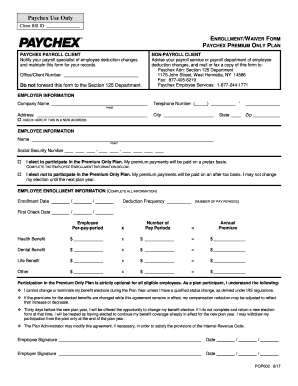
His form for your records. NON-PAYROLL CLIENT Advise your payroll service or payroll department of employee deduction changes, and mail or fax a copy of this form to: Paychex Attn: Section 125 Department 1175 John Street, West Henrietta, NY 14586 Fax: 877-405-6219 Paychex Employee Services: 1-877-244-1771 Office/Client Number Do not forward this form to the Section 125 Department. EMPLOYER INFORMATION Company Name Telephone Number ( ).

How it works

  1. Open form

    Open form follow the instructions

  2. Easily sign form

    Easily sign the form with your finger

  3. Share form

    Send filled & signed form or save

How to fill out the Paychex POP002 online

Filling out the Paychex POP002 form is an important step for employees participating in the Premium Only Plan. This guide will provide you with clear instructions on how to complete the form accurately and efficiently.

Follow the steps to complete your Paychex POP002 form properly.

  1. Click the 'Get Form' button to access the Paychex POP002 form and open it in your preferred editor.
  2. In the employer information section, fill in your company name, telephone number, and address. If your address has changed, check the box to indicate this is a new address.
  3. Move to the employee information section. Enter your name and Social Security number. Indicate your election by selecting one of the two options regarding participation in the Premium Only Plan.
  4. Complete the employee enrollment information. Fill in the enrollment date and first check date. Include the deduction frequency by specifying the number of pay periods.
  5. For each benefit (health, dental, life, other), input the per pay period premium, number of pay periods, and calculate the annual premium based on these numbers.
  6. Review the statements regarding participation in the Premium Only Plan and ensure that you understand the conditions outlined.
  7. Sign and date the form in the employee signature and date sections. Ensure that the employer also provides their signature and date.
  8. Once you have completed all sections and verified the accuracy of your entries, save the changes, and choose to download, print, or share the form as needed.

Complete your Paychex POP002 form online today for a seamless enrollment experience.

Get form

Experience a faster way to fill out and sign forms on the web. Access the most extensive library of templates available.
Get form

Related content

Opposition - USPTO TTABVUE. Trademark Trial and...
Defendant. Name: Paychex of New York, LLC. Correspondence: KRISTEN M WALSH NIXON PEABODY...
Learn more

Related links form

LBP Notification Form 334.indd - Tcdc Govt Tcdc Application Form New Zealand Speed Readings For ESL Learners Book One - Victoria ... - Victoria Ac The Development Of Psychology In Png Maraipdf Form

Questions & Answers

Get answers to your most pressing questions about US Legal Forms API.

Contact support

Paychex offers traditional payroll and HR services, while Paychex Flex represents a more modern, user-friendly platform that provides a comprehensive suite of HR solutions. With Paychex Flex, you enjoy enhanced features such as customizable dashboards, mobile access, and integration options. Understanding the differences can help you choose the best option for your business needs, especially when considering Paychex POP002 for efficient management.

To contact Paychex payroll, navigate to the support section on the Paychex website. You will find options for live chat, email support, or phone numbers for direct assistance. Ensure that you provide specifics about your inquiry related to Paychex POP002 for quicker resolution. Their knowledgeable representatives are prepared to help you with any payroll-related questions.

You can locate your Paychex client ID within your account dashboard once logged in. It is usually found in the account details or settings area. If you have difficulty locating it, reaching out to Paychex customer support is a reliable option. Having your client ID handy is essential for accessing information related to Paychex POP002.

To obtain a copy of your W-2 from Paychex, log into your Paychex account. Look for the 'Tax Documents' section, where you can access and download your W-2 form easily. If you encounter any issues, consider contacting Paychex support for assistance. For users utilizing Paychex POP002, this process is streamlined to enhance your experience.

To view your paystub on Paychex, simply log into your Paychex account and navigate to the section for payroll or paystubs. There, you will find a list of your recent paystubs available for review. This platform ensures that you have quick access to all pertinent information right when you need it.

The Paychex controversy primarily revolves around user experiences, particularly regarding customer service and issues with payroll accuracy. It has led to discussions about the need for transparent communication and reliable solutions. If you encounter problems using Paychex services, platforms like uslegalforms can offer guidance and resources to help address your concerns effectively.

Paychex and Paychex Flex are closely linked but not identical. Paychex Flex is the cloud-based platform offering enhanced functionality and convenience for users, whereas Paychex refers to the overall service provider. Users of Paychex POP002 can integrate with Paychex Flex for an optimal experience, gaining access to various features tailored to your needs.

Accessing your Paychex paystub is simple. You need to log into your Paychex account using your credentials. After logging in, look for the section labeled 'Paystubs' or 'Payroll History' to find and download your required paystub, ensuring you have the data you need at your fingertips.

To check your paystub online, visit the Paychex website and log in to your account. Once you're logged in, navigate to the 'Payroll' section where you can easily view and download your paystubs. This process is streamlined for your convenience, helping you access your financial information with ease and efficiency.

To file as exempt on the Paychex app, open the app and navigate to the tax information section. Select the option to indicate your exempt status and complete the necessary steps outlined in the app. Using Paychex POP002 through the app provides you with efficiency and accessibility for managing your tax information.

Get This Form Now!

Use professional pre-built templates to fill in and sign documents online faster. Get access to thousands of forms.
Get form
If you believe that this page should be taken down, please follow our DMCA take down processhere.

Industry-leading security and compliance

US Legal Forms protects your data by complying with industry-specific security standards.
  • In businnes since 1997
    25+ years providing professional legal documents.
  • Accredited business
    Guarantees that a business meets BBB accreditation standards in the US and Canada.
  • Secured by Braintree
    Validated Level 1 PCI DSS compliant payment gateway that accepts most major credit and debit card brands from across the globe.
Get Paychex POP002
Get form
Form Packages
Adoption
Bankruptcy
Contractors
Divorce
Home Sales
Employment
Identity Theft
Incorporation
Landlord Tenant
Living Trust
Name Change
Personal Planning
Small Business
Wills & Estates
Packages A-Z
Form Categories
Affidavits
Bankruptcy
Bill of Sale
Corporate - LLC
Divorce
Employment
Identity Theft
Internet Technology
Landlord Tenant
Living Wills
Name Change
Power of Attorney
Real Estate
Small Estates
Wills
All Forms
Forms A-Z
Form Library
Customer Service
Terms of Service
Privacy Notice
Legal Hub
Content Takedown Policy
Bug Bounty Program
About Us
Help Portal
Legal Resources
Blog
Affiliates
Contact Us
Delete My Account
Site Map
Industries
Forms in Spanish
Localized Forms
State-specific Forms
Forms Kit
Legal Guides
Real Estate Handbook
All Guides
Prepared for You
Notarize
Incorporation services
Our Customers
For Consumers
For Small Business
For Attorneys
Our Sites
US Legal Forms
USLegal
FormsPass
pdfFiller
signNow
airSlate WorkFlow
DocHub
Instapage
Social Media
Call us now toll free:
+1 833 426 79 33
As seen in:
  • USA Today logo picture
  • CBC News logo picture
  • LA Times logo picture
  • The Washington Post logo picture
  • AP logo picture
  • Forbes logo picture
© Copyright 1997-2025
airSlate Legal Forms, Inc.
3720 Flowood Dr, Flowood, Mississippi 39232
Form Packages
Adoption
Bankruptcy
Contractors
Divorce
Home Sales
Employment
Identity Theft
Incorporation
Landlord Tenant
Living Trust
Name Change
Personal Planning
Small Business
Wills & Estates
Packages A-Z
Form Categories
Affidavits
Bankruptcy
Bill of Sale
Corporate - LLC
Divorce
Employment
Identity Theft
Internet Technology
Landlord Tenant
Living Wills
Name Change
Power of Attorney
Real Estate
Small Estates
Wills
All Forms
Forms A-Z
Form Library
Customer Service
Terms of Service
Privacy Notice
Legal Hub
Content Takedown Policy
Bug Bounty Program
About Us
Help Portal
Legal Resources
Blog
Affiliates
Contact Us
Delete My Account
Site Map
Industries
Forms in Spanish
Localized Forms
State-specific Forms
Forms Kit
Legal Guides
Real Estate Handbook
All Guides
Prepared for You
Notarize
Incorporation services
Our Customers
For Consumers
For Small Business
For Attorneys
Our Sites
US Legal Forms
USLegal
FormsPass
pdfFiller
signNow
airSlate WorkFlow
DocHub
Instapage
Social Media
Call us now toll free:
+1 833 426 79 33
As seen in:
  • USA Today logo picture
  • CBC News logo picture
  • LA Times logo picture
  • The Washington Post logo picture
  • AP logo picture
  • Forbes logo picture
© Copyright 1997-2025
airSlate Legal Forms, Inc.
3720 Flowood Dr, Flowood, Mississippi 39232