Loading
Get Mn Regions Hospital 100-176-804 2017-2026
How it works
-

Open form follow the instructions
-

Easily sign the form with your finger
-

Send filled & signed form or save
How to fill out the MN Regions Hospital 100-176-804 online
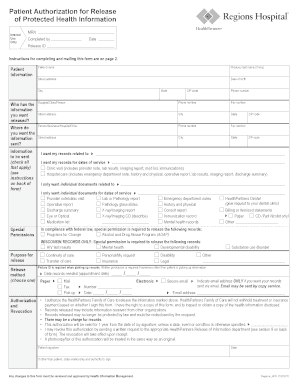
Filling out the MN Regions Hospital 100-176-804 form is a crucial step in authorizing the release of your protected health information. This guide provides clear, step-by-step instructions to help you navigate the online form effectively.
Follow the steps to complete your authorization form
- Click ‘Get Form’ button to access the MN Regions Hospital 100-176-804 form and open it in your preferred online platform.
- Complete the 'Patient Information' section. Ensure you fill in your full name, previous last name (if applicable), street address, date of birth, city, state, ZIP code, and phone number legibly.
- Identify the source of the information you want released by filling out the 'Who has the information you want released?' section. If the records are from a HealthPartners facility, reference the address list provided. For other organizations, provide as much demographic information as possible.
- Specify where you would like the information sent in the 'Where do you want the information sent?' section. Clearly print the name and address of the individual, business, or healthcare facility where the information should go.
- Indicate the information required in the 'Information to be sent' section. You can select from categories such as 'Clinic visit', 'Hospital care', or 'Individual documents'. If necessary, provide specific diagnoses or date ranges.
- Check 'Special Permissions' if you need to release certain sensitive information, such as mental health records or HIV test results. Ensure you mark the appropriate boxes.
- Declare the purpose for releasing the information in the 'Purpose for release' section. This helps in processing the request and may clarify who will be responsible for any costs.
- Choose your preferred 'Release method' for receiving documents. Options include mail, fax, pick-up, electronic, or secure email. If picking up records, indicate your appointment date and remember to bring photo ID.
- Review and complete the 'Authorization' section by signing and dating the form. If you are signing on behalf of a patient, indicate your relationship and authority.
- Once all sections are filled out, you can save changes, download, or print the form as needed before submitting it.
Complete your MN Regions Hospital 100-176-804 form online today for easy processing of your health information.
While rankings can vary, MN Regions Hospital 100-176-804 consistently rates among the top hospitals in Minnesota. This recognition comes from its commitment to excellent healthcare services and innovative treatments. Many patients consider it their first choice due to its comprehensive care and community-focused approach.