M numbers. Generally, about 25 to 40 major items appear in a contract. (2) Items Subdivided. In the Contractor's breakdown, against which all periodical estimates will be checked prior to payment, each major item must be subdivided into sub-items pertinent to the project involved and in agreement with the Contractor's intended basis for requesting monthly payments. c. Column 3. Enter the total quantity for each sub-item of each principal division of work listed in the breakdown. d. Column 4. En.
Loading

Open form follow the instructions

Easily sign the form with your finger

Send filled & signed form or save
How to fill out the HUD-51000 online
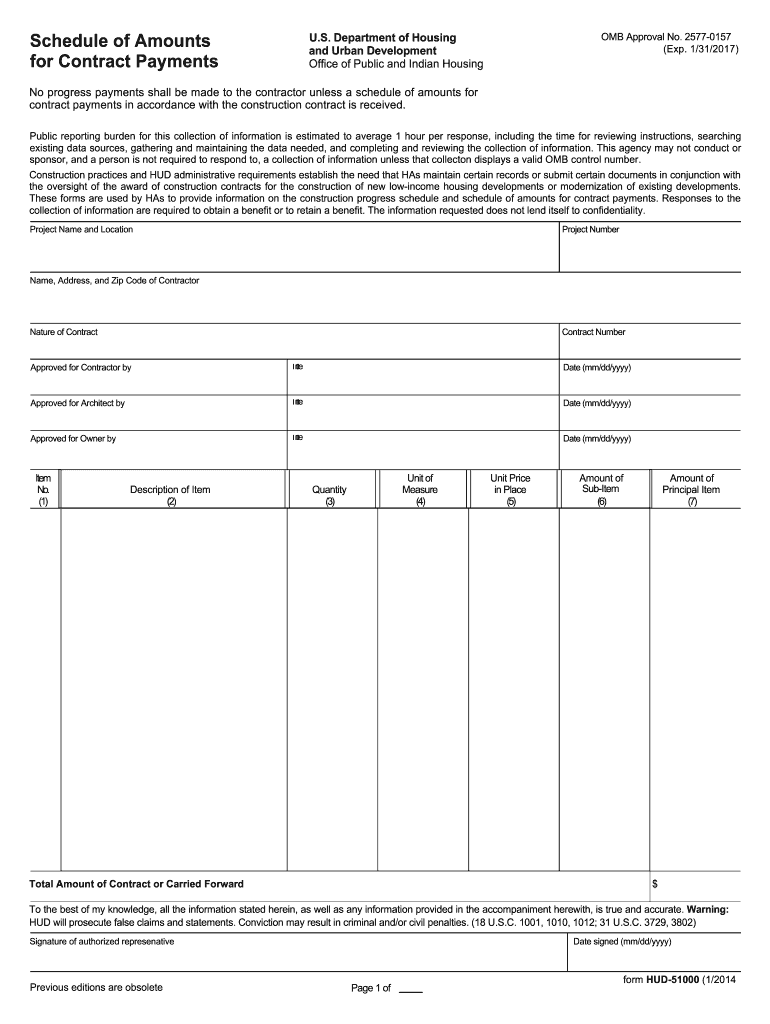
Filling out the HUD-51000 form correctly is essential for ensuring timely processing of contract payments related to HUD-approved construction projects. This guide provides a comprehensive walkthrough of each section of the form to assist users in accurately completing it online.
Follow the steps to complete the HUD-51000 effectively.
- Click ‘Get Form’ button to obtain the form and open it in the editor.
- Begin by entering the project name and location in the designated fields at the top of the form. Ensure that the project number is accurately listed to avoid processing delays.
- In the section for contractor information, provide the name, address, and zip code of the contractor responsible for the project. Ensure all details are correct to facilitate smooth communication.
- Indicate the nature of the contract and the contract number in the related fields. This information is crucial for the identification and tracking of your specific contract.
- For each item listed, enter the item number in column 1, describing the principal division of work in column 2. Follow the guidelines to maintain consistency with the provided master list of items.
- Complete column 3 by entering the total quantity for each sub-item, ensuring it aligns with the contractor's proposed breakdown.
- In column 4, specify the unit of measure for each sub-item. Use standard units applicable to the work being performed, such as 'sq. ft.' or 'tons.'
- Input the unit price for each sub-item in column 5. This should reflect the agreed amount per unit as outlined in the contract.
- Calculate the total amount for each sub-item by multiplying the quantity by the unit price, and enter this amount in column 6.
- Finally, aggregate the amounts of all sub-items for each principal division of work, and enter this total in column 7, ensuring accuracy for contract payment processing.
- Ensure that the form is signed and dated by the authorized representative in the space provided at the bottom. This signature verifies the accuracy of the information provided.
- After completing the form, you can choose to save your changes, download, print, or share the form as needed. Make sure to keep a copy for your records.
Start completing the HUD-51000 online today for efficient contract payment processing.
Experience a faster way to fill out and sign forms on the web. Access the most extensive library of templates available.
Related content
form HUD-51000 (1/2014. Schedule of Amounts for Contract Payments. U.S. Department of...
The Housing Authority of the City of Montgomery, Alabama ... $51,000. Housing Authority...
Get answers to your most pressing questions about US Legal Forms API.
How to find the HUD-1 form?
To find the HUD-1 form, you can check official housing websites or consult your real estate agent, who can often supply it. Alternatively, utilizing resources like USLegalForms ensures that you access the correct versions, including HUD-51000. This way, you can navigate your real estate transactions with confidence and clarity.
What is the difference between HUD 9886 and 9887?
The primary difference between HUD 9886 and 9887 lies in their specific functions. While HUD 9886 focuses on individual eligibility verification for housing programs, HUD 9887 addresses income verification for continued assistance. Both forms are vital for maintaining compliance with housing regulations and ensuring that eligible families receive the support they need.
What is a 9887 form?
The 9887 form is used to verify the family income and tenant eligibility for federal housing assistance programs. This form complements the HUD-51000 by providing additional details regarding financial qualifications. Together, these forms help ensure that the right support reaches eligible families in need.
Where can I get HUD forms?
You can obtain HUD forms from the U.S. Department of Housing and Urban Development's official website or local housing authorities. Additionally, platforms like USLegalForms offer easy access to these documents, including HUD-51000. With these resources, you'll find it simple to get the necessary forms for your housing needs.
What is HUD form 9886 used for?
HUD form 9886 serves as a crucial document that helps verify the identity and eligibility of individuals applying for housing assistance. This form plays a significant role in ensuring compliance with federal housing regulations. By using HUD-51000, applicants can streamline their application process and gain access to important housing programs in a timely manner.
How long does it take to get approved with HUD?
The approval process with HUD can vary, but typically, it takes anywhere from a few days to several weeks. Factors such as document completeness and application volume can influence this timeline. Staying organized and submitting all required paperwork can help expedite your application. For more streamlined assistance, check out the offerings from uslegalforms.
How do you qualify for HUD financing?
Qualifying for HUD financing involves meeting specific income guidelines and credit score requirements. Generally, applicants must demonstrate a steady income and show that their debt-to-income ratio meets HUD's standards. Additionally, certain properties must meet HUD's acceptable criteria. For guidance and resources, consider using uslegalforms to navigate the application process.
How to obtain a HUD-1 Settlement Statement?
To obtain a HUD-1 Settlement Statement, you should request it from your lender once your mortgage has closed. This statement outlines all the costs associated with the real estate transaction and is critical for understanding your financial commitment. You can also access it through your real estate agent or the closing company. If you need further assistance, consider exploring the services offered by uslegalforms.
How far back does a HUD background check go for housing?
A HUD background check typically looks back at least five to seven years, focusing on criminal history and rental history. However, the specifics can vary by program and local regulations. Understanding these details is vital, so consider the expertise of USLegalForms to navigate your HUD-51000 housing application effectively.
What disqualifies you for section 8 in Kansas?
In Kansas, specific circumstances can lead to disqualification for Section 8 housing. These can include insufficient income, past evictions, and certain criminal records. If you're considering applying for HUD-51000, it's essential to evaluate these factors carefully and consult resources like USLegalForms for guidance.
Use professional pre-built templates to fill in and sign documents online faster. Get access to thousands of forms.
If you believe that this page should be taken down, please follow our DMCA take down process here.