Loading
Get Wa Dshs 14-076 2015
How it works
-

Open form follow the instructions
-

Easily sign the form with your finger
-

Send filled & signed form or save
How to fill out the WA DSHS 14-076 online
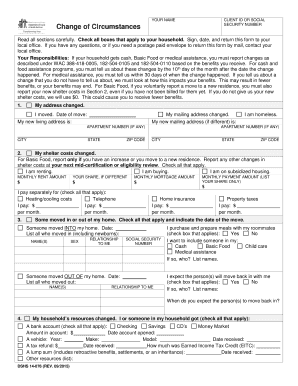
Filling out the WA DSHS 14-076 form is an essential step for users needing to report changes in their circumstances related to benefits. This guide provides a clear, step-by-step approach to help you accurately complete the form online.
Follow the steps to successfully fill out the WA DSHS 14-076 form.
- Click ‘Get Form’ button to retrieve the form and open it in your online editor.
- Begin by filling in your name, client ID, or Social Security number in the designated fields at the top of the form. Ensure that this information is accurate to avoid processing delays.
- In section 1, indicate any changes to your address, including your new living and mailing addresses. If you moved, specify the date of the move.
- In section 2, report any changes to your shelter costs. Check the appropriate boxes if you are renting, buying, or living in subsidized housing, and fill in the respective amounts.
- If someone has moved in or out of your home, complete section 3 by listing their names, relationships, and other required details.
- Report any changes to your household’s resources in section 4, including bank accounts, vehicles, or any additional resources.
- In section 5, document any changes to your household’s income—such as starting, ending, or changes in job status. Include the gross income amounts and any relevant dates.
- Complete section 6 to detail any other household changes that may affect eligibility for assistance, such as changes in childcare costs, marital status, or medical coverage.
- If you wish to terminate any assistance, complete section 7 by checking the appropriate boxes for cash assistance, Basic Food, medical assistance, or other services.
- Finally, in the declaration and signature area, sign and date the form, confirming that the information provided is true and complete. Include the telephone number for any follow-up inquiries.
- Once you have completed all sections, review the form for accuracy. After confirming all information is correct, you can save changes, download a copy, print, or share the form as needed.
Get started now and complete your WA DSHS 14-076 form online for efficient processing.
Get form
Experience a faster way to fill out and sign forms on the web. Access the most extensive library of templates available.
To report changes to your food stamps in Washington State, log into your account on the Washington Benefits portal. You may need to provide new income information or changes in household composition. Always refer to the WA DSHS 14-076 for guidance on what information is required for reporting changes effectively.
Get This Form Now!
Use professional pre-built templates to fill in and sign documents online faster. Get access to thousands of forms.