Loading

Open form follow the instructions

Easily sign the form with your finger

Send filled & signed form or save
How to fill out the Providence Hospital nsg00170 online
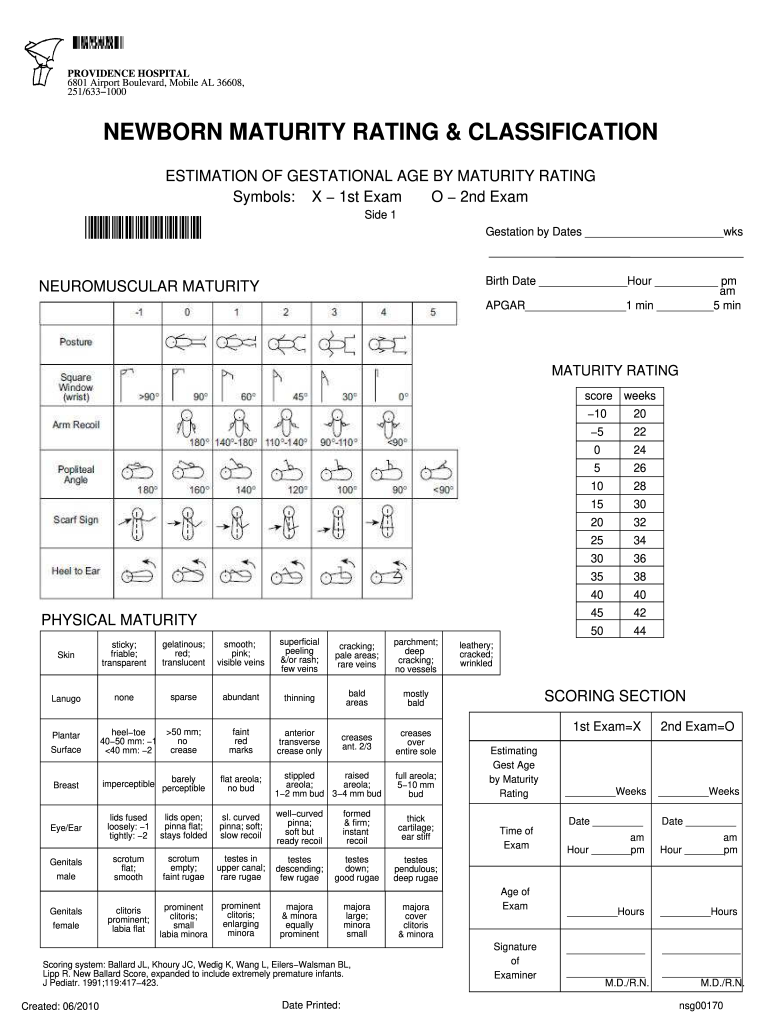
The Providence Hospital nsg00170 form is essential for estimating gestational age through newborn maturity rating. This guide will assist users in completing the form accurately and efficiently, ensuring all necessary information is provided.
Follow the steps to fill out the Providence Hospital nsg00170 form online.
- Click ‘Get Form’ button to obtain the form and open it in the desired online editing tool.
- Enter the gestation by dates, including the total weeks of gestation.
- Input the birth date and the time of birth, selecting either am or pm.
- Record the APGAR scores for 1 minute and 5 minutes after birth in the designated fields.
- Assess neuromuscular maturity by scoring each parameter outlined in the Physical Maturity section. Enter the corresponding ratings in the 'Maturity Rating' area.
- Complete the scoring section by totaling all scores to estimate gestational age based on the maturity rating.
- Provide the time and age of the exam, including the date and individual performing the exam, ensuring that the designated signatures are included.
- Once all information is accurately filled in and reviewed, users can save changes, download, print, or share the completed form as needed.
Complete your documents online to streamline your process today.
Experience a faster way to fill out and sign forms on the web. Access the most extensive library of templates available.
Related content
Jump to: 2016, 2015, 2014, 2013, 2012, 2011, 2010, 2009, 2008, 2007, 2006, 2005, ... of...
Get answers to your most pressing questions about US Legal Forms API.
Is Providence Health Plan part of Cigna?
Providence Health Plan is not directly part of Cigna; however, there are partnerships that allow for some overlap in services and benefits. This means that some customers may access Cigna plans through Providence providers, including those at Providence Hospital nsg00170. Be sure to check your insurance documents to clarify your specific plan's affiliations. Contacting the health plan representatives can provide further insights into your coverage.
What is the billing form for submitting hospital claims?
To submit hospital claims to Providence Hospital nsg00170, you would typically use the CMS-1500 form for professional services or the UB-04 form for institutional services. It’s crucial to fill these forms accurately to prevent billing delays. You can usually download these forms directly from the Providence website or obtain them from the admissions office. For assistance in navigating claim submissions, resources at uslegalforms can provide helpful templates.
What health authority is Providence?
Providence operates under several health authorities depending on the region. Generally, it delivers comprehensive services across various hospitals, clinics, and care networks. Providence Hospital nsg00170 is committed to ensuring high-quality patient care and complies with relevant health regulations. To learn more about its authority and governance, visit the official Providence website.
How do I process a hospital claim?
Processing a hospital claim begins with collecting the necessary paperwork, including your detailed billing statement. Once you have everything, you should fill out the claim form accurately to avoid delays. After submission, monitor the status of your claim via the Providence Hospital nsg00170 portal or contact the customer service for updates. If there are complications, platforms like uslegalforms can help guide you in resolving any issues.
Is the Providence Health Plan Cigna?
While the Providence Health Plan operates independently, it partners with Cigna to provide some health insurance solutions. This collaboration allows patients to access a comprehensive range of services and supports within the Providence Hospital nsg00170 network. Always check your specific plan details to understand your benefits fully. Connecting with customer service can provide clarity on your coverage.
What insurance company is Cigna?
Cigna is a global health services company that offers a range of insurance products and services. It provides health, dental, disability, and life insurance to individuals and employers. For those seeking care at establishments like Providence Hospital nsg00170, Cigna often collaborates with various healthcare providers, ensuring a broad network for patients. You can explore your coverage options through Cigna's official channels.
How to submit claims to Providence?
To submit claims to Providence Hospital nsg00170, you need to gather all relevant medical documentation and ensure your claim form is correctly filled out. You can submit claims physically by mailing them to the claims department or electronically through the designated online portal. It is essential to keep a record of your submission for your reference. For additional assistance, consider using the resources available at uslegalforms.
Why did Hoag hospital leave Providence?
Hoag Hospital's departure from Providence stemmed from strategic realignment and a focus on optimizing healthcare delivery. This change reflects broader trends in the healthcare landscape where facilities seek to enhance efficiency and care quality. The Providence Hospital nsg00170 context can provide you with further details on these shifts and their implications.
Why are so many hospitals closing?
The healthcare sector has seen many hospitals close due to financial restrictions, low patient volumes, and increasing operational costs. The impact of these closures often affects community access to care, making it vital for potential patients to stay informed. For news and resources, explore the Providence Hospital nsg00170 discussions, which encapsulate these issues.
Why did Providence Hospital in DC close?
The closure of Providence Hospital in DC stemmed from a combination of financial difficulties and shifting healthcare demands. Community needs were not adequately met, leading to the decision to close. Learn more about the Providence Hospital nsg00170 situation to gain further insights into these changes.
Use professional pre-built templates to fill in and sign documents online faster. Get access to thousands of forms.
If you believe that this page should be taken down, please follow our DMCA take down process here.