Loading
Form preview
  • US Legal Forms
  • Other Templates
  • Social Forms
  • Michigan Social Forms
  • Mi Lra Uia 1718 2019

Get Mi Lra Uia 1718 2019-2026

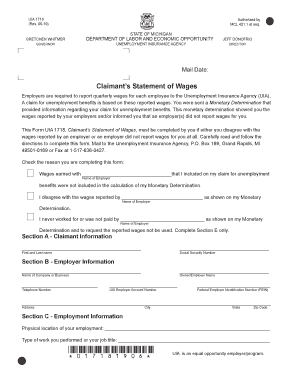
NOFRIO • DIRECTOR Mail Date: Claimant’s Statement of Wages Employers are required to report quarterly wages for each employee to the Unemployment Insurance Agency (UIA). A claim for unemployment benefits is based on these reported wages. You were sent a Monetary Determination that provided information regarding your claim for unemployment benefits. This monetary determination showed you the wages reported by your employers and/or informed you that an employer(s) did not report wages for .

How it works

  1. Open form

    Open form follow the instructions

  2. Easily sign form

    Easily sign the form with your finger

  3. Share form

    Send filled & signed form or save

How to fill out the MI LRA UIA 1718 online

The MI LRA UIA 1718 form, known as the Claimant’s Statement of Wages, is essential for individuals disputing or clarifying the wages reported by their employers to the Unemployment Insurance Agency. This guide will provide clear, step-by-step instructions to help users complete the form online accurately and effectively.

Follow the steps to fill out the MI LRA UIA 1718 online

  1. Press the ‘Get Form’ button to obtain the MI LRA UIA 1718 form and open it within the online editor.
  2. Begin by providing your claimant information in Section A. Enter your first and last name, followed by your social security number.
  3. In Section B, fill out the employer information. Include the name of the company or business, the contact telephone number, the owner/employer name, and their UIA employer account number along with the federal employer identification number (FEIN). Enter the complete address, including city, state, and zip code.
  4. Proceed to Section C to detail your employment information. Write the physical location where you were employed and describe the type of work performed or your job title. Indicate how you were paid (cash, check, direct deposit, etc.) and whether there were other compensations or deductions.
  5. In Section D, move on to report the quarterly wage information. Identify the specific quarters and accurately enter gross wages for each. Use the chart provided to document wages paid per week, ensuring to align your entries with when you received the payments.
  6. Finally, in Section E, provide your certification statement. Sign and date this section to confirm that all reported information is true and correct.
  7. After completing all sections of the form, ensure all information is accurate. You can then save your changes, download the completed form, and if required, print or share it accordingly.

Complete the MI LRA UIA 1718 online to clarify your wage report today.

Get form

Experience a faster way to fill out and sign forms on the web. Access the most extensive library of templates available.
Get form

Related content

MICHIGAN COURT OF APPEALS
... 1718 (citation and quotation marks omitted); see also. Girlish v Acme ... (UIA)...
Learn more
View Online
... mi:T requ.iraJoent.a. (Table 2.) u all. J.rrq grollDd it.aae •ra c11t bT halt...
Learn more
MICRO PROCESSOR ASSEKBLER6(31l 3-MAY-79 16:50 ...
UIA KPWCNT ,FIRST THINGS FIRST, SEE HOW MANY CHARS IN THE BUFFER. 2229 004253 074. INR A...
Learn more

Related links form

Panel Discussion Template Submission Form - ACHE.org - Ache Quotation Approval ACVS Expense Report - American College Of Veterinary Surgeons - Acvs Report - American Folklore Society - Afsnet

Questions & Answers

Get answers to your most pressing questions about US Legal Forms API.

Contact support

Applying for UIA in Michigan can be done online through the MI UIA website, where you can fill out the necessary application forms. Make sure you have your personal information and work history ready before you begin the process. Utilizing resources from US Legal Forms can facilitate your application process and offer insights regarding the MI LRA UIA 1718 framework.

Approval for Michigan unemployment typically takes two to three weeks after filing your application. However, this timeframe can vary based on your situation and the completeness of your submission. To avoid delays, ensure your application is accurate and thorough, and consider using US Legal Forms to help ensure you're submitting everything correctly in relation to MI LRA UIA 1718.

If you earn $1000 a week in Michigan, your unemployment benefits will vary based on your earnings and the state's average wage calculations. Generally, benefits are about half of your weekly earnings, up to a specific cap. For accurate figures and to navigate the MI LRA UIA 1718 benefits, consider utilizing US Legal Forms for additional clarity on the calculations.

To obtain a UIA number in Michigan, you must register online through the MI UIA website. This unique identification number is necessary to file your unemployment claims, so ensure you complete this step promptly. Keep in mind that helpful resources such as US Legal Forms can provide you with the right forms and instructions to secure your UIA number efficiently.

Eligibility for UIA Michigan typically includes individuals who have lost their job through no fault of their own and meet specific wage requirements. You must also be available for work and actively seeking employment. The MI LRA UIA 1718 provides crucial guidelines for determining your eligibility, and resources like US Legal Forms can assist you in understanding your options.

To file for unemployment for the first time in Michigan, you need to visit the Michigan Unemployment Insurance Agency (UIA) website. There, you can complete your application online or access the necessary forms. Make sure to have your personal information, work history, and any separation documents ready. Utilizing resources like US Legal Forms can streamline the process, especially with the MI LRA UIA 1718 in focus.

To protest an unemployment determination in Michigan, you must file an appeal within 30 days of receiving the decision. The MI LRA UIA 1718 allows you to submit your appeal online or by mail, detailing why you disagree with the original ruling. Prepare any supporting documents to strengthen your case. If you need assistance with the appeal process, consider visiting UsLegalForms, where you can find resources to assist you in formulating your protest.

You can file your UIA claim in Michigan online via the Michigan Unemployment Insurance Agency's website or by phone. Ensure you have all necessary documentation, including your Social Security number and employer information ready. The MI LRA UIA 1718 emphasizes the importance of accurate information during the filing process. For additional support, UsLegalForms provides convenient resources to navigate the claim process easily.

To file a UIA claim in Michigan, you need to visit the Michigan Unemployment Insurance Agency's website and follow the instructions provided there. Start by gathering your personal information, employment history, and reasons for separation. The MI LRA UIA 1718 provides a structured process to ensure your application is completed correctly. If you need guidance, UsLegalForms offers helpful tools to assist you in filing your claim efficiently.

In Michigan, you can file for unemployment benefits the week you are laid off. It's crucial to apply as soon as possible to ensure you meet the submission timelines outlined under the MI LRA UIA 1718 regulations. Delaying your application can lead to missed benefits, so take action promptly. For a smoother filing process, consider using resources available on UsLegalForms.

Get This Form Now!

Use professional pre-built templates to fill in and sign documents online faster. Get access to thousands of forms.
Get form
If you believe that this page should be taken down, please follow our DMCA take down processhere.
Get MI LRA UIA 1718
Get form
  • Adoption
  • Bankruptcy
  • Contractors
  • Divorce
  • Home Sales
  • Employment
  • Identity Theft
  • Incorporation
  • Landlord Tenant
  • Living Trust
  • Name Change
  • Personal Planning
  • Small Business
  • Wills & Estates
  • Packages A-Z
  • Affidavits
  • Bankruptcy
  • Bill of Sale
  • Corporate - LLC
  • Divorce
  • Employment
  • Identity Theft
  • Internet Technology
  • Landlord Tenant
  • Living Wills
  • Name Change
  • Power of Attorney
  • Real Estate
  • Small Estates
  • Wills
  • All Forms
  • Forms A-Z
  • Other Templates
  • Legal Hub
  • About Us
  • Help Portal
  • Legal Resources
  • Blog
  • Affiliates
  • Contact Us
  • Delete My Account
  • Site Map
  • Industries
  • Forms in Spanish
  • Localized Forms
  • State-specific Forms
  • Forms Kit
  • Real Estate Handbook
  • All Guides
  • Notarize
  • Incorporation services
  • For Consumers
  • For Small Business
  • For Attorneys
  • USLegal
  • FormsPass
  • pdfFiller
  • signNow
  • altaFlow
  • DocHub
  • Instapage
Form Packages
  • Adoption
  • Bankruptcy
  • Contractors
  • Divorce
  • Home Sales
  • Employment
  • Identity Theft
  • Incorporation
  • Landlord Tenant
  • Living Trust
  • Name Change
  • Personal Planning
  • Small Business
  • Wills & Estates
  • Packages A-Z
Form Categories
  • Affidavits
  • Bankruptcy
  • Bill of Sale
  • Corporate - LLC
  • Divorce
  • Employment
  • Identity Theft
  • Internet Technology
  • Landlord Tenant
  • Living Wills
  • Name Change
  • Power of Attorney
  • Real Estate
  • Small Estates
  • Wills
  • All Forms
  • Forms A-Z
  • Other Templates
Customer Service
  • Legal Hub
  • About Us
  • Help Portal
  • Legal Resources
  • Blog
  • Affiliates
  • Contact Us
  • Delete My Account
  • Site Map
  • Industries
  • Forms in Spanish
  • Localized Forms
  • State-specific Forms
  • Forms Kit
Legal Guides
  • Real Estate Handbook
  • All Guides
Prepared for you
  • Notarize
  • Incorporation services
Our Customers
  • For Consumers
  • For Small Business
  • For Attorneys
Our Sites
  • USLegal
  • FormsPass
  • pdfFiller
  • signNow
  • altaFlow
  • DocHub
  • Instapage
Social Media
Call us now toll free:
+1 833 426 79 33
As seen in:
© Copyright 1999-2026 airSlate Legal Forms, Inc. 17 Station Street, Suite 303, Brookline, MA 02445
  • Your Privacy Choices
  • Terms of Service
  • Privacy Notice
  • Content Takedown Policy
  • Bug Bounty Program