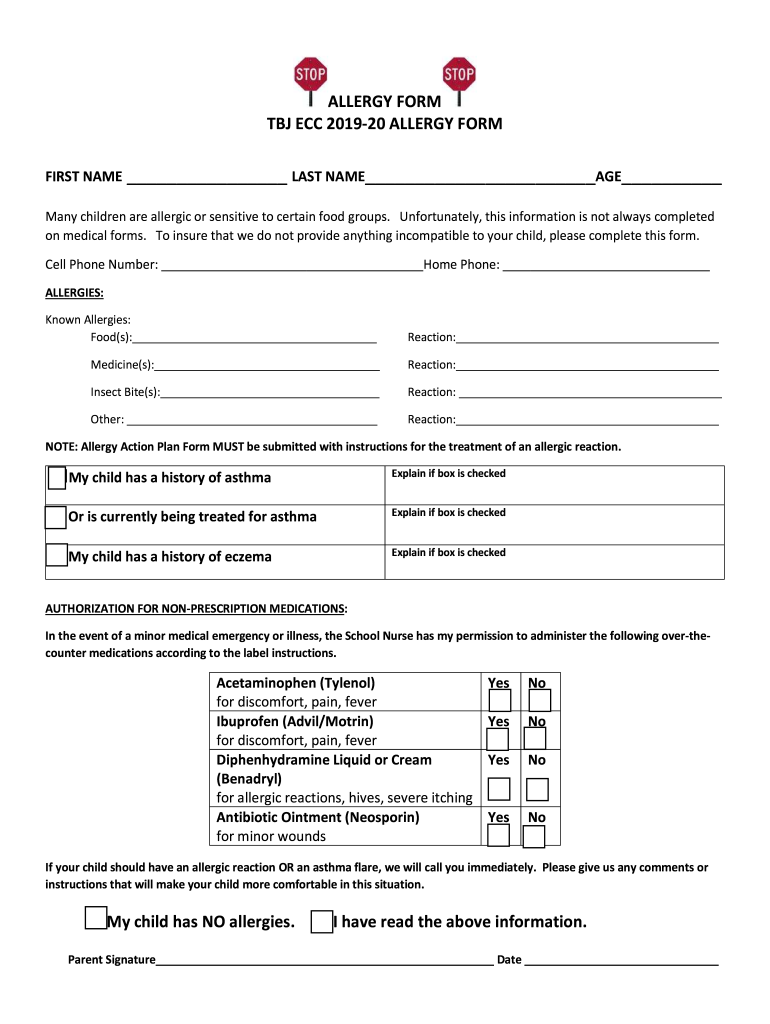
ALLERGY FORM TBJ ECC 201920 ALLERGY FORM FIRST NAME LAST NAME AGE Many children are allergic or sensitive to certain food groups. Unfortunately, this information is not always completed on medical.
Loading

Open form follow the instructions

Easily sign the form with your finger

Send filled & signed form or save
How to fill out the TBJ ECC Allergy Form online
Filling out the TBJ ECC Allergy Form online is essential for ensuring the safety and well-being of your child in school environments. This guide will provide you with clear and supportive instructions to complete the form accurately and efficiently.
Follow the steps to complete the TBJ ECC Allergy Form online
- Press the ‘Get Form’ button to access the TBJ ECC Allergy Form and open it in your preferred editor.
- Begin by entering your child's first and last name, as well as their age in the designated fields at the top of the form.
- Provide your contact information, including your cell phone number and home phone number, to ensure easy communication.
- In the 'Known Allergies' section, detail any food allergies by specifying the food and describing the reaction your child typically has.
- Continue listing any medicine allergies by entering the medicine names and their corresponding reactions.
- In the 'Insect Bite(s)' section, provide details regarding any insect allergies and the reactions faced by your child.
- Fill out the 'Other' allergies section if applicable, describing any other known allergies and reactions.
- Indicate if your child has a history of asthma or eczema by checking the relevant boxes and providing explanations if necessary.
- In the 'Authorization for Non-Prescription Medications' section, indicate your permission for the school nurse to administer specific over-the-counter medications by checking 'Yes' or 'No' for each option listed.
- If your child has allergies or asthma, provide additional comments or instructions that could aid in their management during school.
- Finally, confirm that your child has no allergies if applicable, read the provided information, and include your signature along with the date to authorize the form.
- After completing the form, be sure to save your changes, and you can download, print, or share the completed document as needed.
Complete the TBJ ECC Allergy Form online today to secure your child's safety and health.
Experience a faster way to fill out and sign forms on the web. Access the most extensive library of templates available.
Related content
by N Rocco · 2023 · Cited by 19 — ICG should also not be used in patients with allergy...
... form women younger than 65 years. Cancer 2017. (c) 2017 American Cancer Society. CI...
Get answers to your most pressing questions about US Legal Forms API.
What is the ICD-10 code for seasonal allergies unspecified?
The ICD-10 code for unspecified seasonal allergies is J30.9. This code is vital for healthcare providers when diagnosing and treating allergies that occur during specific seasons. Utilizing the TBJ ECC Allergy Form can help in accurately documenting seasonal allergies to improve patient outcomes.
What is the ICD code for allergy symptoms?
The ICD code for general allergic symptoms is typically coded as 995.3. This code encompasses various manifestations of allergies, facilitating broader medical understanding and treatment. When filled out, the TBJ ECC Allergy Form helps ensure that all symptoms are recorded comprehensively for optimal care.
What is the ICD-10 code for L23 7?
The ICD-10 code L23.7 refers to contact dermatitis due to an unspecified substance. This code is often utilized for various allergic reactions encountered in a clinical setting. The TBJ ECC Allergy Form allows healthcare professionals to track such allergies accurately, enhancing diagnosis and treatment plans.
What is the ICD-9 code for allergies unspecified?
The ICD-9 code for unspecified allergies is allergy status (995.3). This code historically categorized general allergic conditions, facilitating medical billing and reporting. Since the transition to ICD-10, using the correct forms like the TBJ ECC Allergy Form can support smooth documentation during this change.
What is the CPT code for allergy unspecified?
The Current Procedural Terminology (CPT) code for unspecified allergy is 95099. This code is used when a specific allergy cannot be identified, allowing healthcare professionals to bill for related services properly. Integrating the TBJ ECC Allergy Form into your practice can ensure the correct coding and more efficient handling of patient allergies.
How to flush an allergic reaction out of your body?
To help mitigate an allergic reaction, it’s important to stay hydrated and consume foods rich in antioxidants. Additionally, avoiding known allergens and taking antihistamines can provide relief. The TBJ ECC Allergy Form can help your healthcare provider note the specifics of your reactions and create a tailored plan for you.
What is the form of an allergy?
An allergy form typically includes a patient's medical history, details about their allergic reactions, and a list of known allergens. The TBJ ECC Allergy Form is structured to gather essential information, making it easier for healthcare providers to manage and treat allergies effectively. When completed correctly, this form can streamline your clinic’s processes and improve patient care.
What is diagnosis code J30 81?
The diagnosis code J30.81 represents an allergy to pollen. This code falls under the broader category of allergic rhinitis, which refers to inflammation of the nasal passages due to allergens. If you want to understand how these codes apply to the TBJ ECC Allergy Form, it becomes essential for accurate documentation and proper filing with insurance.
Does Benadryl help with hair dye allergy?
Benadryl, an antihistamine, can help relieve symptoms of a hair dye allergy, such as itching and swelling. However, it is essential to consult with a healthcare professional before taking any medication. They may advise using the TBJ ECC Allergy Form to document the allergy for future reference. This documentation assists in managing your allergies more effectively.
How to get rid of hair dye allergic reaction?
To alleviate a hair dye allergic reaction, wash the affected area with mild soap and water immediately. Over-the-counter antihistamines may provide some relief from itching and swelling. Consulting with a healthcare professional is advisable for severe reactions, who may recommend using the TBJ ECC Allergy Form to document the reaction and prevent future occurrences.
Use professional pre-built templates to fill in and sign documents online faster. Get access to thousands of forms.
If you believe that this page should be taken down, please follow our DMCA take down process here.
This form is available in several versions. Select the version you need from the drop-down list below.