Loading
Get Ph Pag-ibig Hqp-pff-106 2019-2026
How it works
-

Open form follow the instructions
-

Easily sign the form with your finger
-

Send filled & signed form or save
How to fill out the PH Pag-IBIG HQP-PFF-106 online
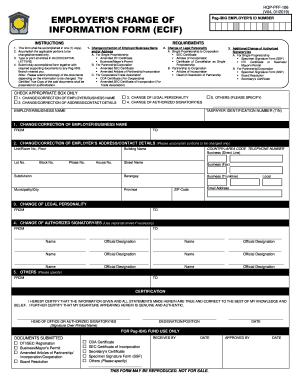
The PH Pag-IBIG HQP-PFF-106 form is essential for employers who need to change or correct their information with Pag-IBIG. This guide provides straightforward, step-by-step instructions to help you complete this form online effectively.
Follow the steps to fill out the PH Pag-IBIG HQP-PFF-106 form online
- Press the ‘Get Form’ button to access the form and open it in your document editor.
- Read the requirements section carefully. Ensure that you have one completed copy of the form and understand that you must only fill out portions that require changes or corrections.
- In the section for the employer's change of information, check the appropriate box for the type of change being made: change or correction of employer/business name or address/contact details.
- For a change or correction of employer/business name, provide the information under the section labeled 'FROM' and 'TO' with the relevant details.
- For a change of address or contact details, fill out only the portions that are changing, including unit/room number, street name, municipality/city, and any relevant contact numbers.
- If you are changing the legal personality of the business, complete the 'FROM' and 'TO' sections as appropriate, and ensure you provide the necessary supporting documents depending on the nature of the change.
- In the section for the change of authorized signatories, list the names and official designations of current signatories being replaced and those authorized to act on behalf of the business.
- Complete the certification section by ensuring that it is signed by the head of the office or an authorized signatory, along with their printed name, position, and the date.
- Once all sections are filled out, review the information provided to ensure accuracy before saving your changes, downloading, printing, or sharing the form.
Complete your PH Pag-IBIG HQP-PFF-106 online today to ensure your information is up to date!
You can check if your Pag-IBIG account is activated by logging into the Pag-IBIG online portal. Alternatively, you can reach out to customer service or visit a local Pag-IBIG branch. They may ask for the PH Pag-IBIG HQP-PFF-106 for verification purposes, ensuring you have all necessary information at hand.