Loading
Get Ak 478 2017-2026
How it works
-

Open form follow the instructions
-

Easily sign the form with your finger
-

Send filled & signed form or save
How to fill out the AK 478 online
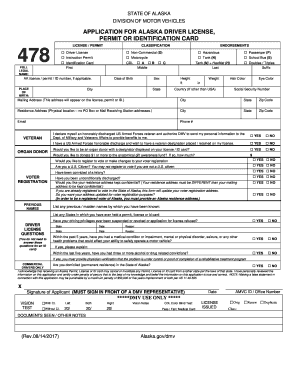
The AK 478 form is essential for applying for an Alaska driver license, permit, or identification card. This guide provides clear instructions to help you complete the form accurately and efficiently.
Follow the steps to complete the AK 478 application online.
- Click 'Get Form' button to obtain the form and open it in the editor.
- Enter your full legal name in the designated fields, ensuring accuracy, as this name will appear on your driver license, permit, or identification card.
- Select the classification that applies to you: either 'Driver License', 'Instruction Permit', or 'Identification Card'.
- Provide your place of birth, including the city, state, and country if it is outside the USA.
- Fill in your date of birth accurately in the designated format.
- Indicate your height and weight using the appropriate measurements, along with your hair color and eye color.
- Input your social security number, mailing address, and residence address clearly. Make sure to provide a physical address for your residence; PO Boxes are not acceptable.
- Answer the optional sections regarding veteran status, organ donation, and voter registration, ensuring to check 'yes' or 'no' for each statement as applicable.
- If you have had any previous names, licenses, or permits, list them in the corresponding fields. Additionally, include any states where you held such documents.
- Respond to the driver license questions about medical conditions or health issues that may impact your driving ability.
- Read and acknowledge the final declaration statement, then sign the application in the designated area electronically.
- After completing all sections, review your information for accuracy before saving your changes. You can then download, print, or share the completed form as needed.
Complete your AK 478 application online today for a seamless experience.
To report issues concerning the Office of Children's Services (OCS) in Alaska, contact the OCS office directly or use the Centralized Intake number at 1-800-478-4444. Share your concerns clearly and include relevant details. Reporting helps improve the services provided to families and children in need. For additional resources, consider visiting the US Legal platform which provides tools that can help navigate these reporting processes effectively.