Get Canada T1213 2019
How it works
-

Open form follow the instructions
-

Easily sign the form with your finger
-

Send filled & signed form or save
How to fill out the Canada T1213 online
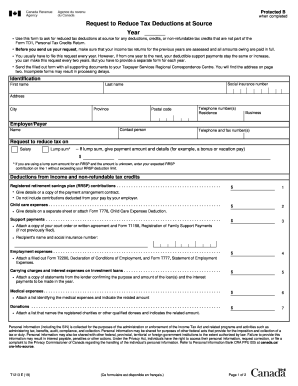
Filling out the Canada T1213 form online is essential for individuals seeking to request a reduction in tax deductions at source. This guide provides clear, step-by-step instructions to help users navigate the form with ease.
Follow the steps to complete the Canada T1213 online accurately.
- Press the ‘Get Form’ button to access the form and open it in your preferred editor.
- Begin by filling out the identification section. Enter your first name, last name, and social insurance number, followed by your complete address, including province, city, and postal code. Ensure your telephone number(s) for both residence and business are included.
- In the employer/payer section, provide the contact person's name and telephone and fax numbers if applicable.
- Indicate your request to reduce tax deductions on your salary or any applicable lump sum payment. If it’s a lump sum, specify the payment amount and any details, such as whether it includes a bonus or vacation pay.
- Proceed to the deductions from income and non-refundable tax credits section. Carefully list each applicable deduction, such as registered retirement savings plan (RRSP) contributions, child care expenses, support payments, and any other relevant deductions. Attach necessary supporting documents where indicated.
- Calculate the total amounts to be deducted from your income. When applicable, subtract any income not subject to tax deductions at source and arrive at the net amount requested for the tax waiver.
- Review your completed form for accuracy and completeness. Ensure that all necessary supporting documents are attached to avoid processing delays.
- Finally, you can save your changes, download the completed form, print it for your records, or share it as required.
Start completing your Canada T1213 form online today for a smoother tax deduction experience.
Get form
To inform your employer of an exemption from withholding, you should fill out the Canada T1213 form to request a reduction in the amount of tax withheld from your paycheck. Submit this completed form to your employer promptly to initiate the change. It's important to follow up with your employer to confirm they have received and processed your request. Being proactive can ensure you start seeing the impacts in your paychecks sooner.