Loading
Form preview
  • US Legal Forms
  • Other Templates
  • More Forms
  • More Multi-State Forms
  • Axis Bank Request For Auto Debit Facility

Get Axis Bank Request For Auto Debit Facility

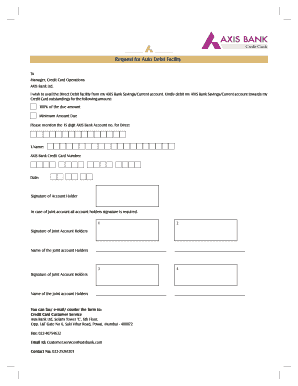
account towards my Credit Card outstandings for the following amount: 100% of the due amount Minimum Amount Due Please mention the 15 digit AXIS Bank Account no. for Direct 1.Name: AXIS Bank Credit Card Number: Date: Signature of Account Holder In case of Joint account all account holders signature is required. 1 2 3 4 Signature of Joint Account Holders Name of the Joint account Holders Signature of Joint Account Holders Name of the Joint account Holders You can fax/ e-mail/ courier.

How it works

  1. Open form

    Open form follow the instructions

  2. Easily sign form

    Easily sign the form with your finger

  3. Share form

    Send filled & signed form or save

How to fill out the Axis Bank Request for Auto Debit Facility online

The Axis Bank Request for Auto Debit Facility is an essential document that allows users to automate their credit card payments. This guide provides a clear, step-by-step approach to help users navigate the process of completing the form online.

Follow the steps to successfully complete the auto debit request form.

  1. Press the ‘Get Form’ button to access the Axis Bank Request for Auto Debit Facility form and open it in your preferred editor.
  2. In the first section, provide your name as the account holder. Ensure that the name matches the records held by Axis Bank.
  3. Enter your AXIS Bank credit card number in the designated field. This is necessary for identifying the account associated with the auto debit request.
  4. Select the payment option by indicating whether you wish to debit 100% of the due amount or the minimum amount due. This choice determines the amount that will be deducted from your savings or current account.
  5. Input your 15-digit AXIS Bank account number to confirm from which account the payments will be deducted.
  6. Date the form by entering the current date to validate the request.
  7. Signature of the account holder is required at the bottom of the form. Ensure that your signature matches the one on file with the bank.
  8. If you hold a joint account, all joint account holders must sign in the designated section to authorize the auto debit request.
  9. Finally, review all the information you have provided for accuracy before saving changes, downloading, printing, or sharing the completed form.

Complete your Axis Bank Request for Auto Debit Facility online today for seamless payment management.

Get form

Experience a faster way to fill out and sign forms on the web. Access the most extensive library of templates available.
Get form

Related content

EX-4.32
The Borrower shall, within three (3) Business Days of demand by a Finance Party, pay to...
Learn more
What Is A Bank Letter
Axis Bank gets letter of caution from RBI Private sector major Axis Bank on Friday said it...
Learn more
Global consumer perspectives on ATM safety
Whether it is a physical attack on the ATM itself in an effort to steal the money...
Learn more

Related links form

Mutual Of Omaha-Designation Of Beneficiary Form.pdf - Pinal County - Pinalcountyaz Pinal County Saguaro Cactus Permit Form AmeriBen Disability Claim Form - Pinal County - Pinalcountyaz Motion And Order To Continue Form/Packet - Pinal County - Pinalcountyaz

Questions & Answers

Get answers to your most pressing questions about US Legal Forms API.

Contact support

Managing your Axis Bank Credit Card autopay is simple and convenient. Log into your Axis Bank online banking account and navigate to the autopay section dedicated to credit cards. From here, you can update payment amounts, adjust the frequency, or change associated accounts to ensure your credit card payments are always made on time.

Setting up auto debit is easy with the Axis Bank Request for Auto Debit Facility. Begin by logging into your account and finding the auto debit options. Choose the services you want, define the payment details, and finish by confirming the setup, ensuring that all your regular payments will happen seamlessly.

To set up auto debit in Axis Bank, first log into your online banking dashboard. From there, access the auto debit or bill payments section, which allows you to add various billers for automatic payments. After selecting your billers, determine the amount and frequency, and submit your request to initiate the Axis Bank Request for Auto Debit Facility.

Setting up automatic debit payments through the Axis Bank Request for Auto Debit Facility involves a few simple steps. Log into your Axis Bank account, choose the option for automatic payments, and review the list of available billers. Select which bills you wish to automate, fill out the required details for each, and confirm your selections to complete the setup.

To enable auto-debit on your debit card with Axis Bank, you can start by logging into your online banking account. Once there, navigate to the auto debit section and select the option to link your debit card for payments. Enter the necessary details such as payment amounts and frequency, and confirm the setup to fully enable the facility.

Yes, setting up autopay using the Axis Bank Request for Auto Debit Facility is often a smart choice for managing your finances. It ensures that your payments are always on time, preventing late fees and penalties. Additionally, it helps you maintain a clear budget, as you will know exactly when your payments are due and how much will be deducted.

To activate your auto debit facility with Axis Bank, you need to first register for this service through your online banking portal. After logging in, locate the auto debit feature, select your preferred billers, and set the payment amount along with the frequency. Confirm the setup, and your auto debit facility will be activated, ensuring timely payments.

Setting up autopay with the Axis Bank Request for Auto Debit Facility is a straightforward process. First, log in to your personal banking account online. Then, navigate to the auto debit section, choose the billers you want to set payments for, and specify the payment amount and frequency. Once you submit the request, you'll receive a confirmation.

Activating your auto-debit facility with Axis Bank is a simple process. Start by logging into your bank account and looking for the section dedicated to recurring payments. There, you can create an Axis Bank Request for Auto Debit Facility by filling out the relevant information. After submission, you will receive confirmation of your auto-debit facility activation, allowing your payments to be managed automatically.

An auto-debit request is a directive you provide to your bank to automatically withdraw a specific amount from your account at regular intervals. This request is essential for using the Axis Bank Request for Auto Debit Facility. It simplifies your billing process, ensuring timely payments without the need for manual intervention. By setting this up, you can enjoy peace of mind knowing your payments are always made on time.

Get This Form Now!

Use professional pre-built templates to fill in and sign documents online faster. Get access to thousands of forms.
Get form
If you believe that this page should be taken down, please follow our DMCA take down processhere.
Get Axis Bank Request for Auto Debit Facility
Get form
  • Adoption
  • Bankruptcy
  • Contractors
  • Divorce
  • Home Sales
  • Employment
  • Identity Theft
  • Incorporation
  • Landlord Tenant
  • Living Trust
  • Name Change
  • Personal Planning
  • Small Business
  • Wills & Estates
  • Packages A-Z
  • Affidavits
  • Bankruptcy
  • Bill of Sale
  • Corporate - LLC
  • Divorce
  • Employment
  • Identity Theft
  • Internet Technology
  • Landlord Tenant
  • Living Wills
  • Name Change
  • Power of Attorney
  • Real Estate
  • Small Estates
  • Wills
  • All Forms
  • Forms A-Z
  • Other Templates
  • Legal Hub
  • About Us
  • Help Portal
  • Legal Resources
  • Blog
  • Affiliates
  • Contact Us
  • Delete My Account
  • Site Map
  • Industries
  • Forms in Spanish
  • Localized Forms
  • State-specific Forms
  • Forms Kit
  • Real Estate Handbook
  • All Guides
  • Notarize
  • Incorporation services
  • For Consumers
  • For Small Business
  • For Attorneys
  • USLegal
  • FormsPass
  • pdfFiller
  • signNow
  • altaFlow
  • DocHub
  • Instapage
Form Packages
  • Adoption
  • Bankruptcy
  • Contractors
  • Divorce
  • Home Sales
  • Employment
  • Identity Theft
  • Incorporation
  • Landlord Tenant
  • Living Trust
  • Name Change
  • Personal Planning
  • Small Business
  • Wills & Estates
  • Packages A-Z
Form Categories
  • Affidavits
  • Bankruptcy
  • Bill of Sale
  • Corporate - LLC
  • Divorce
  • Employment
  • Identity Theft
  • Internet Technology
  • Landlord Tenant
  • Living Wills
  • Name Change
  • Power of Attorney
  • Real Estate
  • Small Estates
  • Wills
  • All Forms
  • Forms A-Z
  • Other Templates
Customer Service
  • Legal Hub
  • About Us
  • Help Portal
  • Legal Resources
  • Blog
  • Affiliates
  • Contact Us
  • Delete My Account
  • Site Map
  • Industries
  • Forms in Spanish
  • Localized Forms
  • State-specific Forms
  • Forms Kit
Legal Guides
  • Real Estate Handbook
  • All Guides
Prepared for you
  • Notarize
  • Incorporation services
Our Customers
  • For Consumers
  • For Small Business
  • For Attorneys
Our Sites
  • USLegal
  • FormsPass
  • pdfFiller
  • signNow
  • altaFlow
  • DocHub
  • Instapage
Social Media
Call us now toll free:
+1 833 426 79 33
As seen in:
© Copyright 1999-2026 airSlate Legal Forms, Inc. 17 Station Street, Suite 303, Brookline, MA 02445
  • Your Privacy Choices
  • Terms of Service
  • Privacy Notice
  • Content Takedown Policy
  • Bug Bounty Program