Get Ok Norman Public Schools Student Health History 2015
How it works
-

Open form follow the instructions
-

Easily sign the form with your finger
-

Send filled & signed form or save
How to fill out the OK Norman Public Schools Student Health History online
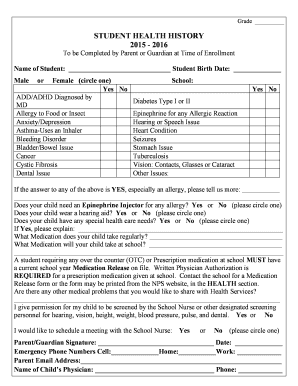
Filling out the OK Norman Public Schools Student Health History form online is a crucial step in ensuring your child's health needs are met within the school environment. This guide will provide you with a detailed, step-by-step approach to successfully complete the form.
Follow the steps to complete the Student Health History form online.
- Press the 'Get Form' button to access the Student Health History document and open it for editing.
- Begin by filling in the student's name and birth date accurately. Ensure that this information matches official documents to prevent any discrepancies.
- Indicate the student's gender by circling either 'Male' or 'Female'.
- In the section provided, detail any medical conditions or concerns by checking 'Yes' or 'No' for each listed item, including ADD/ADHD, diabetes, allergies, and any mental health issues.
- If you answered 'Yes' to any medical issue, provide additional information in the space given, especially regarding allergies, as this is critical for school health services.
- Specify if the student requires an Epinephrine Injector, wears a hearing aid, or has any special healthcare needs; again, provide further explanation if applicable.
- List all medications your child takes regularly, as well as any medications they may need to take during school hours.
- Be aware that a Medication Release form is necessary for any medications taken at school, including over-the-counter drugs. Make sure to have written physician authorization for prescription medications ready.
- Indicate any other medical problems that you wish to disclose to the Health Services team.
- Grant permission for the school nurse to perform screenings by checking 'Yes' or 'No'.
- Indicate whether you would like to schedule a meeting with the School Nurse by circling 'Yes' or 'No.'
- Provide your signature and the date, ensuring that both match your current details.
- Fill in emergency contact numbers, including your cell, home, and work phone, as well as your email address for communication.
- Lastly, provide the name and phone number of your child’s physician, ensuring accuracy.
- Once all sections are complete, save your changes, and consider downloading or printing the form for your records. You can also share the completed form as needed.
Start filling out the Student Health History form online today to ensure your child's health needs are properly documented.
Get form
The largest elementary school in Oklahoma is often recognized based on student enrollment figures, which can fluctuate annually. Generally, schools in larger districts like Norman Public Schools may house significant student populations. Understanding the scale of these institutions may influence your choice of school and require proper documentation, such as the OK Norman Public Schools Student Health History, to enhance the education experience.
Get This Form Now!
Industry-leading security and compliance
-
In businnes since 199725+ years providing professional legal documents.
-
Accredited businessGuarantees that a business meets BBB accreditation standards in the US and Canada.
-
Secured by BraintreeValidated Level 1 PCI DSS compliant payment gateway that accepts most major credit and debit card brands from across the globe.