Get Ut Jordan School District Student Release From School Request 2018-2026
How it works
-

Open form follow the instructions
-

Easily sign the form with your finger
-

Send filled & signed form or save
How to fill out the UT Jordan School District Student Release from School Request online
Filling out the UT Jordan School District Student Release from School Request online is a straightforward process that requires careful attention to detail. This guide will walk you through each section of the form, ensuring that you provide all necessary information accurately.
Follow the steps to complete your student release request.
- Press the ‘Get Form’ button to access the Student Release from School Request form and open it for editing.
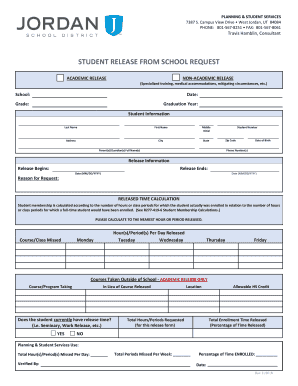
- In the 'Student Information' section, fill in the student's last name, first name, middle initial, address, city, state, zip code, student number, date of birth, and phone number(s). Make sure all details are accurate to ensure proper identification.
- In the 'Parent(s)/Guardian(s) Full Name(s)' field, enter the full names of the parent or guardian responsible for the student. This is essential for communication purposes.
- Next, provide the 'Release Information.' Specify the dates for when the release begins and ends, along with the reason for the request. Ensure you use the correct format for the date (MM/DD/YYYY).
- In the 'Released Time Calculation' section, indicate the course/class missed and the corresponding hour(s)/period(s) per day released for each weekday. Calculate accurately to the nearest hour or period released.
- If applicable, fill out details in the 'Courses Taken Outside of School' section. Indicate the course/program the student is taking and the course released for. Additionally, confirm if the student currently has release time.
- Complete the 'Total Hours/Periods Requested' and 'Allowable HS Credit' sections if relevant, as well as the total enrollment time released percentage.
- Once all sections are completed and verified, ensure the form is signed by the parent/guardian, student, elementary teacher/secondary counselor, principal, administrator of schools, and the consultant from Planning and Student Services.
- After obtaining all necessary signatures, submit the completed form as instructed by your school to ensure proper processing.
- Finally, you may save changes to the document, download it for your records, or print it out for submission.
Complete your Student Release from School Request online today to ensure your child receives the necessary support for their educational needs.
Related links form
A release form for school is a document that formalizes a student's transfer from one district to another. This form is crucial for maintaining official records and ensuring proper communication between the schools. Completing the UT Jordan School District Student Release from School Request allows your child to transition smoothly to their new educational institution.