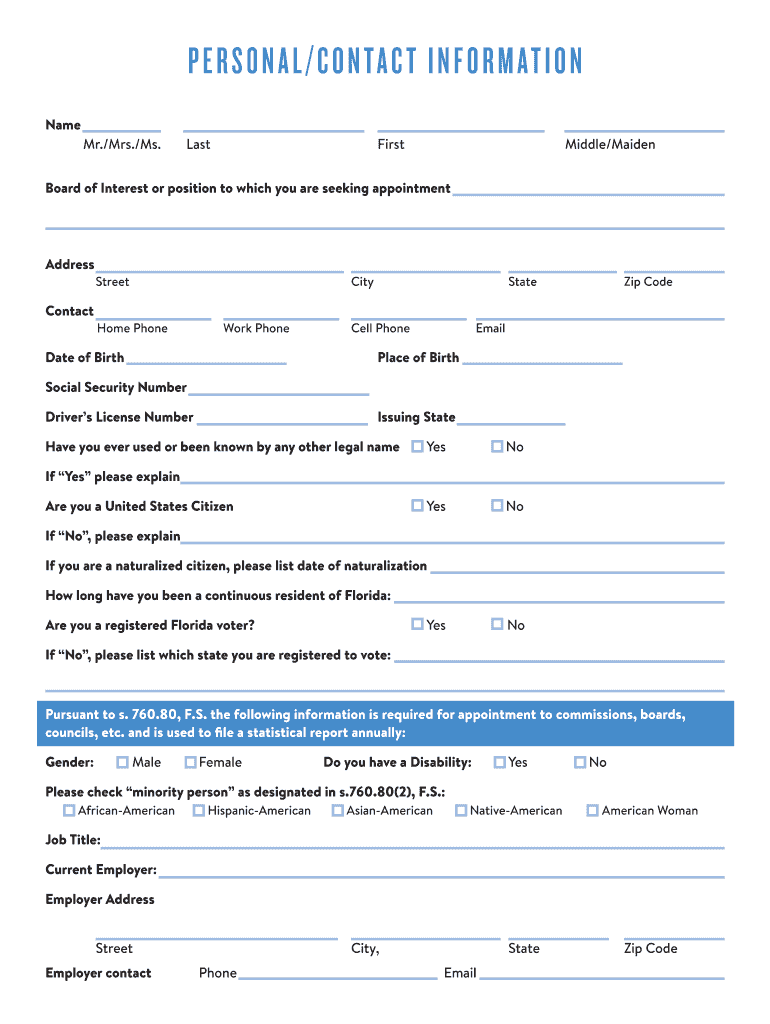
PERSONAL/CONTACT INFORMATION NameMr./Mrs./Ms. LastFirstMiddle/MaidenBoard of Interest or position to which you are seeking appointmentAddressContactStreetCityHome PhoneWork PhoneDate of BirthStateCell.
Loading

Open form follow the instructions

Easily sign the form with your finger

Send filled & signed form or save
How to fill out the FL CFO Personal/Contact Information online
Filling out the FL CFO Personal/Contact Information form may seem overwhelming, but this guide will help you navigate each section with ease. By following these steps, you can ensure that your personal and contact details are submitted accurately and efficiently.
Follow the steps to complete the form correctly.
- Click the ‘Get Form’ button to access the form and open it in the editing interface.
- Begin with entering your name. Fill in your last name, first name, and middle or maiden name in the respective fields.
- Select the board of interest or position you are seeking. Provide the name of the position in the designated field.
- Fill in your address. Include your street address, city, state, and zip code.
- Provide your contact details. Input your home phone, work phone, cell phone, and email address in the appropriate sections.
- Complete the demographic section by providing your date of birth, place of birth, social security number, and driver's license number along with the issuing state.
- Indicate whether you have used or been known by any other legal name. If 'Yes', provide an explanation in the space provided.
- Respond to the citizenship question. If you are a naturalized citizen, include the date of naturalization. State your duration as a continuous resident of Florida.
- Indicate whether you are a registered voter in Florida. If 'No', mention the state where you are registered to vote.
- Fill in the gender section and check if you have a disability, using the options provided.
- Provide your job title, current employer, and their address. Ensure you fill out the employer's contact information as well.
- For the section regarding your former supervisor over the last five years, include the supervisor's name, job title, and your former job title.
- In the education section, list educational institutions attended along with the dates, certificates, and degrees received.
- Answer the questionnaire regarding military service, arrests, and ethical violations. Provide details where applicable.
- List three non-relative references and provide their names, employers, mailing addresses, phone numbers, and emails.
- If applicable, indicate if you believe any identifying information should be exempt from public record laws. Provide the relevant Florida Statute if needed.
- Check the consent box for a background check, acknowledging your consent for a review.
- Finally, review all your entries for accuracy before saving. You can choose to download, print, or share the form as needed.
Complete your FL CFO Personal/Contact Information form online today for a streamlined application process.
Experience a faster way to fill out and sign forms on the web. Access the most extensive library of templates available.
Related content
Feb 1, 2025 — Note: This publication was compiled from information received by the...
Contact Us: Finance Hub. Page Contents. Popular Topics. 2025-26 Academic Year Tuition and...
This transmittal introduces Chapter 40, Hospital and Hospital Health Care Complex Cost...
Get answers to your most pressing questions about US Legal Forms API.
How do I contact Florida Dice?
To reach Florida Dice, you can call their customer service line at 800-830-0732. They offer support for job seekers and employers within the state. For quick access to FL CFO personal/contact information and additional services, you can also visit their website where you will find various resources to assist you.
How do I contact the Florida Division of Real Estate?
To contact the Florida Division of Real Estate, dial 850-487-1395. This division assists with real estate licensing, regulation, and education in the state. For more detailed assistance and FL CFO personal/contact information, visiting their official website can provide helpful resources and guidance.
How do I contact the Florida driver's license customer service?
You can contact the Florida driver's license customer service by calling 850-617-2000. The customer service team can help you with license renewals, replacements, and other driver-related inquiries. For a more comprehensive solution and FL CFO personal/contact information, consider visiting your local DMV or their website.
What is the financial responsibility agency in Florida?
In Florida, the financial responsibility agency is the Department of Highway Safety and Motor Vehicles (DHSMV). This agency ensures drivers have the required insurance coverage and complies with state laws. You can find more information on financial responsibility requirements and access FL CFO personal/contact information through their official website.
How do I contact the Florida DOI?
You can contact the Florida Department of Insurance (DOI) by calling their main hotline at 850-413-3140. The DOI is dedicated to helping residents with their insurance-related questions and concerns. For more assistance and FL CFO personal/contact information, you might explore their official website to find specific resources and support.
How do I call dice customer service?
To reach the Dice customer service team, you can dial their dedicated support line at 800-234-1322. Their representatives are available to assist you with any inquiries regarding job postings or other services. Additionally, you can access their online help center for quick answers and FL CFO personal/contact information to expedite your request.
Who is Florida's current CFO?
As of now, the current Chief Financial Officer (CFO) of Florida is Jimmy Patronis. His role involves overseeing the state's finances and helping ensure responsible fiscal management. For additional details about his office and initiatives, you can visit the official Florida CFO website, where you will find comprehensive FL CFO personal/contact information.
Who can serve the process in Florida?
In Florida, several individuals can serve legal processes, including licensed process servers, law enforcement officers, or any person who is at least 18 years old and not involved in the case. It’s important to ensure that the person serving the process follows the legal requirements laid out in Florida law. For more details on this procedure, check the FL CFO personal/contact information via the Department of Financial Services.
Can you subpoena insurance records?
Yes, you can subpoena insurance records under specific conditions in Florida. Typically, the subpoena must comply with Florida Statutes, and it's essential to have a legal basis for obtaining these records. If you're unsure how to navigate this process, services like USLegalForms can assist in creating and managing subpoenas effectively.
How to serve subpoena on insurance company in Florida?
Serving a subpoena on an insurance company in Florida generally requires you to prepare the subpoena and identify the registered agent for service of process. You can deliver the subpoena in person or via certified mail, ensuring that all legal requirements are met. If you need more guidance, consider using resources such as USLegalForms, which simplify the legal process.
Use professional pre-built templates to fill in and sign documents online faster. Get access to thousands of forms.
If you believe that this page should be taken down, please follow our DMCA take down process here.