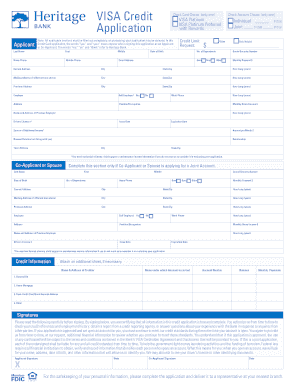
VISA Credit Application ApplicantCheck Card Choice: (only one)o VISA Platinum o VISA Platinum Preferred with RewardsNote: All applicable sections must be filled out completely, or processing your.
Open form follow the instructions
Easily sign the form with your finger
Send filled & signed form or save
How to fill out the Heritage Bank Visa Credit Application online
Filling out the Heritage Bank Visa Credit Application online is an important step towards obtaining a credit card. This guide provides clear and concise instructions to help you complete the application accurately and efficiently.
Follow the steps to successfully complete your credit application.
- Click ‘Get Form’ button to obtain the document and open it in your preferred editor.
- Begin with the 'Applicant' section. Enter your last name, first name, and middle name. Provide your home and mobile phone numbers, date of birth, email address, and requested credit limit.
- Indicate your card choice by selecting either 'VISA Platinum' or 'VISA Platinum Preferred with Rewards.' Also, select your account choice as individual or joint and indicate if this is a new application or an increase.
- Continue filling out your current address, city, state, and ZIP code, including how long you have lived there. If applicable, provide your mailing address and any previous addresses.
- Provide employment information including your employer's name and address, position, and how long you have been employed there. If self-employed, indicate that as well. Also, include your work phone number.
- Enter your monthly gross income and details about your previous employer if relevant. Provide your Social Security number and driver's license details, including issue and expiration dates.
- Complete the 'Credit Information' section by entering the name and address of your creditors, the account number, balance, and monthly payments for any existing debts such as auto loans, mortgages, or credit cards.
- If applicable, fill out the 'Co-Applicant or Spouse' section with similar details as provided for the primary applicant.
- Read and understand the signatures section carefully. Sign and date the application to certify the accuracy of the information provided.
- Finally, save your changes, and choose to download, print, or share the completed form. Ensure all entered information is correct before submission.
Complete your Heritage Bank Visa Credit Application online today for a seamless experience.
Experience a faster way to fill out and sign forms on the web. Access the most extensive library of templates available.
Related content
How Long Will the Penalty APR Apply?: This Penalty APR will apply until you make six...
$20 Balance fee will be imposed if the ledger balance in the account falls below $5000 or...
Although micro credit continues to receive mixed reviews, it is here to stay with...
Get answers to your most pressing questions about US Legal Forms API.
How do you fill out for a credit card?
Filling out a credit card application, particularly the Heritage Bank Visa Credit Application, involves providing your personal and financial information. Make sure to enter your income, employment details, and any existing debts. Follow the prompts on the website, and you will submit your application with ease.
How do I access my Visa credit card online?
To access your Visa credit card online, you will first need to visit the Heritage Bank online banking portal. Log in with your credentials, and you will find options to manage your credit card. You can view transaction history, make payments, and more.
How to fill out credit authorization form?
Filling out a credit authorization form requires you to provide personal information such as your name, address, and Social Security number. Then, include details about your income and employment status. The Heritage Bank Visa Credit Application makes this process straightforward and user-friendly.
How do I log into my Visa credit card account?
To log into your Visa credit card account, visit the Heritage Bank website. Enter your user ID and password in the designated fields. If you are a new user, you may need to register first before accessing your account.
Can I view my Visa card online?
Absolutely, you can view your Visa card details online by logging into your Heritage Bank account. In your account dashboard, find the section dedicated to card management. This feature allows you to see transaction history, balance, and other important information.
Can I access my Visa account online?
Yes, you can easily access your Visa account online through the Heritage Bank website. Simply log in using your registered user ID and password. After logging in, you can manage your account, view statements, and track your spending.
What are the steps of a credit card application?
The steps of a credit card application for the Heritage Bank Visa begin with gathering your personal and financial information. Next, visit the online application portal and fill out the required fields. Once you submit your application, you will receive a notification regarding its status.
How can I access my Visa card online?
You can easily access your Visa card online by visiting the Heritage Bank website. Just log in with your user credentials, and navigate to the card management section. From there, you can view your card details, recent transactions, and more.
How do I file for a credit card?
Filing for a credit card involves completing the Heritage Bank Visa Credit Application. Begin by providing accurate personal information and financial details. After submitting the application, await the bank’s response regarding approval. Ensure you're ready for any follow-up questions they may have.
Is it better to apply online or in person for a credit card?
Applying online for a credit card often proves more convenient. You can instantly access the Heritage Bank Visa Credit Application from your device at any time. While in-person applications can provide direct assistance, online applications typically offer faster processing and feedback.
Use professional pre-built templates to fill in and sign documents online faster. Get access to thousands of forms.
If you believe that this page should be taken down, please follow our DMCA take down process here.