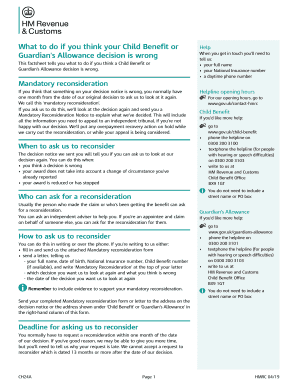
What to do if you think your Child Benefit or Guardians Allowance decision is wrong This factsheet tells you what to do if you think a Child Benefit orGuardians Allowance decision is wrong.Help When.
Open form follow the instructions
Easily sign the form with your finger
Send filled & signed form or save
How to fill out the UK HMRC CH24A online
Filling out the UK HMRC CH24A form can seem daunting, but this guide will support you through each step, ensuring you provide the necessary information accurately. Whether you seek reconsideration for Child Benefit or Guardian’s Allowance, we provide straightforward instructions to navigate this process effectively.
Follow the steps to complete the UK HMRC CH24A form online.
- Click ‘Get Form’ button to obtain the form and open it in the editor.
- Provide your full name in the designated field, ensuring you use your legal name as it appears on official documents.
- Enter your National Insurance number in the appropriate section to help the HMRC identify your records accurately.
- Fill in your daytime phone number, including the area code, to ensure HMRC can reach you if further information is needed.
- Specify the date of the decision you want HMRC to reconsider, as indicated on your original decision notice.
- In the section titled 'Which benefit is your reconsideration about?', select 'Child Benefit' or 'Guardian’s Allowance' by marking the appropriate box.
- Explain why you believe the decision is wrong in the space provided. Include specific details and any evidence to support your claim.
- Review your completed form for accuracy and completeness, ensuring all necessary fields are filled out.
- Sign the form at the bottom, confirming that all supplied information is true and correct.
- Submit your completed CH24A form by mailing it to the address specified on your decision notice or any relevant address provided in the instructions.
Complete your documents online to ensure timely processing and resolution of your issues.
Experience a faster way to fill out and sign forms on the web. Access the most extensive library of templates available.
Related content
Get answers to your most pressing questions about US Legal Forms API.
Does Child Benefit stop at 18 in the UK?
In the UK, Child Benefit typically continues until a child turns 16, or until they reach 20 if they are in approved education. However, you must provide evidence to HMRC confirming their ongoing eligibility. Understanding the finer details, like those outlined in the UK HMRC CH24A, ensures you remain informed about your benefit status as a child approaches adulthood.
Can international students claim Child Benefit in the UK?
International students may be eligible to claim Child Benefit in the UK, but this depends on their residency status and hours worked in the UK. It's essential to check the specific criteria set by HMRC to determine eligibility. If you are uncertain, using the UK HMRC CH24A guidelines can clarify how international students might fit into the Child Benefit scheme.
Does Child Benefit stop when a child goes to university in the UK?
Child Benefit does not automatically stop when a child starts university in the UK. If your child is under 20 and still in full-time education, you can continue receiving Child Benefit. However, you will need to confirm this status with HMRC as per the guidance available in the UK HMRC CH24A. Always check for updates or changes to rules that may affect your benefits.
Who is eligible for Child Benefit in the UK?
Eligibility for Child Benefit in the UK generally includes parents or guardians responsible for children under the age of 16, or under 20 if they are in approved education or training. It is important to know that your income may affect how much you can receive if it exceeds a certain threshold. Understanding the specifics of the eligibility requirements can help you navigate the application process effectively, especially when dealing with the UK HMRC CH24A.
How do I inform HMRC about leaving the UK?
To inform HMRC about leaving the UK, you need to complete the appropriate form, which is usually the P85 form. This form can help you declare your departure and ensure that you settle any tax obligations. By submitting this information, you can also address any Child Benefit claims under the UK HMRC CH24A. Ensure you send the form before you leave, as this will help you keep your tax affairs in order.
What is HMRC in UK payroll?
HMRC oversees the collection of taxes and National Insurance in the UK payroll system. They ensure that employers are deducting the correct amounts from employee wages and handling contributions appropriately. Understanding your obligations related to the UK HMRC CH24A offers clarity on paycheck processes.
Who can claim Child Benefit in the UK?
In the UK, Child Benefit can be claimed by individuals responsible for a child, such as parents or guardians. The eligibility may depend on residency status and income levels. If you are considering your entitlement while using the UK HMRC CH24A form, ensure you provide accurate details to maximize your benefits.
Who do I need to notify when I leave the UK?
When you leave the UK, you should notify HMRC, your employer, and other relevant financial institutions. Each of these parties needs to be aware of your departure for tax purposes. Utilizing the UK HMRC CH24A can ensure that HMRC receives timely updates on your status.
How do I tell HMRC I left the UK?
To notify HMRC that you have left the UK, you can fill out the appropriate forms online or via post. This includes providing your forwarding address and tax details. Using the UK HMRC CH24A form aids in ensuring all information is accurately reported.
What do I need to do if I am leaving the UK?
If you are leaving the UK, it is essential to notify HMRC of your departure. This ensures your tax affairs are properly managed upon leaving. Completing the UK HMRC CH24A form can simplify this task, as it provides detailed information on your status.
Use professional pre-built templates to fill in and sign documents online faster. Get access to thousands of forms.
If you believe that this page should be taken down, please follow our DMCA take down process here.