Loading
Form preview
  • US Legal Forms
  • Other Templates
  • Foreign Forms
  • Foreign Philippines Other Forms
  • Ph Sss Bpn-103 2000

Get Ph Sss Bpn-103 2000

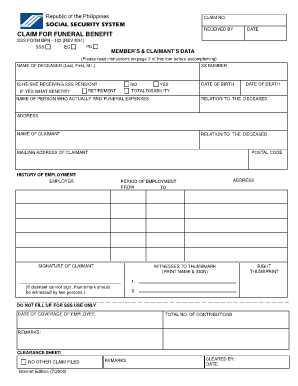
Ctions on page 2 of this fom before accomplishing) NAME OF DECEASED (Last, First, M.I.) SS NUMBER IS HE/SHE RECEIVING SSS PENSION? RETIREMENT IF YES WHAT BENEFIT? NO YES TOTAL DISABILITY NAME OF PERSON WHO ACTUALLY PAID FUNERAL EXPENSES DATE OF BIRTH DATE OF DEATH RELATION TO THE DECEASED ADDRESS NAME OF CLAIMANT RELATION TO THE DECEASED MAILING ADDRESS OF CLAIMANT POSTAL CODE HISTORY OF EMPLOYMENT: EMPLOYER ADDRESS PERIOD OF EMPLOYMENT FROM TO SIGNATURE OF CLAIMANT WITNESSES TO.

How it works

  1. Open form

    Open form follow the instructions

  2. Easily sign form

    Easily sign the form with your finger

  3. Share form

    Send filled & signed form or save

How to fill out the PH SSS BPN-103 online

Filling out the PH SSS BPN-103 form is an essential step for those seeking funeral benefits from the Social Security System in the Philippines. This guide provides clear, step-by-step instructions to help you complete the form accurately and efficiently.

Follow the steps to complete the PH SSS BPN-103 form online.

  1. Press the ‘Get Form’ button to obtain the PH SSS BPN-103 and open it in the editor.
  2. Begin by entering the name of the deceased using their last name, first name, and middle initial in the designated field.
  3. Fill in the Social Security Number of the deceased.
  4. Indicate whether the deceased is receiving an SSS pension by selecting 'Yes' or 'No'. If 'Yes', specify the type of benefit: retirement or total disability.
  5. Provide the name of the person who actually paid for the funeral expenses along with their date of birth.
  6. Enter the date of death of the deceased.
  7. State the relationship of the person who paid for the funeral expenses to the deceased.
  8. Complete the address field for the person who paid the funeral expenses.
  9. Enter your name as the claimant along with your relationship to the deceased.
  10. Fill in your mailing address and postal code.
  11. Provide details of the deceased's employment history, including the name of the employer, address, and period of employment.
  12. Sign the form as the claimant.
  13. If you cannot sign, ensure that two witnesses sign next to your thumbmark.
  14. Once all relevant fields are filled in, save your changes. You can then download, print, or share the completed form as needed.

Complete your PH SSS BPN-103 form online today and ensure you have all necessary documentation ready for submission.

Get form

Experience a faster way to fill out and sign forms on the web. Access the most extensive library of templates available.

Related content

VDOT's Road and Bridge Specifications Revsions...
The specifications were revised on 8-7-08, but are subject to change on short notice. More...
Learn more
Application of Optimization Techniques to the...
by JE Smith · 1999 · Cited by 18 — The global optimization technique of parallel...
Learn more
Xerox Universal Time-Sharing System (UTS)
Jobs. 8. User. 9. User Number. 9. User ID. 9. Job Step. 9. Virtual Memory ______ 10. JITs...
Learn more

Related links form

GE FlowCast - Clinical Enterprise Technologies - University Of Miami - Cet Med Miami Immunization_Acknowledgement_Form - University Of Miami - Umshare Miami Onlinecloudscom Toll Number Form Authorization For 3rd Party Disclosure - Short Form - Med Miami

Questions & Answers

Get answers to your most pressing questions about US Legal Forms API.

Contact support

Generally, you have up to two years to file for SSS burial benefits after the death of the member, as per the guidelines on the PH SSS BPN-103 platform. It’s essential to submit your claim as soon as possible to avoid missing out on your entitlements. Ensure all documentation is ready to expedite your claim process. The sooner you apply, the quicker you can receive assistance during this time.

Yes, applying for Social Security death benefits online is possible through the PH SSS BPN-103 site. Once you log in, navigate to the death benefits section and complete the necessary forms. Be prepared with required documents, as these will support your application. This efficient system simplifies the process, allowing for timely applications.

You can report a death to Social Security online using the PH SSS BPN-103 platform. This enables you to submit the necessary information without having to visit an office. When filling out the form, ensure that you include all required details for a smooth reporting process. This online option is convenient and saves you time.

To file for SSS benefits, start by visiting the PH SSS BPN-103 website. You will need to set up an account if you don't have one already. Once logged in, you can choose the specific benefit you wish to claim and fill out the required forms online. Make sure to follow the prompts and provide all necessary documents for a successful filing.

Yes, you can file a death claim with the SSS online through the PH SSS BPN-103 portal. Simply log in to your account and locate the death claim application form. Make sure to have all relevant documents handy, as you will need them to complete your submission. This method allows you to file claims easily from the comfort of your home.

To file for the SSS funeral benefit online, you need to access the PH SSS BPN-103 platform. Register or log in to your account, then navigate to the benefit claims section. Fill out the required forms accurately and submit them digitally. You may need to upload necessary documents, so keep them ready for a smoother process.

You typically have 12 months from the time of death to claim death benefits in SSS. It is crucial to start the process as soon as possible to ensure you do not miss out on entitled benefits. Utilizing the PH SSS BPN-103 platform can help you manage your claim effectively and within the required timeframe.

To claim burial benefits in SSS, you should first gather all required documents such as the death certificate and proof of relationship. Then, visit the PH SSS BPN-103 platform to complete your application, allowing you to submit everything electronically. This method not only saves time but also helps ensure that you do not miss any necessary paperwork.

The SSS pension amount for a surviving spouse, as per the PH SSS BPN-103 guidelines, is determined by the deceased member's contributions and overall pension benefits. This amount is designed to support the surviving spouse by providing a steady income. The specific figure can vary based on individual circumstances, and understanding this can help manage financial expectations. Uslegalforms can guide you in assembling the correct information to successfully claim what you’re entitled to.

To qualify for a SSS death claim under PH SSS BPN-103, certain conditions must be met, including having a valid relationship with the deceased member, such as being a spouse, child, or dependent party. The member must have also made sufficient contributions to SSS to qualify for benefits. Ensuring all eligibility requirements are understood is vital in the claims process. For assistance with the necessary documentation and procedures, uslegalforms offers comprehensive resources.

Get This Form Now!

Use professional pre-built templates to fill in and sign documents online faster. Get access to thousands of forms.
If you believe that this page should be taken down, please follow our DMCA take down processhere.
Get PH SSS BPN-103
  • Adoption
  • Bankruptcy
  • Contractors
  • Divorce
  • Home Sales
  • Employment
  • Identity Theft
  • Incorporation
  • Landlord Tenant
  • Living Trust
  • Name Change
  • Personal Planning
  • Small Business
  • Wills & Estates
  • Packages A-Z
  • Affidavits
  • Bankruptcy
  • Bill of Sale
  • Corporate - LLC
  • Divorce
  • Employment
  • Identity Theft
  • Internet Technology
  • Landlord Tenant
  • Living Wills
  • Name Change
  • Power of Attorney
  • Real Estate
  • Small Estates
  • Wills
  • All Forms
  • Forms A-Z
  • Other Templates
  • Legal Hub
  • About Us
  • Help Portal
  • Legal Resources
  • Blog
  • Affiliates
  • Contact Us
  • Delete My Account
  • Site Map
  • Industries
  • Forms in Spanish
  • Localized Forms
  • State-specific Forms
  • Forms Kit
  • Real Estate Handbook
  • All Guides
  • Notarize
  • Incorporation services
  • For Consumers
  • For Small Business
  • For Attorneys
  • USLegal
  • FormsPass
  • pdfFiller
  • signNow
  • altaFlow
  • DocHub
  • Instapage
Form Packages
  • Adoption
  • Bankruptcy
  • Contractors
  • Divorce
  • Home Sales
  • Employment
  • Identity Theft
  • Incorporation
  • Landlord Tenant
  • Living Trust
  • Name Change
  • Personal Planning
  • Small Business
  • Wills & Estates
  • Packages A-Z
Form Categories
  • Affidavits
  • Bankruptcy
  • Bill of Sale
  • Corporate - LLC
  • Divorce
  • Employment
  • Identity Theft
  • Internet Technology
  • Landlord Tenant
  • Living Wills
  • Name Change
  • Power of Attorney
  • Real Estate
  • Small Estates
  • Wills
  • All Forms
  • Forms A-Z
  • Other Templates
Customer Service
  • Legal Hub
  • About Us
  • Help Portal
  • Legal Resources
  • Blog
  • Affiliates
  • Contact Us
  • Delete My Account
  • Site Map
  • Industries
  • Forms in Spanish
  • Localized Forms
  • State-specific Forms
  • Forms Kit
Legal Guides
  • Real Estate Handbook
  • All Guides
Prepared for you
  • Notarize
  • Incorporation services
Our Customers
  • For Consumers
  • For Small Business
  • For Attorneys
Our Sites
  • USLegal
  • FormsPass
  • pdfFiller
  • signNow
  • altaFlow
  • DocHub
  • Instapage
Social Media
Call us now toll free:
+1 833 426 79 33
As seen in:
© Copyright 1999-2026 airSlate Legal Forms, Inc. 17 Station Street, Suite 303, Brookline, MA 02445
  • Your Privacy Choices
  • Terms of Service
  • Privacy Notice
  • Content Takedown Policy
  • Bug Bounty Program
PH SSS BPN-103
This form is available in several versions.
Select the version you need from the drop-down list below.
2008 PH SSS BPN-103
Select form
  • 2008 PH SSS BPN-103
  • 2000 PH SSS BPN-103
Select form