Loading
Form preview
  • US Legal Forms
  • Other Templates
  • Foreign Forms
  • Foreign India Other Forms
  • India Nsdl Annexure S6

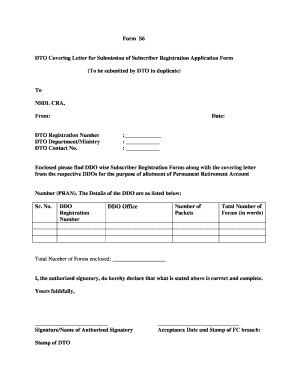
Get India Nsdl Annexure S6

DO wise along with the respective DDO covering letter in the same order as mentioned above. 4. The Provisional Receipt Number will be issued DDO wise. 5. Please quote the correct DTO Reg. No. allotted by CRA.. The forms are liable to be rejected if incorrect DTO Reg. No. is mentioned. -------------------------------------------------------------------------------------------------------------- .

How it works

  1. Open form

    Open form follow the instructions

  2. Easily sign form

    Easily sign the form with your finger

  3. Share form

    Send filled & signed form or save

How to fill out the India NSDL Annexure S6 online

The India NSDL Annexure S6 is a crucial document for submitting subscriber registration applications to the National Securities Depository Limited. This guide provides a detailed walkthrough on how to complete the form accurately and efficiently online, ensuring all required fields are filled out correctly.

Follow the steps to complete your form accurately online.

  1. Click the ‘Get Form’ button to obtain the Annexure S6 form and open it in your preferred editor.
  2. Fill in the detailed recipient information, including the name and address of the NSDL CRA.
  3. Enter the date you are submitting the form. This should be the current date.
  4. Provide your DTO registration number in the designated field to ensure proper identification.
  5. List the DTO department or ministry name accurately, as required.
  6. Include your DTO contact number to facilitate any follow-up communication.
  7. Specify the details of each DDO, including their registration number and the number of packets being submitted.
  8. Count the total number of forms being sent and write both the numeric and word versions in the respective fields.
  9. The authorized signatory must declare the information provided above is correct by signing and providing their name.
  10. Affix the official stamp of the DTO for validation.
  11. Ensure the acceptance date and stamp from the FC branch is captured appropriately.
  12. Review all entries for accuracy, then save changes, download, print, or share the form as needed.

Complete your documents online with confidence!

Get form

Experience a faster way to fill out and sign forms on the web. Access the most extensive library of templates available.
Get form

Related content

0001193125-19-308660.txt
... (INDIA) LTD DATE OF NAME CHANGE: 20060726 6-K ... Annexure-1 to this report as...
Learn more
Offer Letter: Senior Associate 1. We congratulate...
Feb 22, 2018 — Qualifying Post Graduate Degree / Diploma Program on the day of joining...
Learn more

Related links form

(chn) Invision/lcr User Id Request Form - Sfghed Ucsf Named Insured Endorsement Example Architect Evaluation Form - By Client (PDF) - Fm Ucsf Ucsf Compensatory Time Off Election Form - University Of California ... - Ucsfhr Ucsf

Questions & Answers

Get answers to your most pressing questions about US Legal Forms API.

Contact support

PENSION COMPANY PLAN Filter SchemeNAV3Y HDFC PENSION MANAGEMENT COMPANY LIMITED SCHEME A - TIER I 18.48 8.80% ADITYA BIRLA SUN LIFE PENSION FUND SCHEME TAX SAVER TIER II 13.33 8.80% ADITYA BIRLA SUN LIFE PENSION FUND SCHEME TAX SAVER TIER II 13.33 8.80% NPS TRUST - A/C LIC PENSION FUND SCHEME TAX SAVER TIER II 13.18 8.30%36 more rows

eNPS is NPS account which has been opened by subscribers using Aadhaar on CRA portal only i.e. account was opened online without visiting any of the POP-SP (Point of Presence – Service Providers). Since eNPS was not available earlier so most of accounts that were opened earlier were using POP-SP.

Can a Subscriber change his POP or POP-SP? A subscriber has been provided with the option of changing his/her POP/POP-SP. A subscriber under the Corporate model however cannot change his/her associated POP/POP-SP on his own until he/she changes employment or moves out of the sector.

Point of Presence (POP) Charges for NPS in India Charge HeadCharges Account Opening Rs.400 Contribution Processing 0.50% subject to min Rs.30 and Max Rs.25,000 Non Financial Transaction Processing Rs.301 more row

Point of Presence (PoPs) are entities appointed by the PFRDA to provide services to all the citizens of India to open and operate their NPS accounts. They perform functions through their network of branches called POP Service Providers (POP-SP). The operations of these POP-SPs are coordinated and controlled by the POP.

What is the procedure for changing the POP / POP-SP? A subscriber can change the POP-SP by submission of form UoS-S5 to the POP-SP associated at present or to the new POP-SP. The subscriber may also decide to change his/her POP-SP in case of change of location.

Get This Form Now!

Use professional pre-built templates to fill in and sign documents online faster. Get access to thousands of forms.
Get form
If you believe that this page should be taken down, please follow our DMCA take down processhere.
Get India NSDL Annexure S6
Get form
  • Adoption
  • Bankruptcy
  • Contractors
  • Divorce
  • Home Sales
  • Employment
  • Identity Theft
  • Incorporation
  • Landlord Tenant
  • Living Trust
  • Name Change
  • Personal Planning
  • Small Business
  • Wills & Estates
  • Packages A-Z
  • Affidavits
  • Bankruptcy
  • Bill of Sale
  • Corporate - LLC
  • Divorce
  • Employment
  • Identity Theft
  • Internet Technology
  • Landlord Tenant
  • Living Wills
  • Name Change
  • Power of Attorney
  • Real Estate
  • Small Estates
  • Wills
  • All Forms
  • Forms A-Z
  • Other Templates
  • Legal Hub
  • About Us
  • Help Portal
  • Legal Resources
  • Blog
  • Affiliates
  • Contact Us
  • Delete My Account
  • Site Map
  • Industries
  • Forms in Spanish
  • Localized Forms
  • State-specific Forms
  • Forms Kit
  • Real Estate Handbook
  • All Guides
  • Notarize
  • Incorporation services
  • For Consumers
  • For Small Business
  • For Attorneys
  • USLegal
  • FormsPass
  • pdfFiller
  • signNow
  • altaFlow
  • DocHub
  • Instapage
Form Packages
  • Adoption
  • Bankruptcy
  • Contractors
  • Divorce
  • Home Sales
  • Employment
  • Identity Theft
  • Incorporation
  • Landlord Tenant
  • Living Trust
  • Name Change
  • Personal Planning
  • Small Business
  • Wills & Estates
  • Packages A-Z
Form Categories
  • Affidavits
  • Bankruptcy
  • Bill of Sale
  • Corporate - LLC
  • Divorce
  • Employment
  • Identity Theft
  • Internet Technology
  • Landlord Tenant
  • Living Wills
  • Name Change
  • Power of Attorney
  • Real Estate
  • Small Estates
  • Wills
  • All Forms
  • Forms A-Z
  • Other Templates
Customer Service
  • Legal Hub
  • About Us
  • Help Portal
  • Legal Resources
  • Blog
  • Affiliates
  • Contact Us
  • Delete My Account
  • Site Map
  • Industries
  • Forms in Spanish
  • Localized Forms
  • State-specific Forms
  • Forms Kit
Legal Guides
  • Real Estate Handbook
  • All Guides
Prepared for you
  • Notarize
  • Incorporation services
Our Customers
  • For Consumers
  • For Small Business
  • For Attorneys
Our Sites
  • USLegal
  • FormsPass
  • pdfFiller
  • signNow
  • altaFlow
  • DocHub
  • Instapage
Social Media
Call us now toll free:
+1 833 426 79 33
As seen in:
© Copyright 1999-2026 airSlate Legal Forms, Inc. 17 Station Street, Suite 303, Brookline, MA 02445
  • Your Privacy Choices
  • Terms of Service
  • Privacy Notice
  • Content Takedown Policy
  • Bug Bounty Program