Loading
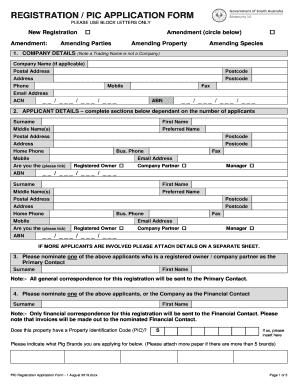
Get Au Pic Registration Application 2019
How it works
-

Open form follow the instructions
-

Easily sign the form with your finger
-

Send filled & signed form or save
How to fill out the AU PIC Registration Application online
The AU PIC Registration Application is essential for registering properties involved in livestock management. This guide will provide you with clear, step-by-step instructions to help you complete the online application efficiently.
Follow the steps to complete your AU PIC Registration Application online.
- Press the ‘Get Form’ button to access the application form and open it within your preferred online editor.
- Enter the company details in Section 1, which includes the company name (if applicable), postal address, contact phone numbers, email address, ACN, and ABN.
- Complete Section 2 with the applicant details; provide the surname, first name, middle names, preferred name, postal address, and contact information for each applicant. If there are multiple applicants, attach additional sheets as necessary.
- Nominate one of the applicants from Section 2 as the Primary Contact in Section 3, ensuring they are a registered owner or company partner.
- In Section 4, select a Financial Contact from the applicants listed, as they will receive all financial correspondence related to the registration.
- Indicate whether the property has a Property Identification Code (PIC) and provide the code if applicable.
- Fill in Section 5 with the property name and location for visits, including the postcode.
- In Section 6, provide the relevant property details, such as volume and folio numbers, previous land owner, and special notes if necessary.
- Complete Section 7 by providing the property owner’s details as recorded with the Land Titles Office.
- Fill in Section 8 regarding your livestock enterprise, including expected maximum stock numbers and enterprise types for each species kept.
- Sign the form in the designated area, print your name, and date it. Ensure you check the consent box if you allow your information to be shared.
- Calculate the required payment in the payment details section, including the PIC fee and total amount due.
- Finalize by submitting the form, either electronically or by returning it to the specified address with the appropriate payment method.
Complete your AU PIC Registration Application online today for efficient livestock management.
Get form
Experience a faster way to fill out and sign forms on the web. Access the most extensive library of templates available.
Applying for an Idaho pharmacist license involves completing your application through the designated state board. Start by gathering the necessary documents, then submit your AU PIC Registration Application along with other required materials. This application will guide you through each step, ensuring that you have the tools needed to navigate the process smoothly.
Get This Form Now!
Use professional pre-built templates to fill in and sign documents online faster. Get access to thousands of forms.