Loading
Get Durable Medical Equipment Authorization Request 2015
How it works
-

Open form follow the instructions
-

Easily sign the form with your finger
-

Send filled & signed form or save
How to fill out the Durable Medical Equipment Authorization Request online
Filling out the Durable Medical Equipment Authorization Request is an essential step in obtaining the necessary equipment for your medical needs. This guide provides clear, step-by-step instructions to assist users in completing the form online efficiently.
Follow the steps to complete your authorization request.
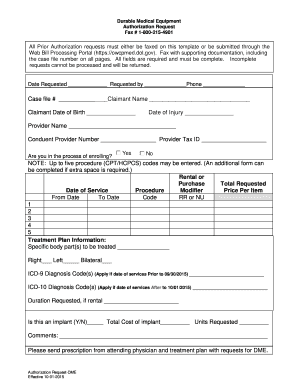
- Press the ‘Get Form’ button to access the Durable Medical Equipment Authorization Request form and open it in the editor.
- Fill in the date requested, your name, and your phone number. These fields are mandatory to ensure proper communication.
- Enter the case file number, claimant's name, and claimant's date of birth. Accurate information in these fields is crucial for identification.
- Document the date of injury. This helps establish the context for your equipment needs.
- Provide the provider's name, the Conduent provider number, and the provider tax ID. This information confirms the authorized provider's identity.
- Indicate whether you are in the process of enrolling by selecting 'Yes' or 'No'.
- List up to five procedure codes in the respective fields. If you need additional space, you can complete another form.
- For each procedure code, indicate whether it is for rental or purchase, the total requested, date of service, and the price per item.
- Complete the treatment plan information section, specifying the body part(s) to be treated and whether they are right, left, or bilateral.
- If applicable, input ICD-9 diagnosis codes for services prior to 09/30/2015 or ICD-10 diagnosis codes for services after 10/01/2015.
- If the request includes rental equipment, specify the duration requested.
- Indicate if the request is for an implant by choosing 'Y' (Yes) or 'N' (No), and provide the total cost and units requested if applicable.
- Add any additional comments that might support your request.
- Ensure that prescription from your attending physician and treatment plan are attached, then review your information for completeness.
- Once all information is filled out, you can save changes, download, print, or share the completed request form.
Start your Durable Medical Equipment Authorization Request online today.
Get form
Experience a faster way to fill out and sign forms on the web. Access the most extensive library of templates available.
The steps to complete a Durable Medical Equipment Authorization Request typically involve gathering necessary documents, submitting the request through your insurance provider, and awaiting their review. After submission, you may need to respond to any requests for additional information. Consulting the uslegalforms platform can provide clarity and structure throughout each step, ensuring nothing is overlooked.
Get This Form Now!
Use professional pre-built templates to fill in and sign documents online faster. Get access to thousands of forms.