Loading
Form preview
  • US Legal Forms
  • Form Library
  • Executive Forms
  • Executive Department DOL Forms
  • Dol 5500 2008

Get Dol 5500 2008

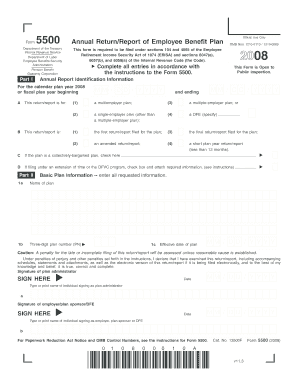
0110 / 1210-0089 This form is required to be filed under sections 104 and 4065 of the Employee Retirement Income Security Act of 1974 (ERISA) and sections 6047(e), 6057(b), and 6058(a) of the Internal Revenue Code (the Code). 2008 Complete all entries in accordance with the instructions to the Form 5500. This Form is Open to Public Inspection. ▼ Form Pension Benefit Guaranty Corporation Part I Annual Report Identification Information For the calendar plan year 2008 or fiscal plan yea.

This website is not affiliated with IRS

How it works

  1. Open form

    Open form follow the instructions

  2. Easily sign form

    Easily sign the form with your finger

  3. Share form

    Send filled & signed form or save

How to fill out the DoL 5500 online

The Department of Labor (DoL) 5500 is an essential filing for employee benefit plans, providing critical information to regulators and the public. This guide offers clear and supportive instructions for completing the form online, helping users navigate every section efficiently.

Follow the steps to accurately complete the DoL 5500 form.

  1. Press the ‘Get Form’ button to obtain the form and open it in your preferred digital editor.
  2. In Part I, fill out the Annual Report Identification Information. Specify the calendar plan year or fiscal plan year beginning date, marking whether the plan is a multiemployer, single-employer, or other specified type, along with the return/report status.
  3. Proceed to Part II for Basic Plan Information. Enter the plan name, three-digit plan number, and effective date of the plan. Ensure accuracy to avoid penalties for late or incomplete filing.
  4. Provide the plan sponsor's and administrator's names, addresses, and contact information in the respective fields. Include the Employer Identification Number (EIN) and business code.
  5. Detail participant information in the sections provided, including counts of active, retired, and separated participants as necessary for your filing.
  6. Specify the types of benefits provided under the plan, such as pension and welfare benefits, by checking the appropriate boxes and entering the relevant feature codes.
  7. Indicate the plan funding and benefit arrangements by checking all applicable options. This information aids in the understanding of how the plan is structured financially.
  8. Attach any necessary schedules or additional documents as required, checking the appropriate boxes and entering the number of attachments.
  9. Before submitting, review the form for completeness and accuracy. Once satisfied, you can save changes, download, print, or share the form as necessary.

Start filling out your DoL 5500 form online today to ensure compliance and support for your employee benefit plan.

Get form

Experience a faster way to fill out and sign forms on the web. Access the most extensive library of templates available.

Related content

Form 5500
EBSA · Key Topics · Reporting & Filing · Form 5500. Form 5500. Lapse in Appropriations...
Learn more
Employee Benefits Security Administration
Explore the Employee Benefits Security Administration (EBSA) for guidance on health plans...
Learn more
Reporting and Disclosure Guide for Employee...
More information about electronic filing under EFAST2 is available at efast.dol.gov. The...
Learn more

Related links form

Department Of Homeland Security Form I-9 Document - Southern ... - Spsu Elementary Real Analysis Solutions Manual Pdf World Civilizations Philip J Adler Pdf Nystrom Atlas Answer Key

Questions & Answers

Get answers to your most pressing questions about US Legal Forms API.

Contact support

Yes, most self-funded plans are required to file the DoL 5500 form annually. This requirement helps ensure transparency and compliance with federal regulations. If your plan falls under this category and you need assistance with filing, uslegalforms offers solutions to help you meet these obligations efficiently.

Typically, a plan administrator or a professional like an accountant prepares the DoL 5500. Some organizations also choose to use a third-party service provider for this task. If you’re unsure or need assistance, uslegalforms offers tools and resources that can simplify the preparation of Form 5500.

The primary difference between Form 5500 and Form 5500 EZ lies in their use. Form 5500 is typically required for larger plans with more than 100 participants, while Form 5500 EZ is designed for smaller, one-participant plans. Familiarizing yourself with these differences can help you determine the correct form to file according to your plan's specifics.

Insurance carriers or service providers must file Form 5500 Schedule A if they provide health insurance coverage to a plan. This form details the insurance arrangements made by the plan and is crucial for transparency. Understanding these requirements can ensure your plan remains compliant with federal regulations surrounding the DoL 5500.

Employers with employee benefit plans that cover more than 100 participants at the beginning of the plan year need to file a Form 5500. This requirement generally applies to pension plans, 401(k) plans, and group health plans, among others. If your business qualifies, it is essential to understand these filing requirements to avoid complications.

The DOL Form 5500 is a required annual report that provides essential information about employee benefit plans, including retirement plans, health plans, and other welfare benefits. This form helps the Department of Labor collect data to evaluate the financial condition of employee benefit plans. Completing the DoL 5500 correctly is crucial for compliance and accountability.

A Form 5500 audit is an independent examination of your employee benefit plans to ensure compliance with federal regulations. This audit verifies the accuracy of the information reported on the DoL 5500 form. Employers often find this auditing process beneficial, as it can enhance transparency and trust among plan participants.

Generally, employers that maintain retirement plans with more than 100 participants must file the DoL 5500 form annually. This requirement includes various types of employee benefit plans, such as 401(k) plans and pension plans. Confirming your business's obligations can help you stay compliant and avoid penalties.

Employers sponsoring a single-participant plan or a one-participant retirement plan typically do not have to file the Form 5500 EZ unless specific criteria indicate otherwise. If the plan meets the requirements for a small plan and has fewer than 100 participants, it often does not need to file. Make sure your plan aligns with these guidelines to avoid unnecessary filing.

Certain plans, such as those with fewer than 100 participants or plans that are fully insured and meet specific conditions, may be exempt from filing the DoL 5500 form. Additionally, certain government and church plans do not need to file. It is essential to evaluate each plan’s unique circumstances to determine if an exemption applies.

Get This Form Now!

Use professional pre-built templates to fill in and sign documents online faster. Get access to thousands of forms.
If you believe that this page should be taken down, please follow our DMCA take down processhere.

Industry-leading security and compliance

US Legal Forms protects your data by complying with industry-specific security standards.
  • In businnes since 1997
    25+ years providing professional legal documents.
  • Accredited business
    Guarantees that a business meets BBB accreditation standards in the US and Canada.
  • Secured by Braintree
    Validated Level 1 PCI DSS compliant payment gateway that accepts most major credit and debit card brands from across the globe.
Get DoL 5500
  • Adoption
  • Bankruptcy
  • Contractors
  • Divorce
  • Home Sales
  • Employment
  • Identity Theft
  • Incorporation
  • Landlord Tenant
  • Living Trust
  • Name Change
  • Personal Planning
  • Small Business
  • Wills & Estates
  • Packages A-Z
  • Affidavits
  • Bankruptcy
  • Bill of Sale
  • Corporate - LLC
  • Divorce
  • Employment
  • Identity Theft
  • Internet Technology
  • Landlord Tenant
  • Living Wills
  • Name Change
  • Power of Attorney
  • Real Estate
  • Small Estates
  • Wills
  • All Forms
  • Forms A-Z
  • Form Library
  • Legal Hub
  • About Us
  • Help Portal
  • Legal Resources
  • Blog
  • Affiliates
  • Contact Us
  • Delete My Account
  • Site Map
  • Industries
  • Forms in Spanish
  • Localized Forms
  • State-specific Forms
  • Forms Kit
  • Real Estate Handbook
  • All Guides
  • Notarize
  • Incorporation services
  • For Consumers
  • For Small Business
  • For Attorneys
  • USLegal
  • FormsPass
  • pdfFiller
  • signNow
  • altaFlow
  • DocHub
  • Instapage
Form Packages
  • Adoption
  • Bankruptcy
  • Contractors
  • Divorce
  • Home Sales
  • Employment
  • Identity Theft
  • Incorporation
  • Landlord Tenant
  • Living Trust
  • Name Change
  • Personal Planning
  • Small Business
  • Wills & Estates
  • Packages A-Z
Form Categories
  • Affidavits
  • Bankruptcy
  • Bill of Sale
  • Corporate - LLC
  • Divorce
  • Employment
  • Identity Theft
  • Internet Technology
  • Landlord Tenant
  • Living Wills
  • Name Change
  • Power of Attorney
  • Real Estate
  • Small Estates
  • Wills
  • All Forms
  • Forms A-Z
  • Form Library
Customer Service
  • Legal Hub
  • About Us
  • Help Portal
  • Legal Resources
  • Blog
  • Affiliates
  • Contact Us
  • Delete My Account
  • Site Map
  • Industries
  • Forms in Spanish
  • Localized Forms
  • State-specific Forms
  • Forms Kit
Legal Guides
  • Real Estate Handbook
  • All Guides
Prepared for you
  • Notarize
  • Incorporation services
Our Customers
  • For Consumers
  • For Small Business
  • For Attorneys
Our Sites
  • USLegal
  • FormsPass
  • pdfFiller
  • signNow
  • altaFlow
  • DocHub
  • Instapage
Social Media
Call us now toll free:
+1 833 426 79 33
As seen in:
© Copyright 1999-2026 airSlate Legal Forms, Inc. 3720 Flowood Dr, Flowood, Mississippi 39232
  • Your Privacy Choices
  • Terms of Service
  • Privacy Notice
  • Content Takedown Policy
  • Bug Bounty Program
DoL 5500
This form is available in several versions.
Select the version you need from the drop-down list below.
2018 DoL 5500
Select form
  • 2018 DoL 5500
  • 2017 DoL 5500
  • 2016 DoL 5500
  • 2015 DoL 5500
  • 2014 DoL 5500
  • 2013 DoL 5500
  • 2012 DoL 5500
  • 2011 DoL 5500
  • 2010 DoL 5500
  • 2009 DoL 5500
  • 2008 DoL 5500
Select form