Loading
Get Isio-ak 140-r-e 2010-2026
How it works
-

Open form follow the instructions
-

Easily sign the form with your finger
-

Send filled & signed form or save
How to fill out the ISIO-AK 140-R-E online
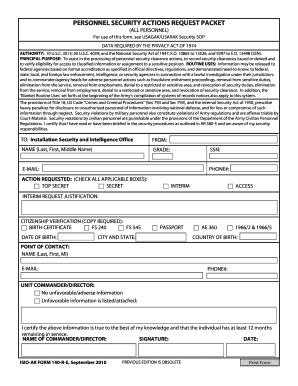
The ISIO-AK 140-R-E is a crucial form used for personnel security clearance actions. This guide will provide clear and detailed instructions to help users navigate the form online to ensure accurate submission.
Follow the steps to successfully complete the ISIO-AK 140-R-E online.
- Press the ‘Get Form’ button to obtain the ISIO-AK 140-R-E and open it in your online editing tool.
- Begin by filling out your personal information, including your last name, first name, middle name, grade, Social Security Number, email address, and phone number.
- Select the action requested by checking all applicable boxes for the security clearance level you are applying for: Top Secret, Secret, or Interim.
- If you are requesting an interim access clearance, provide justification in the specified field.
- Under citizenship verification, select the appropriate documents you are providing, such as a birth certificate or passport. Ensure you have a copy of the document ready to attach.
- Enter your date of birth, city and state of birth, and country of birth as requested in the respective fields.
- Identify your point of contact by providing their last name, first name, middle initial, email address, and phone number.
- Fill in the unit commander or director's information, confirming if there is any unfavorable information. Attach the relevant documentation if applicable.
- Certify the accuracy of the information provided by signing and dating the form. Include the name of the commander or director in the designated area.
- Review all filled fields for accuracy. Once confirmed, you can choose to save changes, download, print, or share the completed form as needed.
Complete your personnel security actions request online today for a smoother processing experience.