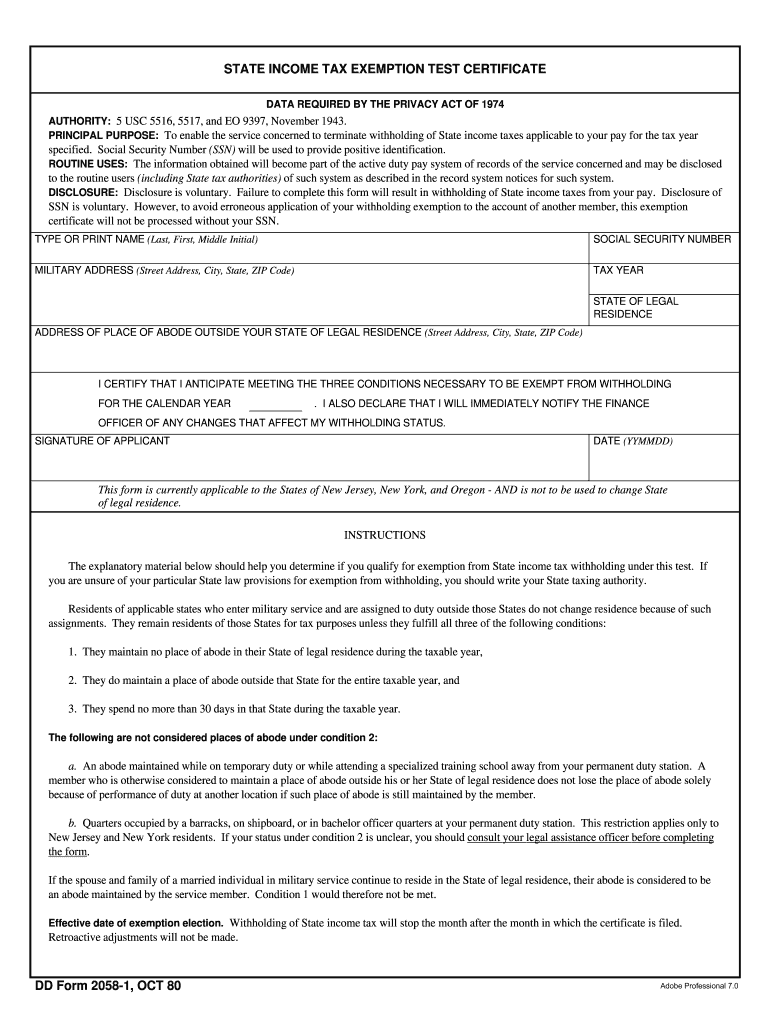
Rk residents. If your status under condition 2 is unclear, you should consult your legal assistance officer before completing the form. If the spouse and family of a married individual in military service continue to reside in the State of legal residence, their abode is considered to be an abode maintained by the service member. Condition 1 would therefore not be met. Effective date of exemption election. Withholding of State income tax will stop the month after the month in which the certifica.
Loading

Open form follow the instructions

Easily sign the form with your finger

Send filled & signed form or save
How to fill out the DD 2058-1 online
The DD 2058-1 form is essential for military personnel seeking to apply for a state income tax exemption. Completing this form accurately is crucial to terminate the withholding of state income taxes applicable to your pay for specified tax years.
Follow the steps to fill out the DD 2058-1 correctly.
- Press the ‘Get Form’ button to access the DD 2058-1. This will enable you to open the document in an editable format.
- Carefully enter your full name in the designated field as 'Type or print name (Last, First, Middle Initial)'. Make sure to provide accurate details to avoid any processing issues.
- In the ‘Social Security Number’ field, input your SSN. This is necessary for positive identification and processing of the exemption certificate.
- Fill in your complete military address, including street address, city, state, and ZIP code. Accuracy is vital for proper communication regarding your exemption.
- Specify the tax year for which you are requesting the exemption in the 'Tax Year' field.
- Indicate your state of legal residence. This should reflect the state where you hold tax obligations.
- If applicable, provide the address of your place of abode outside your state of legal residence. Include the street address, city, state, and ZIP code.
- Review the conditions necessary to qualify for exemption from withholding. Ensure you meet all three conditions outlined in the instructions.
- Certify your acknowledgment by signing in the 'Signature of Applicant' field and date the form in the 'Date (YYMMDD)' section.
- Once all fields are completed, save your changes. You may choose to download, print, or share the DD 2058-1 form as needed.
Complete the DD 2058-1 online to ensure your state tax withholding is properly managed.
Experience a faster way to fill out and sign forms on the web. Access the most extensive library of templates available.
Related content
Form DD-2058-1 is a U.S. government form that is used as a basis for not withholding New...
Windows is either a registered trademark or a trademark of Microsoft Corporation in the...
dd only needs to know two things: where to read from (the if= argument) and ... root 2058...
Get answers to your most pressing questions about US Legal Forms API.
What makes you a resident of a state military spouse?
As a military spouse, factors that establish your residency in a state include your marriage to a service member, your location during their service, and your intent to remain in that state. Additionally, filing the DD 2058-1 with your updated residency can help solidify your status. Regularly reviewing and updating this information can provide you with stability and access to local benefits. It’s important to assess your situation to maintain compliance and clarity.
What is an example of a home of record?
An example of a home of record might be the city and state where you enlisted in the military, and this is often documented on your initial military paperwork. The home of record is significant as it may influence your residency status and benefits. It’s vital to keep your DD 2058-1 updated to reflect this correctly. Clarifying your home of record helps streamline legal processes throughout your military journey.
How do you know your legal state of residence?
To know your legal state of residence, review documents such as your DD 2058-1 and consider where you have established ties. Think about factors like where you register to vote, keep your vehicle, and where you intend to return after your service. All of these aspects contribute to confirming your legal state of residence. Being informed of these details ensures you remain compliant with legal and tax regulations.
What is a DD form 2058 1?
A DD form 2058-1 is a crucial document used by military personnel to declare their legal state of residence. This form is essential for various administrative purposes, including tax considerations and benefits eligibility. When filling out the DD 2058-1, ensure that you provide accurate information to reflect your true residence status. Proper filing of this form can simplify many legal matters.
How do you determine your state of legal residence in the military?
Your state of legal residence in the military is determined by your intentions, documentation, and, often, by where you declare residency on the DD 2058-1 form. Consider factors like where you spend your time, where you receive mail, and your planned address after service. It’s essential to keep everything consistent to avoid confusion with legal and tax obligations.
What form do I need to change my residency in the AF?
To change your residency in the Air Force, you will need the DD 2058-1 form. This form helps you declare your residency status and facilitates updates to your legal documentation. Ensure that you fill out this form accurately and submit it according to your base's instructions. It plays a crucial role in determining benefits and tax implications.
How to determine state of legal residence in the military?
To determine your state of legal residence in the military, consider where you intend to return after your service. Review documents like your DD 2058-1, which can clarify your legal residence. Additionally, think about where you are registered to vote and where you file taxes. All these factors help establish your residency.
How to determine your state of legal residence in the military?
Determining your state of legal residence in the military includes assessing where you consider home, where you hold voter registration, and where you file taxes. The DD 2058-1 form is essential in formalizing your residency claims. You can also consider additional factors such as property ownership and duration of residence in a state. Keeping accurate records and forms helps establish your legal residency.
What makes you a resident of a state as a military spouse?
As a military spouse, you can be considered a resident of a state based on where you have established your home, even if your military member is stationed elsewhere. Factors like voter registration and local ties can contribute to your residency status. You may also use the DD 2058-1 form to declare your residency in the state where you live. Maintaining an established residence can benefit you when filing taxes and other legal matters.
What form do I need to change my legal residence in the Army?
To change your legal residence in the Army, you need the DD 2058-1 form. This form allows you to officially claim a different state as your legal residence. It is important to complete this form as it affects your taxes and benefits. Ensuring your legal residence is up to date is vital for both you and your family.
Use professional pre-built templates to fill in and sign documents online faster. Get access to thousands of forms.
If you believe that this page should be taken down, please follow our DMCA take down process here.