Loading
Form preview
  • US Legal Forms
  • Other Templates
  • Executive Forms
  • Executive Department DHS Forms
  • Fema Ics 203

Get Fema Ics 203

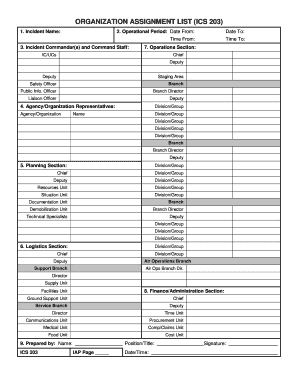
Uty Deputy Staging Area Safety Officer Branch Public Info. Officer Branch Director Liaison Officer Deputy 4. Agency/Organization Representatives: Agency/Organization Division/Group Name Division/Group Division/Group Division/Group Division/Group Branch Branch Director Deputy 5. Planning Section: Division/Group Chief Division/Group Deputy Division/Group Resources Unit Division/Group Situation Unit Division/Group Documentation Unit Branch Demobilization Unit Branch Direct.

How it works

  1. Open form

    Open form follow the instructions

  2. Easily sign form

    Easily sign the form with your finger

  3. Share form

    Send filled & signed form or save

How to fill out the FEMA ICS 203 online

The FEMA ICS 203 form is essential for documenting the roles and responsibilities of personnel during an incident. This guide will assist you in navigating the online process to ensure accurate and effective completion of the form.

Follow the steps to fill out the FEMA ICS 203 form online.

  1. Press the ‘Get Form’ button to access the FEMA ICS 203 form and open it in your preferred editing tool.
  2. Fill in the 'Incident Name' field with the designated name assigned to the incident at hand.
  3. In the 'Operational Period' section, input the start and end date, and the corresponding time for each using the 24-hour clock format.
  4. Enter the names of the Incident Commander(s) and Command Staff in the 'Incident Commander(s) and Command Staff' section, making sure to label any assistants appropriately.
  5. For the 'Agency/Organization Representatives' section, list the names of the agencies or organizations and their corresponding representatives, ensuring to use at least the first initial and last name.
  6. Complete the 'Planning Section' by entering the names of the Planning Section Chief, Deputy, and Unit Leaders, while indicating their specialties if applicable.
  7. Populate the 'Logistics Section' with the names of the Chief and Deputy, as well as other relevant Branch Directors and Unit Leaders, ensuring clarity of each individual’s role.
  8. In the 'Finance/Administration Section,' provide the names of the Chief and Deputy, along with the other Unit Leaders as required.
  9. In the final 'Prepared by' section, enter your name, position/title, signature, date, and time the form was completed, ensuring all information is accurate.
  10. Once all information is filled out, you can save changes, download the completed form, print it, or share it as necessary.

Begin filling out your FEMA ICS 203 form online today to ensure efficient documentation and coordination during your incident response.

Get form

Experience a faster way to fill out and sign forms on the web. Access the most extensive library of templates available.
Get form

Related content

ICS Forms
ICS Forms ; ICS 201. Incident Briefing. DHS / FEMA Form ; ICS 202. Incident Objectives...
Learn more
The ICS uses a series of standard forms and...
Organization. Assignment List. ICS 203. Provides information on the response ... This form...
Learn more
Mission Base Staff Tasks 11 April 2005
Apr 11, 2005 — Complete and compile an Incident Action Plan using the provided material...
Learn more

Related links form

Affidavit Of Practical Experience - South Carolina Department Of ... Registration Application For Electronic Funds Transfer - The South ... - Sctax ABL-29A - The South Carolina Department Of Revenue - Sctax South Carolina L Al 106

Questions & Answers

Get answers to your most pressing questions about US Legal Forms API.

Contact support

A 203 form in ICS, formally known as ICS Form 203, serves as the organization assignment list that outlines the incident management structure. This form identifies key roles, helping to clarify responsibilities within the team. Familiarizing yourself with the FEMA ICS 203 is essential for effective incident management. For practical resources and examples, uslegalforms provides comprehensive solutions tailored to your needs.

ICS Form 203 is generally prepared by the Planning Section Chief within the Incident Command System. This person gathers all pertinent information regarding the incident organization and fills out the form to reflect the current structure. By mastering FEMA ICS 203, you improve collaboration among team members and streamline operations. Consider visiting uslegalforms for templates that can simplify this task.

The organization assignment list in ICS Form 203 is typically prepared by the Incident Commander or their designee. This individual is responsible for outlining the roles and responsibilities of team members involved in an incident. By using FEMA ICS 203, the assignment list becomes clear and organized, ensuring everyone understands their tasks. Utilize tools available through uslegalforms to facilitate this process.

ICS Form 204 is a critical document used in the Incident Command System, particularly for tactical resource assignments. This form provides specific information about resources assigned to operations, including their location and duration of assignment. Understanding the use of Form 204 alongside FEMA ICS 203 enhances your ability to manage incidents effectively. You can find detailed descriptions and examples of these forms on uslegalforms.

FEMA ICS certificates do not have a set expiration date. However, it is recommended that you refresh your knowledge and skills regularly. As the field of incident command evolves, staying updated with the latest practices helps ensure effective emergency response. Consider utilizing resources from uslegalforms to access relevant training materials related to FEMA ICS 203.

FEMA ICS certificates can be found through the FEMA website or other authorized training platforms. Engaging with these resources enables you to take courses that cover the FEMA ICS 203 and related training. By completing these courses, you can gain valuable knowledge and credentials, enhancing your emergency management skills.

The Planning Section Chief manages the preparation of the incident action plan, overseeing the creation of essential documents like the FEMA ICS 203. This role is crucial for ensuring that the incident response is aligned with established objectives and strategies. With effective leadership, the team can maintain focus and clarity throughout the incident management process.

The ICS 202 form, which provides a summary of the situation, is usually prepared by the Planning Section as well. Typically, the Situation Unit Leader coordinates the collection and assembly of information to create a comprehensive report. This preparation facilitates an informed decision-making process as the incident unfolds, ensuring everyone is on the same page.

The ICS 203 form is primarily prepared by the Planning Section Chief, who collaborates with other stakeholders to gather the necessary data. This collaborative effort ensures the form reflects the most current status of the incident and the objectives for the upcoming operational period. Having clear responsibilities promotes effective communication and teamwork during an incident.

ICS forms, including the FEMA ICS 203, are typically completed by individuals assigned to specific roles within the incident management team. These responsibilities might include the Planning Section Chief and other designated personnel who gather relevant information. By utilizing the proper chain of command, the team ensures that forms are filled out accurately and efficiently.

Get This Form Now!

Use professional pre-built templates to fill in and sign documents online faster. Get access to thousands of forms.
Get form
If you believe that this page should be taken down, please follow our DMCA take down processhere.
Get FEMA ICS 203
Get form
  • Adoption
  • Bankruptcy
  • Contractors
  • Divorce
  • Home Sales
  • Employment
  • Identity Theft
  • Incorporation
  • Landlord Tenant
  • Living Trust
  • Name Change
  • Personal Planning
  • Small Business
  • Wills & Estates
  • Packages A-Z
  • Affidavits
  • Bankruptcy
  • Bill of Sale
  • Corporate - LLC
  • Divorce
  • Employment
  • Identity Theft
  • Internet Technology
  • Landlord Tenant
  • Living Wills
  • Name Change
  • Power of Attorney
  • Real Estate
  • Small Estates
  • Wills
  • All Forms
  • Forms A-Z
  • Other Templates
  • Legal Hub
  • About Us
  • Help Portal
  • Legal Resources
  • Blog
  • Affiliates
  • Contact Us
  • Delete My Account
  • Site Map
  • Industries
  • Forms in Spanish
  • Localized Forms
  • State-specific Forms
  • Forms Kit
  • Real Estate Handbook
  • All Guides
  • Notarize
  • Incorporation services
  • For Consumers
  • For Small Business
  • For Attorneys
  • USLegal
  • FormsPass
  • pdfFiller
  • signNow
  • altaFlow
  • DocHub
  • Instapage
Form Packages
  • Adoption
  • Bankruptcy
  • Contractors
  • Divorce
  • Home Sales
  • Employment
  • Identity Theft
  • Incorporation
  • Landlord Tenant
  • Living Trust
  • Name Change
  • Personal Planning
  • Small Business
  • Wills & Estates
  • Packages A-Z
Form Categories
  • Affidavits
  • Bankruptcy
  • Bill of Sale
  • Corporate - LLC
  • Divorce
  • Employment
  • Identity Theft
  • Internet Technology
  • Landlord Tenant
  • Living Wills
  • Name Change
  • Power of Attorney
  • Real Estate
  • Small Estates
  • Wills
  • All Forms
  • Forms A-Z
  • Other Templates
Customer Service
  • Legal Hub
  • About Us
  • Help Portal
  • Legal Resources
  • Blog
  • Affiliates
  • Contact Us
  • Delete My Account
  • Site Map
  • Industries
  • Forms in Spanish
  • Localized Forms
  • State-specific Forms
  • Forms Kit
Legal Guides
  • Real Estate Handbook
  • All Guides
Prepared for you
  • Notarize
  • Incorporation services
Our Customers
  • For Consumers
  • For Small Business
  • For Attorneys
Our Sites
  • USLegal
  • FormsPass
  • pdfFiller
  • signNow
  • altaFlow
  • DocHub
  • Instapage
Social Media
Call us now toll free:
+1 833 426 79 33
As seen in:
© Copyright 1999-2026 airSlate Legal Forms, Inc. 17 Station Street, Suite 303, Brookline, MA 02445
  • Your Privacy Choices
  • Terms of Service
  • Privacy Notice
  • Content Takedown Policy
  • Bug Bounty Program