Loading
Form preview
  • US Legal Forms
  • Other Templates
  • More Forms
  • More Uncategorized Forms
  • Id Gujarat Commercial Tax Procedure Form

Get Id Gujarat Commercial Tax Procedure Form

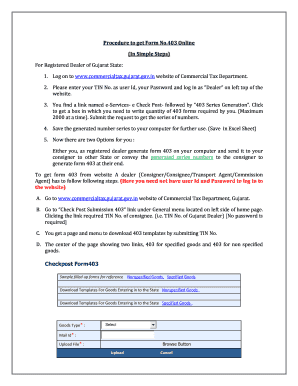
U sheet vise-column vise error report. If it happens, please go back to mentioned location of error and get it correct. Then upload the sheet again. J. You will be given message of Please Wait, Data is being Validated followed by Message No Error found in Uploaded Sheet As soon as this message display, please enter submit button below. On submission, you will get bar coded receipt of form submitted and below the receipt a PDF link appears for form 403. K. You can have print out of.

How it works

  1. Open form

    Open form follow the instructions

  2. Easily sign form

    Easily sign the form with your finger

  3. Share form

    Send filled & signed form or save

How to fill out the ID Gujarat Commercial Tax Procedure Form online

Filling out the ID Gujarat Commercial Tax Procedure Form online is a straightforward process designed for registered dealers in Gujarat. This guide will provide you with detailed instructions to facilitate the completion of the form efficiently.

Follow the steps to fill out the ID Gujarat Commercial Tax Procedure Form online.

  1. Click 'Get Form' button to obtain the form and open it for editing.
  2. Visit the www.commercialtax.gujarat.gov.in website of the Commercial Tax Department. Log in as a 'Dealer' by entering your TIN number as the user ID and your password.
  3. Find the link named e-Services - e Check Post - followed by '403 Series Generation'. Click this link to access a box where you will enter the quantity of 403 forms needed (maximum of 2000 at a time) and submit your request for generating the series numbers.
  4. Save the generated series of numbers to your computer for future reference, preferably in an Excel sheet format.
  5. As a registered dealer, decide whether to generate form 403 on your computer for your consigner or to convey the generated series numbers to the consigner for them to generate form 403 on their end.
  6. If the dealer (Consigner/Consignee/Transport Agent/Commission Agent) needs to access form 403, they should go to the same website without logging in. Click on 'Check Post Submission 403' found under the General menu on the left side of the homepage.
  7. Use the TIN number of the consignee (the Gujarat dealer) to access the page for downloading the 403 templates.
  8. On the download page, you will see two links: '403 for specified goods' and '403 for non-specified goods'. Click the link that corresponds to your requirement to download the appropriate template.
  9. After clicking the desired link, a 'File Download Message' will appear. Click 'Save' and choose a location on your computer to save the downloaded template.
  10. The template consists of three Excel sheets: one for General Information (fill the first field with the generated series number), the second for Commodity Details, and the third for Transportation Details. Complete the sheets using tooltips and dropdown options, ensuring to fill mandatory fields marked with a red asterisk (*).
  11. After filling in the template, return to the download screen on the website. Select form 403 and enter your email address, then use the browse button to link the template path and start uploading it.
  12. Carefully attend to the displayed instructions. Should any errors appear in your template, the system will provide an error report indicating the relevant sheet and column. Correct these errors and re-upload the sheet.
  13. Once the message 'No Error found in Uploaded Sheet' appears, you may proceed to click the submit button. This will generate a barcoded receipt of the submitted form, along with a PDF link for form 403.
  14. You can print the receipt, but first, click the PDF link, which will display the form 403 with the barcode on your screen. Ensure to print three copies, which must be stamped and signed for the driver to carry while passing through the check post.

Start filling out the ID Gujarat Commercial Tax Procedure Form online today.

Get form

Experience a faster way to fill out and sign forms on the web. Access the most extensive library of templates available.
Get form

Related content

PET Film, Sheet, and Strip from India
... Tax Saved On Purchases” column header refers to, MTZ identified those taxes as part...
Learn more
Registration under GVAT & CST
101 – Application form for obtaining registration under VAT Act,. 2003. (2) FORM No.101A...
Learn more
Tobacco Tax Reform
by PV Marquez · Cited by 1 — Executive Summary. 11. The Tobacco Use Challenge. 12. The...
Learn more

Related links form

TX DSHS 11-15224 2019 TX DSHS Uncompensated Trauma Care Application 2019 TX DSHS Hepatitis B Acute Case Track Record 2018 TX DSHS Form 1. NHSN (HAI) Data Contacts

Questions & Answers

Get answers to your most pressing questions about US Legal Forms API.

Contact support

Generating a VAT number requires you to have an active VAT registration certificate. Once you are registered, your VAT number will be assigned automatically. If you need support, refer to the ID Gujarat Commercial Tax Procedure Form for guidance. This ensures you have the correct number to conduct business transactions legally and efficiently.

Applying for VAT registration in Gujarat involves completing an application form on the state's official tax site. Make sure you gather all required documents, including proof of identity and business registration. Using the ID Gujarat Commercial Tax Procedure Form can expedite this process. Once processed, the tax authorities will issue a VAT registration certificate to you.

To register for VAT tax, you must fill out the application form required by your state's tax department. After submitting the necessary documents, including the ID Gujarat Commercial Tax Procedure Form, the authorities will review your application. Once approved, you will receive your VAT registration number. This number is vital for conducting business transactions smoothly.

The new rule of professional tax in Gujarat requires all professionals and businesses to register for PTRC within a specified timeframe. This ensures that everyone contributes to the state's revenue system. The ID Gujarat Commercial Tax Procedure Form clarifies the registration process and requirements. Staying informed about these regulations is crucial for compliance.

To register for Professional Tax Registration Certificate (PTRC) in Gujarat, you should fill out the PTRC application form available on the official website. Ensure you have valid identification and business proof ready. The ID Gujarat Commercial Tax Procedure Form simplifies the steps to obtain your PTRC, allowing you to operate legally without hassles. Remember, timely registration helps you avoid penalties.

VAT, or Value Added Tax, in Gujarat is a tax on the sale of goods and services. This tax is implemented at each stage of the supply chain and is collected by the sellers. Understanding the ID Gujarat Commercial Tax Procedure Form will help you navigate the VAT regulations effectively. Compliance with VAT in Gujarat contributes to the state's revenue and promotes fair trading.

To register for VAT in India, you need to visit the official VAT website in your state. Complete the application form and submit the required documentation, including proof of identity and business details. The ID Gujarat Commercial Tax Procedure Form is essential to streamline your registration process. After processing, you will receive your VAT registration certificate.

To generate a VAT number, you first need to register for VAT by filling out the ID Gujarat Commercial Tax Procedure Form. After submitting the required documents and information, you will receive your unique VAT number. This number is crucial for your business transactions and tax compliance.

Filing a professional tax return online in Gujarat is straightforward. You must complete the ID Gujarat Commercial Tax Procedure Form and submit it through the official website. Ensure you include all your income details accurately, and once filed, keep a copy for your records.

Filing a VAT return for a petrol pump in Gujarat involves keeping accurate records of sales and purchases. You must submit your returns on time to avoid penalties. The ID Gujarat Commercial Tax Procedure Form can guide you through this process, ensuring you complete all necessary steps effectively.

Get This Form Now!

Use professional pre-built templates to fill in and sign documents online faster. Get access to thousands of forms.
Get form
If you believe that this page should be taken down, please follow our DMCA take down processhere.
Get ID Gujarat Commercial Tax Procedure Form
Get form
  • Adoption
  • Bankruptcy
  • Contractors
  • Divorce
  • Home Sales
  • Employment
  • Identity Theft
  • Incorporation
  • Landlord Tenant
  • Living Trust
  • Name Change
  • Personal Planning
  • Small Business
  • Wills & Estates
  • Packages A-Z
  • Affidavits
  • Bankruptcy
  • Bill of Sale
  • Corporate - LLC
  • Divorce
  • Employment
  • Identity Theft
  • Internet Technology
  • Landlord Tenant
  • Living Wills
  • Name Change
  • Power of Attorney
  • Real Estate
  • Small Estates
  • Wills
  • All Forms
  • Forms A-Z
  • Other Templates
  • Legal Hub
  • About Us
  • Help Portal
  • Legal Resources
  • Blog
  • Affiliates
  • Contact Us
  • Delete My Account
  • Site Map
  • Industries
  • Forms in Spanish
  • Localized Forms
  • State-specific Forms
  • Forms Kit
  • Real Estate Handbook
  • All Guides
  • Notarize
  • Incorporation services
  • For Consumers
  • For Small Business
  • For Attorneys
  • USLegal
  • FormsPass
  • pdfFiller
  • signNow
  • altaFlow
  • DocHub
  • Instapage
Form Packages
  • Adoption
  • Bankruptcy
  • Contractors
  • Divorce
  • Home Sales
  • Employment
  • Identity Theft
  • Incorporation
  • Landlord Tenant
  • Living Trust
  • Name Change
  • Personal Planning
  • Small Business
  • Wills & Estates
  • Packages A-Z
Form Categories
  • Affidavits
  • Bankruptcy
  • Bill of Sale
  • Corporate - LLC
  • Divorce
  • Employment
  • Identity Theft
  • Internet Technology
  • Landlord Tenant
  • Living Wills
  • Name Change
  • Power of Attorney
  • Real Estate
  • Small Estates
  • Wills
  • All Forms
  • Forms A-Z
  • Other Templates
Customer Service
  • Legal Hub
  • About Us
  • Help Portal
  • Legal Resources
  • Blog
  • Affiliates
  • Contact Us
  • Delete My Account
  • Site Map
  • Industries
  • Forms in Spanish
  • Localized Forms
  • State-specific Forms
  • Forms Kit
Legal Guides
  • Real Estate Handbook
  • All Guides
Prepared for you
  • Notarize
  • Incorporation services
Our Customers
  • For Consumers
  • For Small Business
  • For Attorneys
Our Sites
  • USLegal
  • FormsPass
  • pdfFiller
  • signNow
  • altaFlow
  • DocHub
  • Instapage
Social Media
Call us now toll free:
+1 833 426 79 33
As seen in:
© Copyright 1999-2026 airSlate Legal Forms, Inc. 17 Station Street, Ste. 203, Brookline, MA 02445
  • Your Privacy Choices
  • Terms of Service
  • Privacy Notice
  • Content Takedown Policy
  • Bug Bounty Program