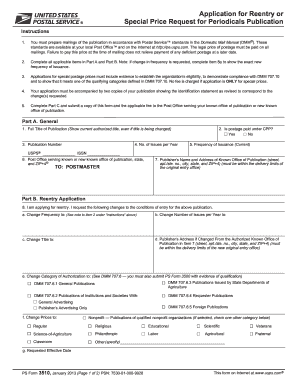
Agricultural Fraternal Classroom Other (specify) g. Requested Effective Date PS Form 3510, January 2013 (Page 1 of 2) PSN: 7530-01-000-9928 This form on Internet at www.usps.com® Part C. Applicant Signature 9. Applicant’s Name (print) 10. Applicant’s Title (print) 11. Date 12. Applicant’s Signature (print) 13. Applicant’s E-mail (print) 14. Telephone Number (Include area code) Part D. Postmaster A. Review the application and identification statement for accuracy and co.
Open form follow the instructions
Easily sign the form with your finger
Send filled & signed form or save
How to fill out the USPS PS 3510 online
Filling out the USPS PS 3510 is an essential process for those seeking to apply for reentry or special price requests for periodicals publication. This guide offers clear and supportive instructions to help users navigate the form effectively.
Follow the steps to complete the USPS PS 3510 online.
- Press the ‘Get Form’ button to access the form and launch it in the online editor.
- In Part A, provide the general details of your publication. Begin by entering the full title of the publication as authorized, your publication number, and the number of issues published each year. Indicate if postage is paid under the CPP by selecting 'Yes' or 'No', and update the frequency of issuance along with the USPS and ISSN numbers.
- List the Post Office serving your known publication office and provide the complete address, including the publisher’s name and address within the appropriate delivery limits.
- Proceed to Part B, where you will indicate if you are applying for reentry. Specify any changes requested including frequency of issuance, number of issues per year, title changes, and if the publisher's address has changed. Provide details about the category of authorization under DMM 707.6 and select the relevant options for price changes or requested effective date.
- Complete Part C by entering your name, title, date, and signature. Include your email address and telephone number for any follow-up communications.
- Once all sections are thoroughly completed, review your entries to ensure accuracy. Save your changes, then download the form for printing or sharing as needed.
Start filling out the USPS PS 3510 online today to streamline your publication process.
Experience a faster way to fill out and sign forms on the web. Access the most extensive library of templates available.
Related content
Postal Service forms may be preceded by “PS Form,” which simply stands for “Postal...
Jan 5, 2024 — The 14 November 2000 edition adds links to postal authorities in many...
Mar 31, 2010 — for Additional Entry, Reentry or Special Price Request (PS Form 3510)...
Get answers to your most pressing questions about US Legal Forms API.
How to get PS Form 3849?
To obtain PS Form 3849, also known as the Notice Left form, you can visit the official USPS website to download it directly. This form is helpful if you missed a delivery and contains essential instructions for rescheduling your package drop-off. If you're dealing with USPS PS 3510 inquiries, having this form on hand can streamline your process. Alternatively, you can pick up a physical copy at your local post office.
How to get USPS customer service representative?
To reach a USPS customer service representative, you can call their national customer service number at 1-800-ASK-USPS. Be prepared to provide details about your inquiry related to services like USPS PS 3510. Additionally, you can visit your local post office for in-person assistance or check the USPS website for helpful resources. Engaging with customer service ensures you get the answers you need efficiently.
How to fill out USPS claim form?
To fill out a USPS claim form, start by gathering all necessary documentation, including your tracking number and original shipping receipt. Proceed to the USPS PS 3510 form, where you will report the loss or damage and provide details about the package. If you find the process overwhelming, consider using services like USLegalForms, which can clarify each step to ensure your claim is submitted correctly.
How do I fill out a USPS certified mail form?
When filling out a USPS certified mail form, begin by writing your return address in the upper-left corner of the label. Next, provide the recipient's information clearly, and choose the right service options available. Don't forget to keep a copy of the USPS PS 3510 form for your records, as it can help track the mail and resolve any outstanding issues.
How to fill out a USPS claim form?
Filling out a USPS claim form involves gathering your package tracking number and the receipt of your shipment. Once you access the USPS PS 3510 form, input your information accurately, including the package value and a description of its contents. If you encounter any challenges, platforms like USLegalForms can guide you through the process, ensuring a smooth experience.
How do I file a lost package claim with USPS?
To file a lost package claim with USPS, you need to start by visiting the USPS website or heading to your nearest post office. You will need to provide details such as the tracking number and the contents of the package. Make sure to complete the USPS PS 3510 form online or in person, which helps streamline the process for you.
How to fill out Certified Mail ps form 3811?
Filling out Certified Mail PS form 3811 requires you to include the sender's and recipient’s names and addresses clearly. Ensure that you indicate whether return receipt is requested, which provides proof of delivery. Then, sign and date your form before mailing it. This form works hand in hand with USPS PS 3510 to ensure your package is tracked effectively throughout its delivery journey.
How to fill out Certified Mail USPS?
To fill out Certified Mail USPS, begin by writing the recipient's details on the mailing label. Ensure you also include the return address. After affixing the label, complete the necessary signature and date fields on the form. Utilizing USPS PS 3510 provides essential tracking features that enhance your certified mail experience.
How to fill out USPS hold mail form?
To fill out the USPS hold mail form, you need to enter your address and select the start and end dates for the hold service. Make sure to indicate whether the hold applies to all mail or only certain types. You can complete this form online or print it to submit at your local post office. Using USPS PS 3510 can help streamline your mail preferences during your absence.
How to fill out USPS certified mail form?
Filling out the USPS certified mail form is straightforward. Start by providing the recipient's name and address in the designated areas. Then, include your return address and ensure you check the box for certified mail before completing the form. If you want further support with certified mail, consider using the USPS PS 3510 for additional options.
Use professional pre-built templates to fill in and sign documents online faster. Get access to thousands of forms.
If you believe that this page should be taken down, please follow our DMCA take down process here.
This form is available in several versions. Select the version you need from the drop-down list below.