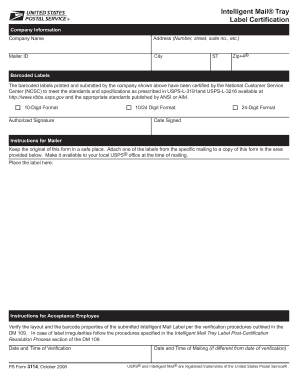
submitted by the company shown above have been certified by the National Customer Service Center (NCSC) to meet the standards and specifications as prescribed in USPS-L-3191and USPS-L-3216 available at http://www.ribbs.usps.gov and the appropriate standards published by ANSI or AIM. 10-Digit Format Authorized Signature 10/24 Digit Format 24-Digit Format Date Signed Instructions for Mailer Keep the original of this form in a safe place. Attach one of the labels from the specific mailing to a.
Open form follow the instructions
Easily sign the form with your finger
Send filled & signed form or save
How to fill out the USPS PS 3114 online
The USPS PS 3114 form is essential for certifying that barcoded labels meet the standards set by the United States Postal Service. This guide will provide you with step-by-step instructions to effectively fill out the form online, ensuring that all necessary information is accurately completed.
Follow the steps to successfully complete the USPS PS 3114 form online:
- Click the ‘Get Form’ button to access the USPS PS 3114 document and open it in your online editor.
- Begin by entering the company information in the designated fields. Fill in your company name, address (including number, street, suite number, etc.), city, state, and Zip+4 code.
- In the Mailer ID field, provide your unique Mailer ID to help identify your company within the USPS system.
- Next, locate the section for barcoded labels. Confirm that the barcoded labels you have printed and submitted are certified by the National Customer Service Center (NCSC) as per USPS standards.
- Complete the 10-Digit Format and 24-Digit Format fields, ensuring to accurately enter the required numeric data.
- Sign the form in the Authorized Signature field as required, and enter the date of signing.
- Follow the respective instructions for Mailer. Retain the original copy of this certification form in a secure location and attach one of the barcoded labels from your mailing to the indicated area on the form.
- Finally, complete the instructions for Acceptance Employee by noting the date and time of verification, if applicable. If the date and time of mailing differ from the verification date, fill in those details.
- Once all sections are completed, review your entries for accuracy. Save changes, download, print, or share the form as needed.
Complete your USPS PS 3114 document online today for an efficient mailing process!
Experience a faster way to fill out and sign forms on the web. Access the most extensive library of templates available.
Related content
Instructions for completing SF 3104A are contained on the form itself. If the deceased was...
May 21, 2020 — POLICIES, PROCEDURES, AND FORMS. UPDATES. Manuals. DMM Revision: Business...
May 25, 2018 — Background. The 2018 primary season is here and the Postal Ser- vice™...
Get answers to your most pressing questions about US Legal Forms API.
Can I pick up a package from USPS if I missed the delivery?
Yes, you can pick up your package from USPS if you missed the delivery. Typically, you should receive a notice indicating where and when to pick it up. It is important to bring the notice and an identification card to the post office. For more information on managing your delivery options, including using the USPS PS 3114 features, consult the US Legal Forms platform, which can provide clarity on the USPS processes.
How to fill out USPS redelivery form?
To complete a USPS redelivery form, first check your delivery notice card for instructions. You’ll need to indicate the package details and choose a preferred delivery day. Doing this directly online is convenient and ensures you do not miss your package again. Many users find it helpful to access resources on US Legal Forms, which can provide step-by-step assistance for the USPS PS 3114 redelivery process.
How to fill out a USPS customs form?
To fill out a USPS customs form, start by identifying the type of item you are sending. You need to provide information about the sender and recipient, describe the contents of the package, and declare the value. You can use the USPS PS 3114 form for international shipments, which simplifies the process. If you prefer, you can also utilize platforms like US Legal Forms to guide you through the customs form requirements.
How do I file an indemnity claim with USPS?
Filing an indemnity claim with USPS involves visiting their claims page and selecting the appropriate form. Be sure to gather all required documentation, including proof of loss or damage, so that your claim is complete. Including the USPS PS 3114 can help articulate your circumstances effectively. If you're unsure about how to proceed, US Legal Forms offers templates and guidance to simplify the process.
How do I add delivery notes to USPS?
To add delivery notes to a USPS shipment, you can enter specific instructions at the time of labeling your package. This information will be visible to the delivery personnel, guiding them in special requests for delivery. It's important to fill out your USPS PS 3114 accurately to ensure your notes are included. If you have questions about the process, US Legal Forms can provide the necessary support.
How do I upload proof of value to USPS?
Uploading proof of value to USPS requires you to access your claims portal and select your ongoing claim. Choose the option to upload documents and follow the prompts to attach files showing the value of your lost or damaged item. Remember, the USPS PS 3114 form can enhance your submission process by ensuring the evidence is well-presented. For extra assistance, consider using US Legal Forms as a helpful resource.
How to submit a saved claim on USPS?
To submit a saved claim on USPS, go to the USPS claims portal and log in to your account. Locate your saved claim and follow the on-screen instructions to complete and submit it. Using the USPS PS 3114 form can help clarify your submission, making sure all details are correct. If you encounter any issues, US Legal Forms can offer valuable resources to assist you.
How do I send important documents through USPS?
When sending important documents through USPS, choose a service like Priority Mail or Priority Express, both of which provide tracking and insurance options. Make sure to properly package your documents to prevent damage during transit. Utilizing the USPS PS 3114 can help you ensure that your documents reach their destination securely. For additional resources and forms, visit US Legal Forms.
How do I file a claim with USPS car accident?
To file a claim related to a USPS car accident, visit the official USPS website and navigate to their claims section. You will need to provide specific details about the accident, including tracking numbers and any relevant documentation. Utilizing the USPS PS 3114 form can streamline this process, ensuring that all necessary information is presented clearly. If you need assistance, consider using US Legal Forms for guidance on filing your claim effectively.
What does a USPS tracking number look like?
A USPS tracking number typically consists of 20 to 22 digits, which may include letters and numbers. It's formatted to provide essential information about your package's shipping journey. If you are using USPS PS 3114, having your tracking number handy will help you easily monitor your shipment’s status through the USPS website or app.
Use professional pre-built templates to fill in and sign documents online faster. Get access to thousands of forms.
If you believe that this page should be taken down, please follow our DMCA take down process here.