Loading
Get Ssa-6234-f6 2013-2026
This website is not affiliated with any governmental entity
How it works
-

Open form follow the instructions
-

Easily sign the form with your finger
-

Send filled & signed form or save
How to fill out the SSA-6234-F6 online
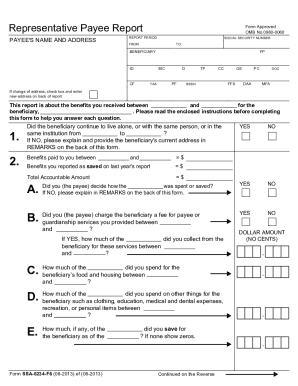
The SSA-6234-F6, also known as the Representative Payee Report, is a crucial document that must be completed by individuals who manage Social Security or Supplemental Security Income benefits on behalf of someone else. This guide provides clear, step-by-step instructions for filling out this form online to ensure compliance and proper reporting.
Follow the steps to complete the SSA-6234-F6 form online.
- Click ‘Get Form’ button to obtain the form and open it in the online editor.
- Enter the payee's name and address at the top of the form. Make sure all details are accurate, as they are crucial for the reporting process.
- Complete the report period fields by entering the start and end dates for the benefits managed. This will indicate the timeframe you are accounting for.
- Answer Question 1 regarding custody changes. Mark 'YES' or 'NO' as applicable, and provide details in the REMARKS section if necessary.
- For Question 2, calculate the total accountable amount by adding the benefits received during the report period to any savings from last year's report. Fill in the amounts in the required fields.
- Indicate who decided how the benefits were used by marking 'YES' or 'NO' in Question 2A. If 'NO', provide an explanation in the REMARKS section.
- In Question 2B, specify if you charged a fee to the beneficiary for services, and enter the amount collected.
- Complete Questions 2C, 2D, and 2E by reporting the amounts spent on food, housing, personal items, and any unused benefits saved at the end of the reporting period.
- If you reported savings in Question 2E, answer Question 3 to specify the type of account in which the benefits are saved. Provide the title of the account in Question 4 if necessary.
- Sign and date the report in the designated fields. Make sure to print your job title clearly if representing an organization.
- Review your entries for accuracy, then save your changes, download a copy for your records, and submit the completed report through the online platform as instructed.
Complete your SSA-6234-F6 report online today to ensure proper management of benefits.
You must be 18 or older to complete the Representative Payee Accounting Report online. If you are under 18 and a representative payee, you must complete the paper Representative Payee Report form you received in the mail and return it to the address shown on the form.