Loading
Form preview
  • US Legal Forms
  • Form Library
  • Industry Forms
  • Industry Shipping Forms
  • Tjx Commercial Invoice Instructions 2019

Get Tjx Commercial Invoice Instructions 2019-2026

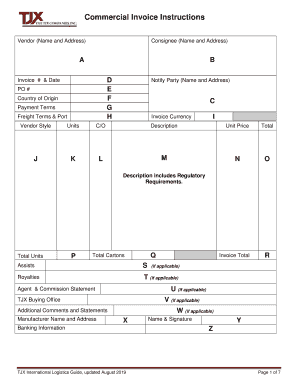
Commercial Invoice Instructions Vendor (Name and Address)Consignee (Name and Address)AB D E F G HInvoice # & Date PO # Country of Origin Payment Terms Freight Terms & PortNotify Party (Name.

How it works

  1. Open form

    Open form follow the instructions

  2. Easily sign form

    Easily sign the form with your finger

  3. Share form

    Send filled & signed form or save

How to fill out the TJX Commercial Invoice Instructions online

This guide provides comprehensive instructions on completing the TJX Commercial Invoice Instructions online. Follow these steps to ensure accurate and efficient invoice submission, facilitating smooth processing for all parties involved.

Follow the steps to accurately complete your TJX Commercial Invoice Instructions.

  1. Click ‘Get Form’ button to obtain the TJX Commercial Invoice Instructions and open it in the designated online editor.
  2. Enter the vendor’s name and address in the specified fields to ensure proper identification.
  3. Fill in the consignee's name and address, selecting the appropriate TJX division for shipment. Ensure accuracy to avoid delays.
  4. Provide the invoice number and date, along with the purchase order (PO) number as per your agreement with TJX.
  5. Indicate the country of origin for the goods. It's important to list the correct manufacturing country as per customs regulations.
  6. Specify payment terms as outlined in the TJX Purchase Order. This should include applicable INCO terms from 2010.
  7. Detail freight terms and the designated port or place, reflecting what is stated in your TJX Purchase Order.
  8. Select the correct currency used during negotiations for the TJX Purchase Order.
  9. For each item, provide the vendor style, which may include unique product identification like number, code, or style name.
  10. Document the number of units shipped per invoice line, ensuring clarity and accuracy.
  11. Fill out item descriptions inclusive of regulatory requirements, detailing all necessary compliance information as required by customs.
  12. Indicate the total units and total cartons being shipped, providing a complete inventory report.
  13. Introduce the total invoice cost, ensuring it aligns with your original agreements.
  14. If applicable, fill out fields related to assists and royalties as per the necessary guidelines for your submission.
  15. Provide additional banking information for payment processing if required.
  16. Conclude by adding the signature of the responsible vendor’s individual along with their typed name and title.
  17. Review all entries for accuracy before saving the form. You can then download, print, or share the completed document as needed.

Complete your TJX Commercial Invoice Instructions online today to ensure efficient processing and compliance.

Get form

Experience a faster way to fill out and sign forms on the web. Access the most extensive library of templates available.
Get form

Related content

CASE 0:23-cv-03444-KMM-ECW Doc. 87 Filed 07/01/25...
Event Sales provided TJX with instructions concerning the salvage program that would help...
Learn more
Audit & Compliance Committee Meeting
Nov 1, 2010 — instructions/link to Acknowledgement Form (required for merit pay...
Learn more
Proxy Statement
May 25, 2011 — To transact such other business as may properly come before the annual...
Learn more

Related links form

Ignition Interlock Permit Application 2012 - Nebraska DMV - Dmv Ne Affidavit For Verification Of Ownership Of An ATV - Nebraska Official ... - Dmv Ne Affidavit For Transfer Of Decedent's Vehicle/Motorboat - Dmv Ne Installment Agreement Dmv Nebraska Form

Questions & Answers

Get answers to your most pressing questions about US Legal Forms API.

Contact support

Filling out invoice details requires attention to each section of the document. Be thorough when entering both your and your client's information, as well as specifics about the goods or services provided. Consult the TJX Commercial Invoice Instructions for guidance on what additional details might be necessary for compliance and clarity.

The format of a commercial invoice typically includes sections for the seller's and buyer's contact details, invoice number, date, item descriptions, quantities, unit prices, and total amount due. It's vital to structure this document clearly for easy comprehension. By following the TJX Commercial Invoice Instructions, you can ensure that your format meets all necessary legal and trade requirements.

Writing payment instructions on an invoice involves clearly stating the accepted payment methods and any relevant terms. For instance, specify if payments should be made via check, credit card, or online transfer. Refer to the TJX Commercial Invoice Instructions for additional details on how to present these instructions clearly to ensure prompt payment.

When filling out an invoice example, use a clear format that outlines all critical details. Include sections for your business information, customer details, service or product descriptions, and total costs. Ensure you refer to the TJX Commercial Invoice Instructions while creating examples, as they guide you in entering the correct information in an organized manner.

Filling in a commercial invoice involves detailing all pertinent information clearly and accurately. Begin by including your details and those of your client, list the items sold, their quantities, and their prices. Ensure that you follow the TJX Commercial Invoice Instructions for any specific formatting or legal requirements to avoid issues.

To fill out an invoice statement correctly, start by entering your business name and contact information at the top. Next, provide the client's details, followed by listing the products or services rendered, including their prices. Finally, add any applicable taxes and the total amount due while referencing the TJX Commercial Invoice Instructions for accuracy.

For USPS packages, place the commercial invoice in a plastic sleeve and attach it securely to the outside of the parcel. This setup allows postal workers and customs agents to access the invoice quickly. Following the TJX Commercial Invoice Instructions will ensure you comply with postal regulations and facilitate smooth processing.

You should place the commercial invoice in a plastic wallet or sleeve inside the package. Position it on top of the items for easy visibility when opened by customs. Refer to the TJX Commercial Invoice Instructions for further guidance on proper documentation placement for smooth transit.

The commercial invoice should always be placed inside the package. This placement helps customs officials review the information more efficiently. To ensure compliance with all regulations, refer to the TJX Commercial Invoice Instructions for best practices on packaging and documentation.

A commercial invoice must include specific details to serve its purpose effectively. Typically, this includes the sender and recipient's information, a description of the items, values, and the terms of sale. Following the TJX Commercial Invoice Instructions helps guarantee that you meet all essential requirements for smooth customs processing.

Get This Form Now!

Use professional pre-built templates to fill in and sign documents online faster. Get access to thousands of forms.
Get form
If you believe that this page should be taken down, please follow our DMCA take down processhere.
Get TJX Commercial Invoice Instructions
Get form
  • Adoption
  • Bankruptcy
  • Contractors
  • Divorce
  • Home Sales
  • Employment
  • Identity Theft
  • Incorporation
  • Landlord Tenant
  • Living Trust
  • Name Change
  • Personal Planning
  • Small Business
  • Wills & Estates
  • Packages A-Z
  • Affidavits
  • Bankruptcy
  • Bill of Sale
  • Corporate - LLC
  • Divorce
  • Employment
  • Identity Theft
  • Internet Technology
  • Landlord Tenant
  • Living Wills
  • Name Change
  • Power of Attorney
  • Real Estate
  • Small Estates
  • Wills
  • All Forms
  • Forms A-Z
  • Form Library
  • Legal Hub
  • About Us
  • Help Portal
  • Legal Resources
  • Blog
  • Affiliates
  • Contact Us
  • Delete My Account
  • Site Map
  • Industries
  • Forms in Spanish
  • Localized Forms
  • State-specific Forms
  • Forms Kit
  • Real Estate Handbook
  • All Guides
  • Notarize
  • Incorporation services
  • For Consumers
  • For Small Business
  • For Attorneys
  • USLegal
  • FormsPass
  • pdfFiller
  • signNow
  • altaFlow
  • DocHub
  • Instapage
Form Packages
  • Adoption
  • Bankruptcy
  • Contractors
  • Divorce
  • Home Sales
  • Employment
  • Identity Theft
  • Incorporation
  • Landlord Tenant
  • Living Trust
  • Name Change
  • Personal Planning
  • Small Business
  • Wills & Estates
  • Packages A-Z
Form Categories
  • Affidavits
  • Bankruptcy
  • Bill of Sale
  • Corporate - LLC
  • Divorce
  • Employment
  • Identity Theft
  • Internet Technology
  • Landlord Tenant
  • Living Wills
  • Name Change
  • Power of Attorney
  • Real Estate
  • Small Estates
  • Wills
  • All Forms
  • Forms A-Z
  • Form Library
Customer Service
  • Legal Hub
  • About Us
  • Help Portal
  • Legal Resources
  • Blog
  • Affiliates
  • Contact Us
  • Delete My Account
  • Site Map
  • Industries
  • Forms in Spanish
  • Localized Forms
  • State-specific Forms
  • Forms Kit
Legal Guides
  • Real Estate Handbook
  • All Guides
Prepared for you
  • Notarize
  • Incorporation services
Our Customers
  • For Consumers
  • For Small Business
  • For Attorneys
Our Sites
  • USLegal
  • FormsPass
  • pdfFiller
  • signNow
  • altaFlow
  • DocHub
  • Instapage
Social Media
Call us now toll free:
+1 833 426 79 33
As seen in:
© Copyright 1999-2026 airSlate Legal Forms, Inc. 17 Station Street, Suite 303, Brookline, MA 02445
  • Your Privacy Choices
  • Terms of Service
  • Privacy Notice
  • Content Takedown Policy
  • Bug Bounty Program