Loading
Get Warehouse Receipts
How it works
-

Open form follow the instructions
-

Easily sign the form with your finger
-

Send filled & signed form or save
How to fill out the Warehouse Receipts online
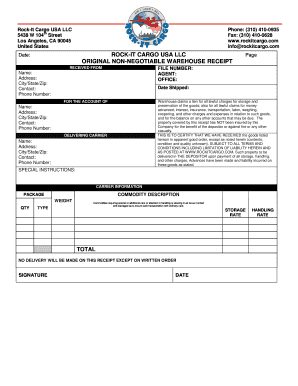
Filling out a Warehouse Receipt correctly is essential for managing the storage and delivery of goods. This guide provides clear and comprehensive instructions for completing the Warehouse Receipts online, ensuring that all necessary information is accurately recorded.
Follow the steps to complete your Warehouse Receipt online.
- Click ‘Get Form’ button to obtain the Warehouse Receipt and open it in your preferred editor.
- Enter the date of receipt in the designated field, ensuring that it reflects the current date on which the goods are received.
- In the 'Received From' section, provide the name, address, city, state, zip code, and contact information for the individual or entity delivering the goods.
- Complete the 'Date Shipped' field with the date when the goods were originally shipped from the sender.
- Fill out the 'For the Account Of' section with the name, address, city, state, zip code, and contact information for the person or entity whom the goods are for.
- In the 'Delivering Carrier' section, record the carrier's name, address, city, state, zip code, and contact information.
- Provide any 'Special Instructions' relevant to the handling or storage of the goods, ensuring that they are clearly stated.
- Specify the commodity description, including details that accurately describe the nature of the goods.
- Under the 'Package' section, enter the weight and quantity of the goods, making sure to note the type of packaging used.
- Fill in the storage rate and handling rate fields with the applicable charges for services rendered.
- At the bottom of the form, sign and date where required to certify that the information provided is accurate.
- Once all fields have been completed, you can save your changes, download, print, or share the Warehouse Receipt as needed.
Complete your Warehouse Receipts online to streamline your document management process.
Filling out a delivery receipt requires attention to detail, similar to a warehouse receipt. You should include the date, a detailed list of items being delivered, the recipient's details, and any terms for the delivery. By using a legal platform like US Legal Forms, you can easily create a delivery receipt that meets all requirements, ensuring a smooth delivery process.