Loading
Get Chronic Illness Form 2013-2026
How it works
-

Open form follow the instructions
-

Easily sign the form with your finger
-

Send filled & signed form or save
How to fill out the Chronic Illness Form online
Filling out the Chronic Illness Form is an important step in ensuring that a student receives appropriate accommodations due to their medical needs. This guide provides clear, step-by-step instructions for completing the form online, making the process as easy as possible for users.
Follow the steps to successfully complete the Chronic Illness Form online.
- Click ‘Get Form’ button to obtain the form and open it in the editing interface.
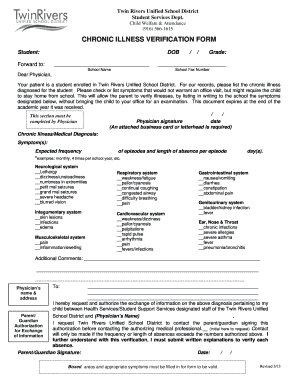
- Begin by entering the student's information, including their name and date of birth in the designated fields. Ensure that the grade and school name are accurately filled out for proper identification.
- Proceed to the section for the physician. The physician must provide details about the chronic illness diagnosis. It is essential that they list any symptoms that may not require an office visit but could justify the student's absence from school.
- The physician should check off the relevant symptoms from the provided list for each body system. This section includes categories such as neurological, respiratory, and gastrointestinal systems, allowing for detailed documentation of the student's conditions.
- Specify the expected frequency of episodes and the average length of absence per episode. Use clear examples such as 'monthly' or 'four times per school year' to provide a consistent understanding.
- In the additional comments section, the physician can provide any extra relevant information that may assist the school in understanding the student's needs.
- The physician must sign and date the form in the designated area. It is important to attach a business card or use official letterhead for validation.
- The parent or guardian must fill out their section, indicating their consent for information exchange and providing their signature with the date.
- Once all sections of the form are complete, review the information for accuracy. Users can then save changes, download, print, or share the completed form as needed.
Complete your documents online for a smooth filing process.
Validating someone with a chronic illness involves recognizing and understanding their condition and its effects. Offering emotional support and listening to their experiences can make a significant difference. Using a chronic illness form can also help in officially acknowledging their situation, thereby facilitating access to important resources.