Loading
Form preview
  • US Legal Forms
  • Other Templates
  • Industry Forms
  • Industry Insurance & Medical Forms
  • Southern Companions Weekly Time Sheet & Client Care Record

Get Southern Companions Weekly Time Sheet & Client Care Record

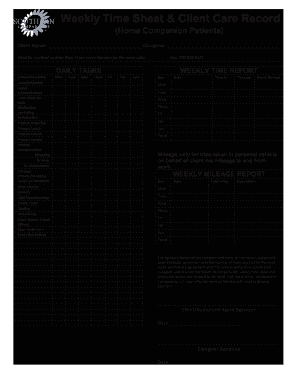
11am every Monday for the week prior. Companion/sitter Companionship Assist w/mobilization Take client for walk Medication reminding Socialization Prepare Breakfast Prepare Lunch Prepare Dinner Prepare snacks Provide transportation: Shopping Errands Dr appointment Conduct errands/shopping Assist w/recreation Linen change Laundry Light housekeeping Empty Trash Dusting Vacuuming Clean kitchen (wash dishes) Clean Bathroom Other (list below) DAILY TASKS Mon Tues Wed Thurs Fri Sat Sun Fax:.

How it works

  1. Open form

    Open form follow the instructions

  2. Easily sign form

    Easily sign the form with your finger

  3. Share form

    Send filled & signed form or save

How to fill out the Southern Companions Weekly Time Sheet & Client Care Record online

This guide provides a comprehensive overview of how to accurately fill out the Southern Companions Weekly Time Sheet & Client Care Record online, ensuring that caregivers and clients can efficiently track care services and hours worked. Follow the steps below to complete the form thoroughly and correctly.

Follow the steps to complete your time sheet and client care record online.

  1. Click the ‘Get Form’ button to obtain the form and access it in your preferred online editor.
  2. Begin by entering the client’s name in the specified field. Ensure this reflects the name of the person receiving care.
  3. Next, fill in the caregiver's name to establish who provided the services. This makes it clear who is accountable for the reported hours.
  4. In the services section, check all applicable tasks performed during the week. This may include companionship, medication reminding, meal preparation, and transportation. If any additional services were offered, list them in the provided space for 'Other.'
  5. Proceed to the daily tasks section where you will enter the respective days of the week. Document the specific tasks completed on each day in the provided fields.
  6. Move to the weekly time report section. For each day, record the date, time in, time out, and total hours worked. Ensure that your total hours accurately reflect the information documented.
  7. In the mileage report section, input the total miles driven for any trips made in a personal vehicle on behalf of the client. This should not include travel to and from your place of work.
  8. Once all data is entered, have the client or authorized agent review the information. They should sign alongside your signature to indicate agreement on services rendered and hours worked.
  9. Finally, save your changes, and download, print, or share the completed form as necessary. Ensure that the form is submitted by 11 AM every Monday to avoid delayed payment.

Complete your Southern Companions Weekly Time Sheet & Client Care Record online today to ensure timely processing.

Get form

Experience a faster way to fill out and sign forms on the web. Access the most extensive library of templates available.
Get form

Related content

SCDHHS Self-Directed Attendant and Companion Care...
May 22, 2017 — • Attendant records time using Care Call system (via phone or mobile...
Learn more
Families Caring for an Aging America
Women who provided 36 hours of care weekly to a parent were two times more likely to...
Learn more
GAO-12-120G, GAO Schedule Assessment Guide
May 30, 2012 — The GAO Schedule Assessment Guide covers best practices for project...
Learn more

Related links form

Maine Reinstatement Cosmetology License Form Barbering And Cosmetology Program - Maine.gov - State Me Administrator-In-Training Application - Maine.gov - State Me Sf424c

Questions & Answers

Get answers to your most pressing questions about US Legal Forms API.

Contact support

To write 7 hours and 30 minutes on a timesheet, you can represent the time in decimal form. In this case, you would write it as 7.5 hours. When using the Southern Companions Weekly Time Sheet & Client Care Record, simply fill in 7.5 in the hours column for the respective day. This simple representation allows for clearer calculations and helps you maintain accurate records.

Filling out a weekly time sheet involves entering each day’s hours worked in the appropriate sections. Start by recording the date, followed by your work hours for each day, including any breaks. The Southern Companions Weekly Time Sheet & Client Care Record offers a structured format that guides you step-by-step, making it easy to keep accurate and organized records. Be sure to double-check for any missing entries before submitting your time sheet.

To write hours on a time sheet, you can begin by accurately recording the start and end times of each work period. Make sure to log breaks and lunch hours separately, as these usually do not count towards total hours worked. When using the Southern Companions Weekly Time Sheet & Client Care Record, clearly denote your hours in each designated space to avoid any confusion. This method ensures precise tracking and easy calculation of your total hours for the week.

Get This Form Now!

Use professional pre-built templates to fill in and sign documents online faster. Get access to thousands of forms.
Get form
If you believe that this page should be taken down, please follow our DMCA take down processhere.
Get Southern Companions Weekly Time Sheet & Client Care Record
Get form
  • Adoption
  • Bankruptcy
  • Contractors
  • Divorce
  • Home Sales
  • Employment
  • Identity Theft
  • Incorporation
  • Landlord Tenant
  • Living Trust
  • Name Change
  • Personal Planning
  • Small Business
  • Wills & Estates
  • Packages A-Z
  • Affidavits
  • Bankruptcy
  • Bill of Sale
  • Corporate - LLC
  • Divorce
  • Employment
  • Identity Theft
  • Internet Technology
  • Landlord Tenant
  • Living Wills
  • Name Change
  • Power of Attorney
  • Real Estate
  • Small Estates
  • Wills
  • All Forms
  • Forms A-Z
  • Other Templates
  • Legal Hub
  • About Us
  • Help Portal
  • Legal Resources
  • Blog
  • Affiliates
  • Contact Us
  • Delete My Account
  • Site Map
  • Industries
  • Forms in Spanish
  • Localized Forms
  • State-specific Forms
  • Forms Kit
  • Real Estate Handbook
  • All Guides
  • Notarize
  • Incorporation services
  • For Consumers
  • For Small Business
  • For Attorneys
  • USLegal
  • FormsPass
  • pdfFiller
  • signNow
  • altaFlow
  • DocHub
  • Instapage
Form Packages
  • Adoption
  • Bankruptcy
  • Contractors
  • Divorce
  • Home Sales
  • Employment
  • Identity Theft
  • Incorporation
  • Landlord Tenant
  • Living Trust
  • Name Change
  • Personal Planning
  • Small Business
  • Wills & Estates
  • Packages A-Z
Form Categories
  • Affidavits
  • Bankruptcy
  • Bill of Sale
  • Corporate - LLC
  • Divorce
  • Employment
  • Identity Theft
  • Internet Technology
  • Landlord Tenant
  • Living Wills
  • Name Change
  • Power of Attorney
  • Real Estate
  • Small Estates
  • Wills
  • All Forms
  • Forms A-Z
  • Other Templates
Customer Service
  • Legal Hub
  • About Us
  • Help Portal
  • Legal Resources
  • Blog
  • Affiliates
  • Contact Us
  • Delete My Account
  • Site Map
  • Industries
  • Forms in Spanish
  • Localized Forms
  • State-specific Forms
  • Forms Kit
Legal Guides
  • Real Estate Handbook
  • All Guides
Prepared for you
  • Notarize
  • Incorporation services
Our Customers
  • For Consumers
  • For Small Business
  • For Attorneys
Our Sites
  • USLegal
  • FormsPass
  • pdfFiller
  • signNow
  • altaFlow
  • DocHub
  • Instapage
Social Media
Call us now toll free:
+1 833 426 79 33
As seen in:
© Copyright 1999-2026 airSlate Legal Forms, Inc. 17 Station Street, Ste. 203, Brookline, MA 02445
  • Your Privacy Choices
  • Terms of Service
  • Privacy Notice
  • Content Takedown Policy
  • Bug Bounty Program