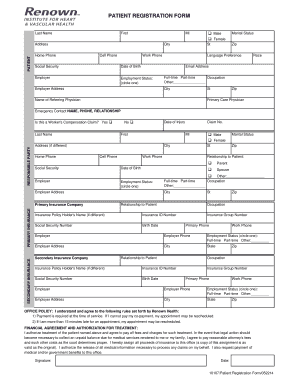
Get Renown Health Patient Registration Form 2014-2026
How it works
-

Open form follow the instructions
-

Easily sign the form with your finger
-

Send filled & signed form or save
How to fill out the Renown Health Patient Registration Form online
Completing the Renown Health Patient Registration Form online is a straightforward process that ensures your information is accurately recorded. This guide will walk you through each section of the form, providing clear instructions to help you easily fill it out.
Follow the steps to successfully complete the form:
- Press the ‘Get Form’ button to access the Renown Health Patient Registration Form and open it in your browser.
- Begin by entering the patient’s last name, first name, and middle initial in the designated fields at the top of the form.
- Complete the address section by providing the street address, city, state, and zip code. Include home, cell, and work phone numbers.
- Fill in the patient’s social security number and date of birth, along with their employer's name and employment status by circling the appropriate option (full-time or part-time).
- Indicate the patient’s marital status and language preference, and select their race.
- Provide the patient’s email address and the address of their employer, if applicable.
- List the names of the referring physician and the primary care physician.
- In the emergency contact section, input the name, phone number, and relationship of the emergency contact person.
- If applicable, indicate whether this is a worker's compensation claim and provide the date of injury.
- Next, complete the responsible party section, repeating information where necessary, such as name, date of birth, and address. Specify the relationship to the patient.
- Fill out insurance information by providing details about primary and secondary insurance companies, including policy holder’s name and relationship to the patient.
- Complete the fields for insurance policy numbers, group numbers, and social security numbers associated with the insurance.
- Review the office policy and financial agreement sections, ensuring your understanding and agreement.
- Finally, sign and date the form to confirm accuracy and consent, before saving any changes made or downloading and printing the completed form.
Start completing your Renown Health Patient Registration Form online today.
Related links form
Filling out a patient release form involves providing clear and specific information. Start by entering your personal details and the name of the healthcare provider or facility. Next, specify what information you authorize to be shared, along with the purpose of the release. If needed, the UsLegalForms platform can guide you through this process, making it easier for you to complete your patient release form securely.